From link-in-bio to a checkout that sells more.
Stan Store is a quick way to sell from your bio. Swipefast is for when you want your own branded checkout, an extra at checkout and an offer after payment, from $29 a month.
From $29/mo · 7-day free trial · 0% of your sales · 30 days risk-free
- What they sell
- A $47 content planner
- Price
- $47, straight from your bio link
- At checkout
- 30 hook templates, +$17
- After they pay
- One tap for a 1:1 review, $97
Built for the way you sell.
Bumps and upsells from $29
Stan puts upsells, order bumps, discount codes and affiliates on Creator Pro at $99. Swipefast has unlimited bumps, a one-click upsell on every checkout and discount codes from Starter at $29, and affiliates on Pro at $49.
Your brand, not a template
Your colours, your logo and your own sales page above the checkout, on your own domain if you like.
Works from any link
Put the checkout link in your bio, your emails or your website, or use your Swipefast link-in-bio page, which lists your checkouts on every plan. Every link can be tagged, so you can see which one sold.
See the link in bio pageLet your AI set it up
Tell Claude or ChatGPT what you sell. It builds the checkout as a draft for you to check and publish.
The real product, screen by screen.
Every picture here is Swipefast itself, not a mock-up: what your buyer sees, how you build it, and what you see after the sale.
- 1
What your buyer sees
A Swipefast checkout, live and taking orders. The order bump sits right above the total, so one tick adds it while their card is already out. This one is the founder's own checkout for The Offer Maker.
Try the live demo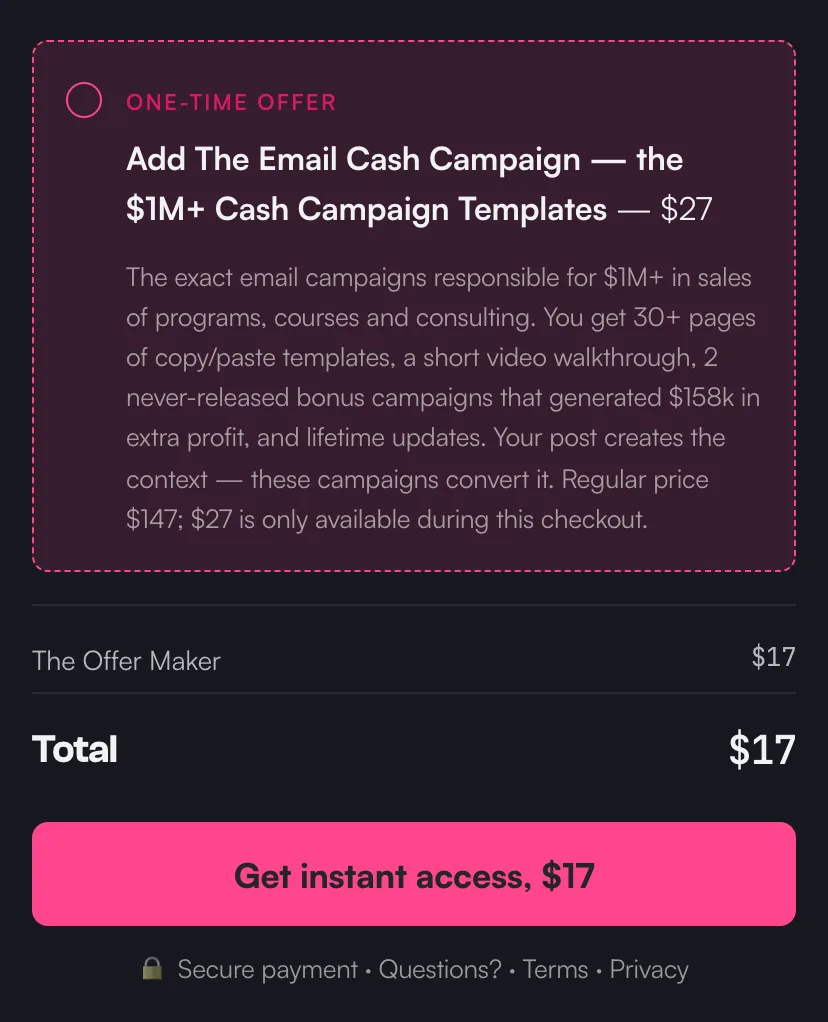
A live checkout on Swipefast, with its order bump. - 2
Your AI builds it
Connect Claude, ChatGPT or another AI app once. Then copy a prompt from Pip's playbook and fill in what you sell, the price and where buyers get it. Your AI builds the checkout as a draft. It never publishes on its own, and changes that touch money on a live checkout wait for your yes.
Edit a checkout with Claude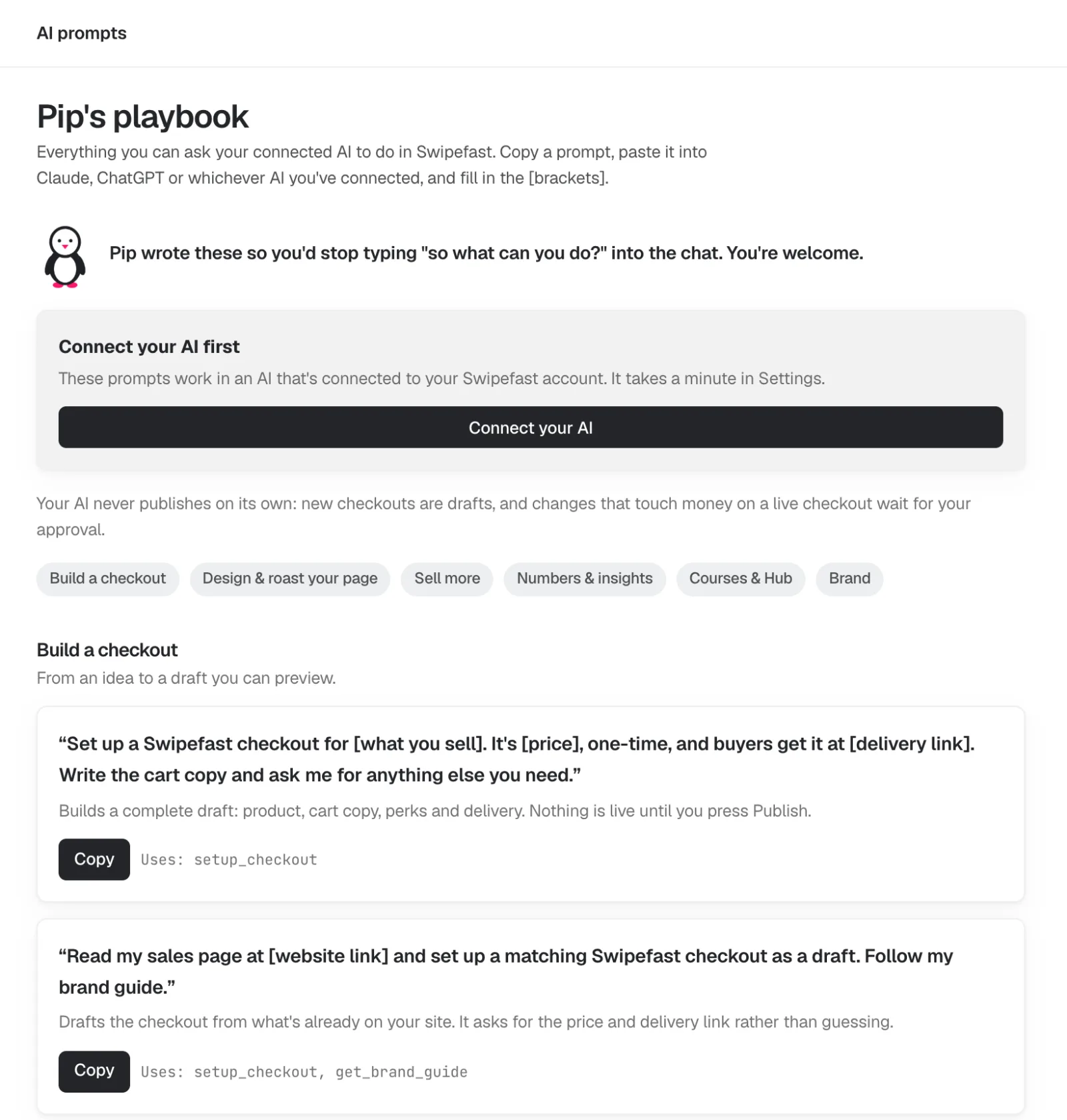
- 3
Change anything by clicking it
The editor shows your checkout the way your buyer will see it. Click the headline, the guarantee or the order bump and its settings open on the right. Changes save on their own. Payment plans, questions and options are one click each.
Add an order bump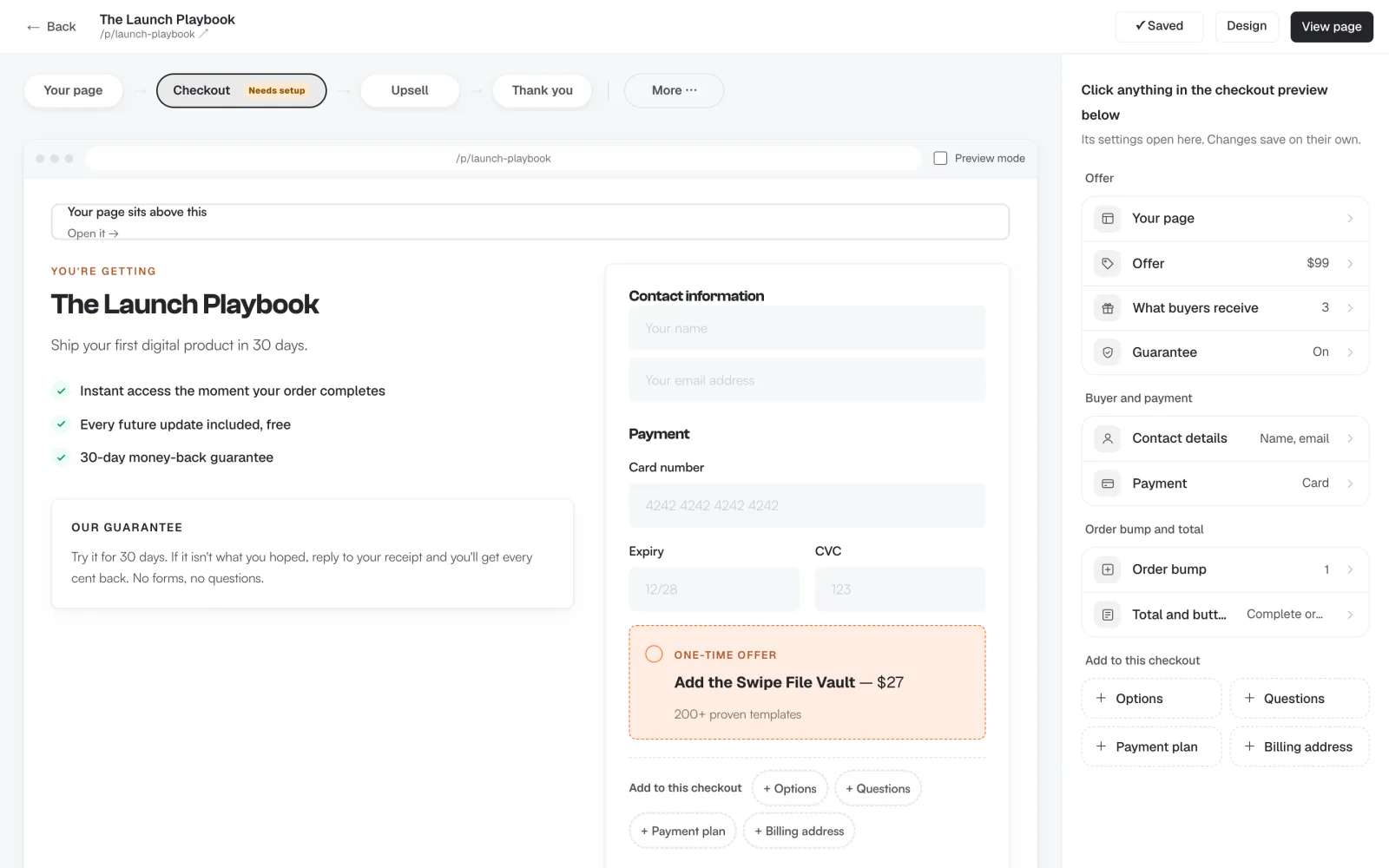
- 4
One-click upsells after payment
Straight after they pay, offer the next thing. One tap charges the card they just used, with nothing to type again. Chain up to five offers, each yes or no leading to another offer or the thank-you page. Upsells are on every plan.
Add a one-click upsell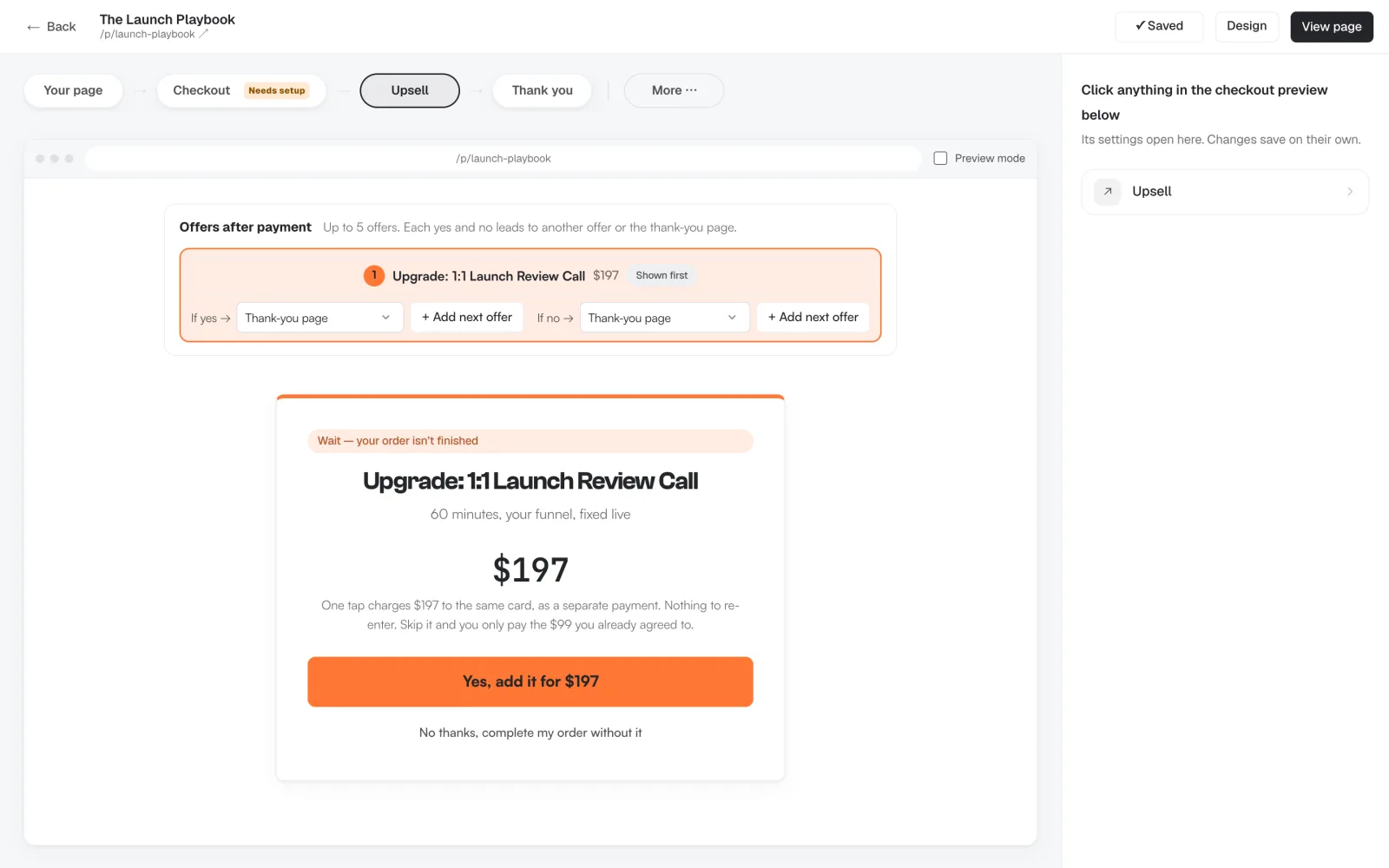
- 5
One link in your bio
Your link-in-bio page shows your photo, name and bio, and lists your checkouts, at yourname.swipefast.io/links. Followers tap straight through to a checkout that already has your order bump on it.
Set up your link in bio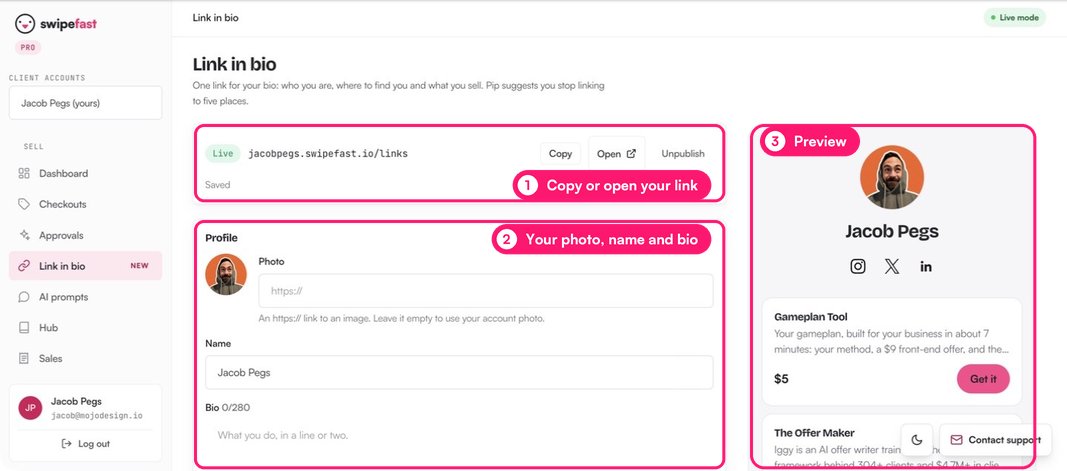
- 6
See what every offer earns
Each checkout has its own numbers: revenue, average order, conversion rate, and how many buyers took the order bump and the upsell. You see which offer pulls its weight and which one to change.
Real order bump numbers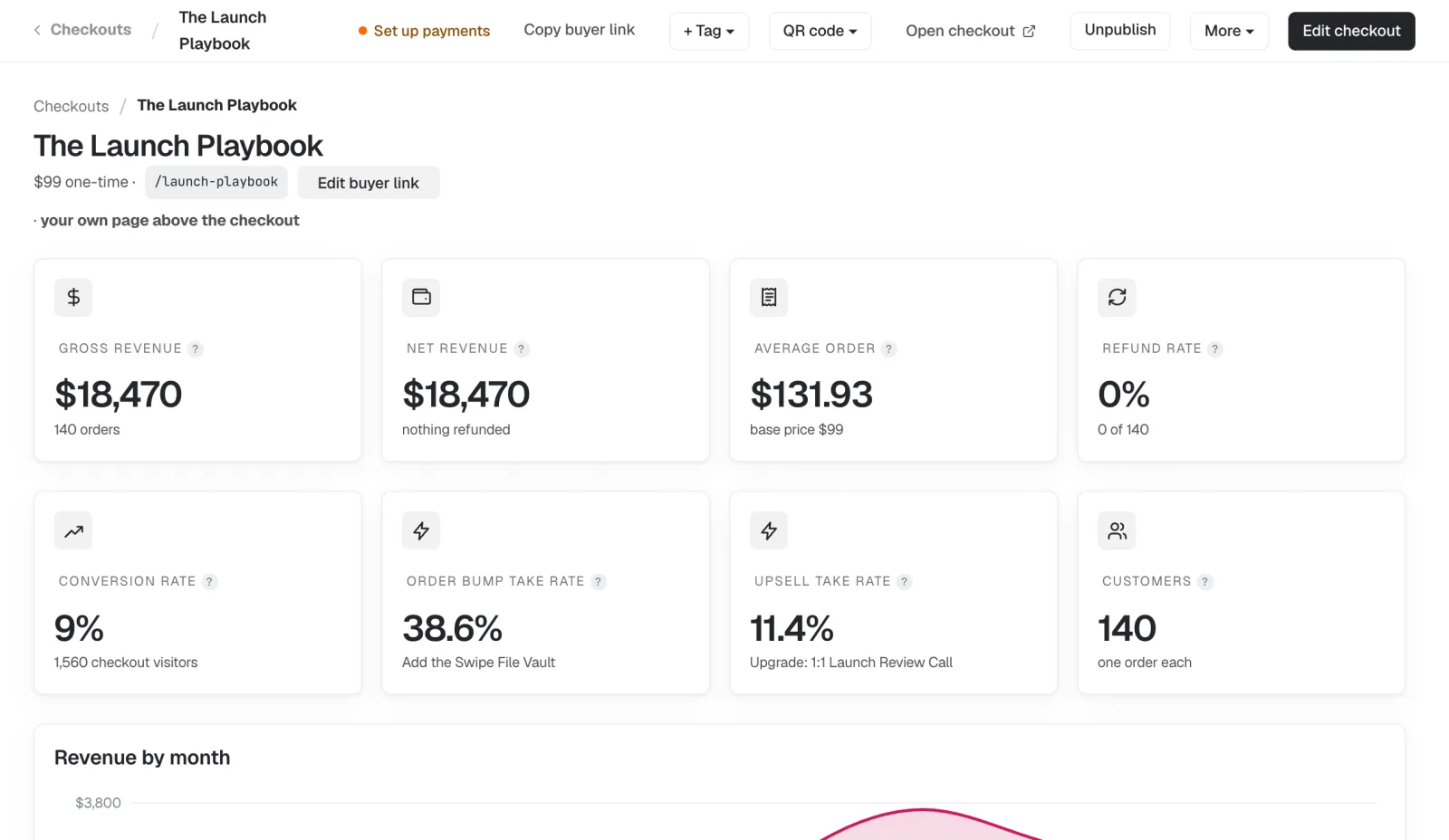
Demo account, sample numbers.
Dashboard screens are from our demo account, so their names and numbers are sample data.
Stan Store or Swipefast?
| Stan Store | Swipefast | |
|---|---|---|
| Price | Creator $29/mo; Creator Pro $99/mo | Starter $29/mo; Pro $49/mo or $490/yr |
| Fee on each sale | 0% | 0% |
| Order bumps and upsells | Creator Pro | Unlimited bumps and a one-click upsell, from Starter |
| Discount codes | Creator Pro | Included |
| Affiliates | Creator Pro | On Pro |
| Link-in-bio storefront | Yes | Yes, on every plan: your photo, bio, links and checkouts at yourstore.swipefast.io/links |
Stan Store plans from its pricing page, checked November 4, 2026; they can change, so check stan.store before you decide.
What it costs a month
| Sales a month | Stan Store | Swipefast | |
|---|---|---|---|
| $1,000 | $99 | $29 | $70 less a month |
| $5,000 | $99 | $29 | $70 less a month |
| $10,000 | $99 | $29 | $70 less a month |
| $50,000 | $99 | $29 | $70 less a month |
Stan Store on Creator Pro, its cheapest plan with order bumps and upsells, against Swipefast Starter. Card fees aside: they're the same 2.9% + 30¢ on both. From help.stan.store, checked 15 October 2026.
- You sell from social media and want each buyer to spend a little more
- You want the checkout to look like your brand
- You'd rather not pay $99 a month for upsells and bumps
- You want one ready-made template for your bio store, bookings, courses and email collection. That's Stan's home ground
Moving from Stan Store?
- Export your customers and sales from Stan Store. How to export ↗
- Tell your AI "Rebuild my Stan Store checkout in Swipefast, with the same bump and upsell." It sets everything up as a draft for you to check.
- Point your buttons and links at your new checkout, and publish.
Your past orders and receipts, any subscriptions it already bills, and anything only Stan Store does.
The short answers.
Does Stan Store charge a fee on each sale?
Stan says it charges 0% transaction fees; Stripe or PayPal processing still applies. Swipefast is the same: 0% to us, your processor's normal fee.
Can I keep my Stan link-in-bio?
Yes. Keep Stan for your bio page and send one offer to a Swipefast checkout, if you want bumps and an upsell on it without Creator Pro.
Does Swipefast have a link-in-bio page?
Yes, on every plan, Starter included. Your page at yourstore.swipefast.io/links shows your photo, bio and links, with your checkouts as product cards. Tapping one opens its checkout, order bump and upsell included. More at swipefast.io/link-in-bio.
Which is better for coaches?
If you sell calls and programmes and want payment plans, an extra at checkout and an offer after payment, Swipefast covers that from Starter at $29, and buyers can pick a call time inside the checkout. If one ready-made bio store on Stan's $29 Creator plan already covers what you sell, Stan is simpler.
Guides for this.
Keep $840 a year.
Start your 7-day free trial for $0At $5,000 a month in sales. Prices checked 15 October 2026.
Stan Store is a trademark of its owner, and Swipefast isn't affiliated with it. Prices may have changed since 15 October 2026.
Your checkout, live this afternoon.
Try either plan free for 7 days. Your first payment is 30 days risk-free.