Checkout page for digital products, built by your AI: sell templates, ebooks and courses.
Buyers pay and get their download or course link straight away. Your AI builds the checkout, the order bump and the upsell, and Swipefast takes 0% of your sales.
From $29/mo · 7-day free trial · 0% of your sales · 30 days risk-free
- What they sell
- The Email Swipe File
- Price
- $27
- At checkout
- 10 bonus launch emails, +$17
- After they pay
- One tap to add the full course, $97
Instant delivery, order bumps and upsells for digital products.
Instant delivery
Theirs the second they pay
Buyers land on their download or course link the second they pay, and get it in their receipt too. Bumps and upsells deliver their own links.
Order bump
One tick, bigger order
Put a small extra beside the payment form, like 10 bonus emails. Unlimited order bumps come with every plan, Starter included.
One-click upsell
One tap, second sale
Offer the full course straight after payment. One tap charges the same card. Chain up to 5 offers with yes and no paths, on every plan.
0% of your sales
No cut, at any size
Gumroad takes 10% plus 50¢ per sale. Swipefast starts at a flat $29 a month, which costs less once you sell about $250 a month.
Course hosting
The course can live here too
Put lessons in the Swipefast Hub, with text, images, PDFs and drip, and video played from YouTube, Vimeo or Loom. On every plan.
Currencies and languages
Sell beyond one country
Price in USD, EUR, GBP and more, and show the checkout in English, Spanish, French or German.
The real product, screen by screen.
Every picture here is Swipefast itself, not a mock-up: what your buyer sees, how you build it, and what you see after the sale.
- 1
What your buyer sees
A Swipefast checkout, live and taking orders. The order bump sits right above the total, so one tick adds it while their card is already out. This one is the founder's own checkout for The Offer Maker.
Try the live demo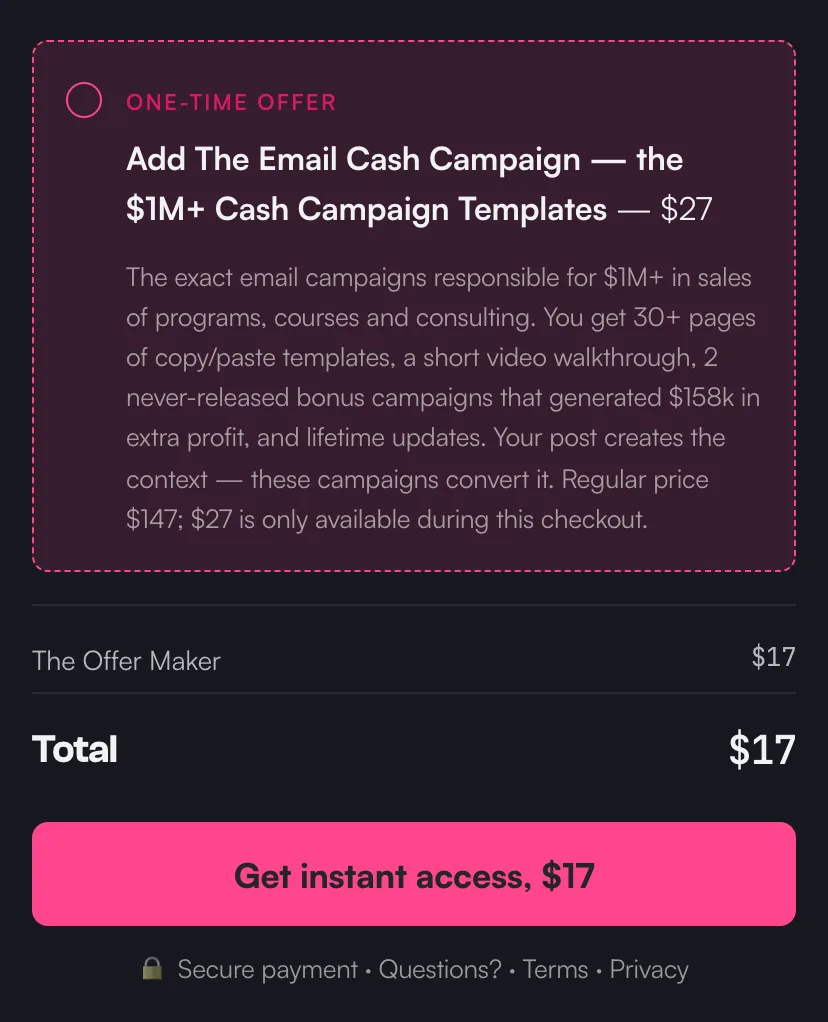
A live checkout on Swipefast, with its order bump. - 2
Your AI builds it
Connect Claude, ChatGPT or another AI app once. Then copy a prompt from Pip's playbook and fill in what you sell, the price and where buyers get it. Your AI builds the checkout as a draft. It never publishes on its own, and changes that touch money on a live checkout wait for your yes.
Edit a checkout with Claude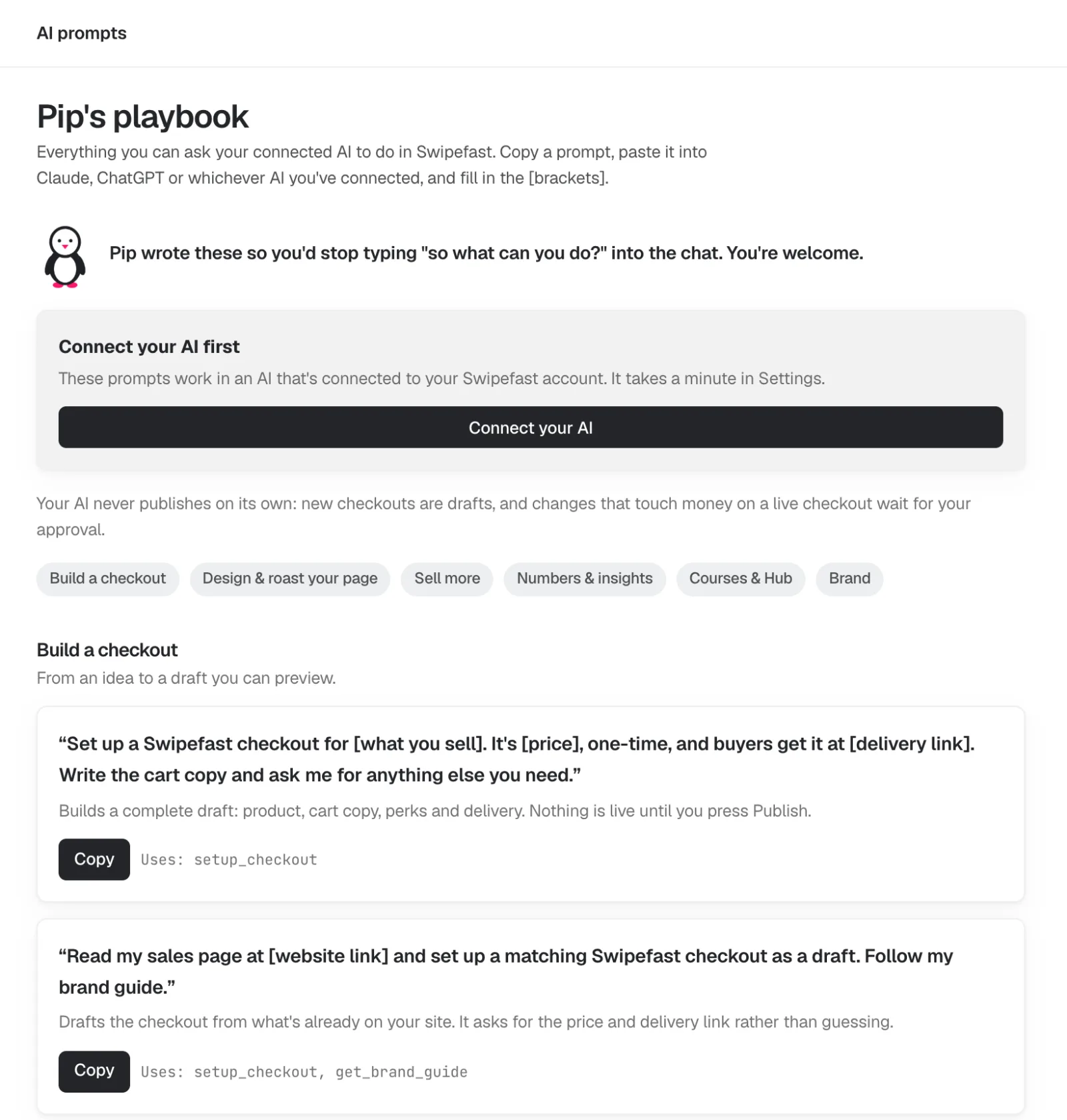
- 3
Change anything by clicking it
The editor shows your checkout the way your buyer will see it. Click the headline, the guarantee or the order bump and its settings open on the right. Changes save on their own. Payment plans, questions and options are one click each.
Add an order bump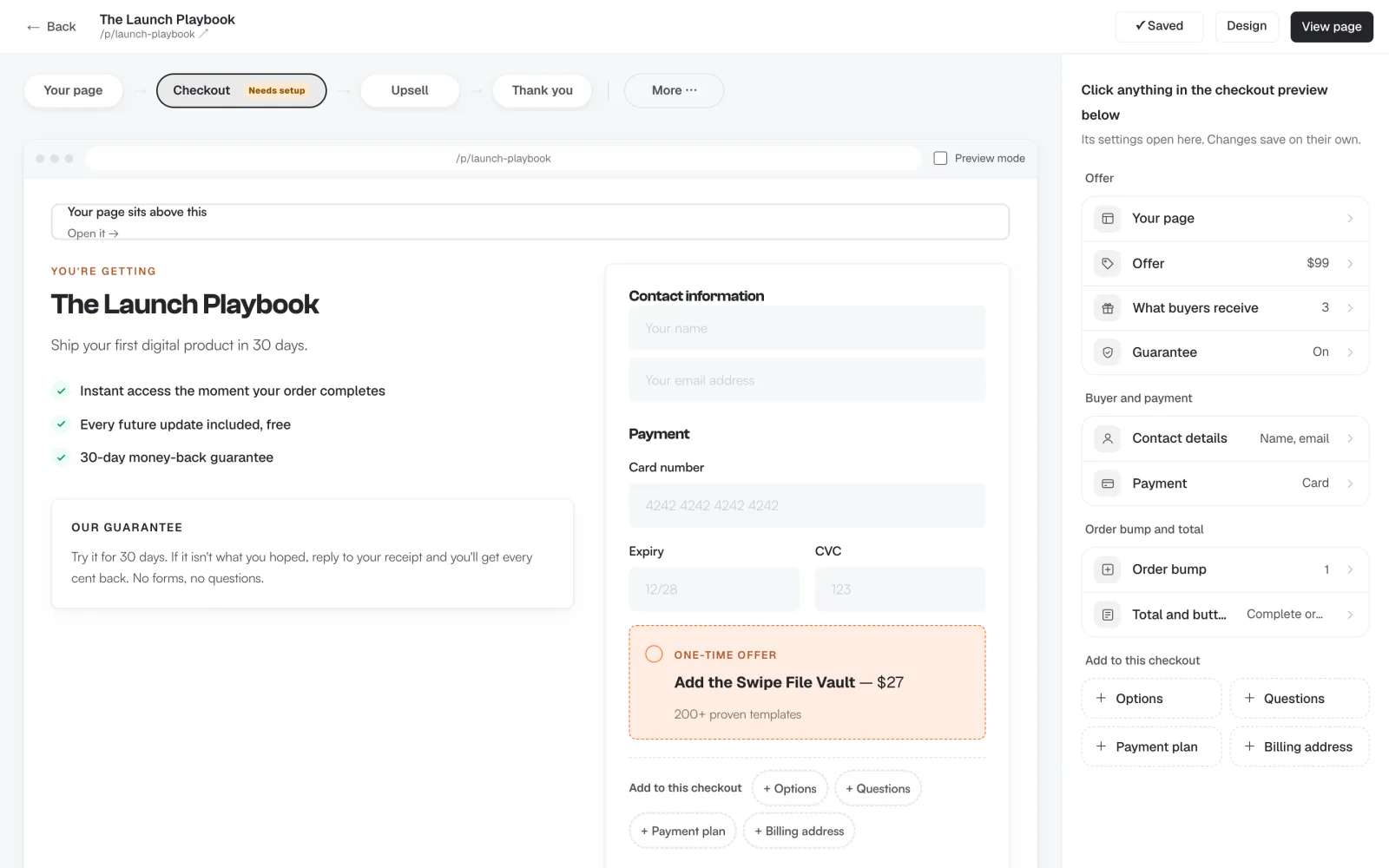
- 4
One-click upsells after payment
Straight after they pay, offer the next thing. One tap charges the card they just used, with nothing to type again. Chain up to five offers, each yes or no leading to another offer or the thank-you page. Upsells are on every plan.
Add a one-click upsell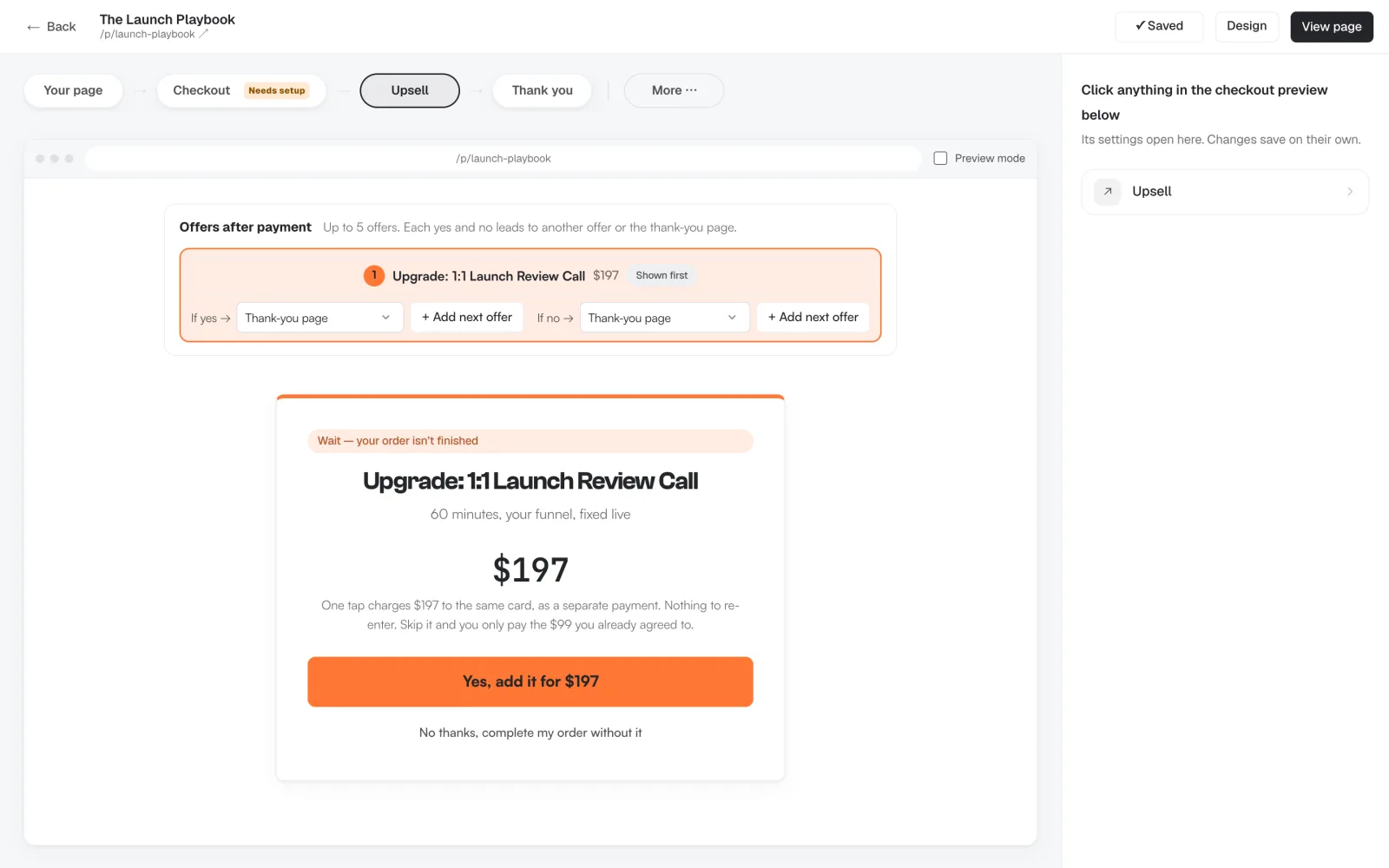
- 5
Delivered the moment they pay
Choose how each product reaches the buyer: an access link to a download, a Notion page or a community, or a course in your Hub. They get it on the thank-you page straight after paying, and again in their receipt email. Order bumps and upsells get their own delivery too.
Deliver your product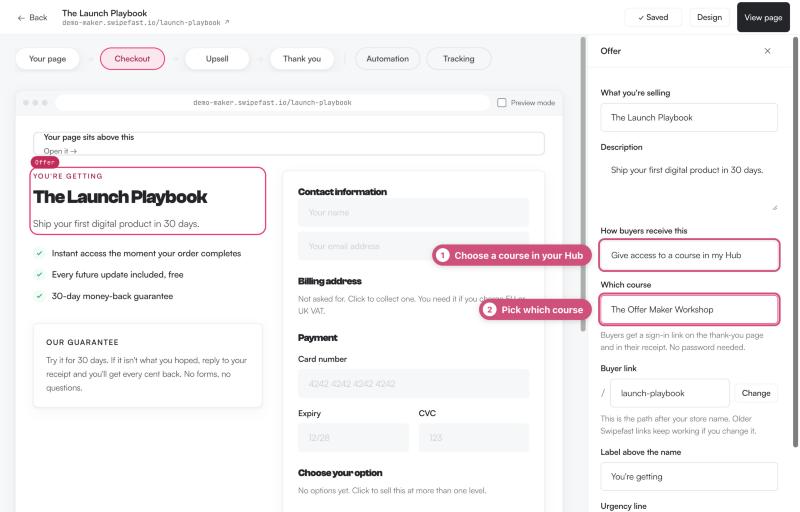
- 6
See what every offer earns
Each checkout has its own numbers: revenue, average order, conversion rate, and how many buyers took the order bump and the upsell. You see which offer pulls its weight and which one to change.
Real order bump numbers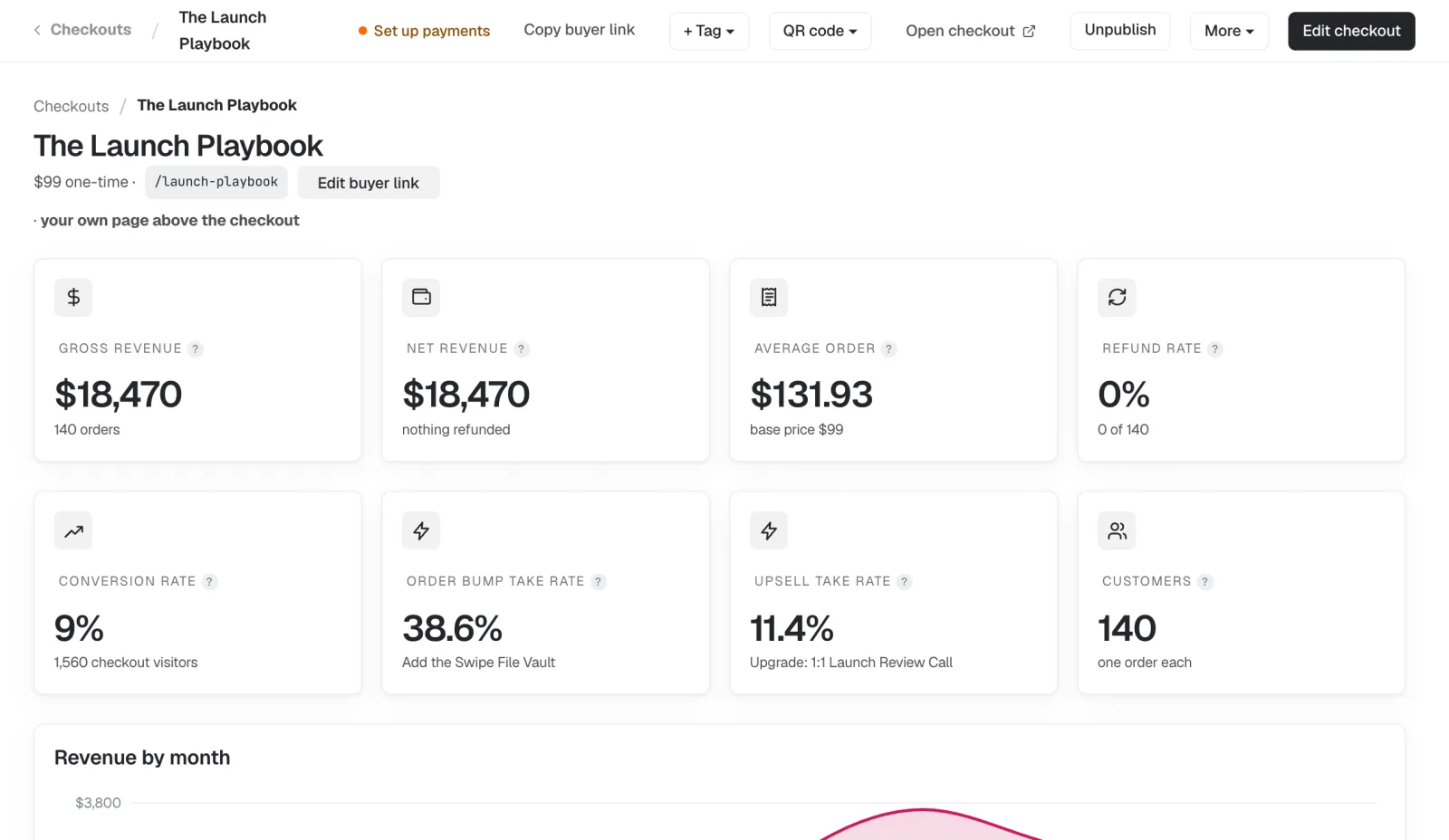
Demo account, sample numbers.
Dashboard screens are from our demo account, so their names and numbers are sample data.
Tell your AI what you sell. It builds the checkout.
Connect Swipefast once to Claude, ChatGPT, Cursor or any of the 20 AI apps it works with, on every plan. Ask in plain words and it builds the checkout, the order bump and the upsell as a draft. Nothing goes live until you publish it, and a change to money on a live checkout waits for your approval.
All 20 AI appsMake a checkout for The Email Swipe File at $27 that delivers my Google Drive link. Add 10 bonus launch emails as a $17 order bump, and offer the full course for $97 after they pay.
Done. Your checkout is a draft in Swipefast. Check it, then publish it when you're ready.
How to sell a digital product with Swipefast.
- 1
Connect your AI
Add Swipefast to Claude, ChatGPT, Cursor or another AI app once. Prefer clicking? The dashboard does the same job.
- 2
Describe the product
The name, the price and the link buyers get, plus the bump and the upsell. Your AI builds it as a draft.
- 3
Publish and share the link
Connect Stripe or PayPal and publish. Buyers pay and get their link on the thank-you page and in their receipt.
In their own words.
“Did my first ever digital sale in 1hr after launching. Amazing to have a landing page and paying possibility on the same page.”
 Vincent ClaeysMicrosoft Copilot Consultant
“The interface is really easy to use. I've been using ThriveCart for a while and this alternative is much faster for me to set up each time I have a new checkout to create.”
 Stephanie HetuBusiness & AI Consultant
- You sell digital products and want to stop giving away a percentage
- You want bumps and upsells without paying for a higher plan
- Your files live in Google Drive, Notion or Dropbox, or your course can go in the Swipefast Hub
- You sell a few products a month and want no monthly fee. Payhip, Gumroad or Lemon Squeezy take a cut instead, which is cheaper at low volume
Two plans. 0% of your sales.
Try either plan free for 7 days. Your first payment is 30 days risk-free.
Starter
Everything you need to sell. Ask Claude or ChatGPT to build it.
$29/month
or $290 a year
- Unlimited checkouts, order bumps and free lead magnets
- Upsell chains with downsells: up to 5 offers, yes and no paths
- Payment plans and subscriptions
- Sales tax and buy now, pay later
- Every report, plus the buyer map
- Claude or ChatGPT builds and runs it
- Email support
Pro
Everything you need to grow. Ask Claude or ChatGPT to run it.
$49/month
or $490 a year
Everything in Starter, plus:
- The affiliate centre: PayPal payouts and JV partners
- Subscribers upgrade and downgrade, with proration
- Your own domain and campaigns
- Analytics on up to 10 websites (Starter: 1)
- Zapier, Make, webhooks and the API
- Stablecoin payments, QR codes and bulk invoices
- Team members with roles, and client accounts
Card required. Cancel before day 7 and you pay nothing. Compare every feature
The short answers.
How do I deliver a digital product after payment?
Add the product's access link (a Google Drive, Notion, course or download link) to the checkout. Buyers see it on the thank-you page and in their receipt the moment they pay.
Can my AI build the checkout page for my digital product?
Yes. Connect Swipefast to Claude, ChatGPT, Cursor or another AI app once, then give it the product, the price, the delivery link, the bump and the upsell. It builds the checkout as a draft, and nothing goes live until you publish it.
Is Swipefast cheaper than Gumroad?
Above about $250 a month in sales, yes, on Starter at $29. Gumroad takes 10% plus 50¢ per sale; Swipefast takes 0% of sales on every plan.
Does Swipefast host my files?
Courses, yes: the Swipefast Hub holds lessons with text, images, PDFs and video played from YouTube, Vimeo or Loom. Other files, no. Keep them in Google Drive, Notion, Dropbox or your course platform, and Swipefast sends buyers to them.
Who handles sales tax on digital products?
Turn on Stripe Tax and Swipefast charges the right VAT or sales tax for each buyer. Or sell through Lemon Squeezy, which handles tax as merchant of record.
What does it cost?
Starter is $29 a month, and Pro is $49 a month or $490 a year, both with a 7-day free trial. Order bumps and upsells are on both.
Guides for this.
Your checkout, live this afternoon.
Try either plan free for 7 days. Your first payment is 30 days risk-free.