Swipefast vs Systeme.io: a checkout-first alternative to the all-in-one.
Systeme.io is free to start and does funnels, email and courses in one place, with order bumps and one-click upsells counted per plan: 1 each on Free, 10 on Startup at $17. Swipefast is a checkout: $29 a month for unlimited bumps and upsell chains, sales tax and pay later, on your own Stripe or PayPal. Stay on Systeme.io if one login for everything at $0 to $17 suits you.
From $29/mo · 7-day free trial · 0% of your sales · 30 days risk-free
- What they sell
- The $97 course you sell in a Systeme.io funnel
- Price
- $97, or 3 monthly payments of $35
- At checkout
- Workbook, +$27, ticked at checkout
- After they pay
- One tap for a group call, $97
Built for the way you sell.
Bumps and upsells on every checkout, from $29
Swipefast Starter, at $29 a month, has unlimited order bumps and upsell chains of up to 5 offers, each with a yes and a no path. Systeme.io counts them per plan: 1 order bump and 1 one-click upsell on Free, 10 on Startup at $17, 100 on Webinar at $47 and unlimited on Unlimited at $97.
Sales tax and pay later at checkout
Starter works out EU VAT and US sales tax with Stripe Tax. Through Stripe, it also offers Klarna, Afterpay and Affirm where the buyer's country, currency and amount qualify, and you're paid in full upfront.
Keep Systeme.io for email
Swipefast is only the checkout and doesn't send newsletters. Keep your list and automations in Systeme.io: on Pro ($49), a Zapier step can add each buyer there with a tag, or give them course access. On Starter, connect Kit, Mailchimp, MailerLite or another email tool instead.
Bring your Systeme.io products across
Paste a Systeme.io API key, on any plan. Your products arrive as drafts with their prices, billing, order bumps and upsell, and your coupons arrive paused. The import only reads from Systeme.io, so your funnels keep selling until you switch your links.
The real product, screen by screen.
Every picture here is Swipefast itself, not a mock-up: what your buyer sees, how you build it, and what you see after the sale.
- 1
What your buyer sees
A Swipefast checkout, live and taking orders. The order bump sits right above the total, so one tick adds it while their card is already out. This one is the founder's own checkout for The Offer Maker.
Try the live demo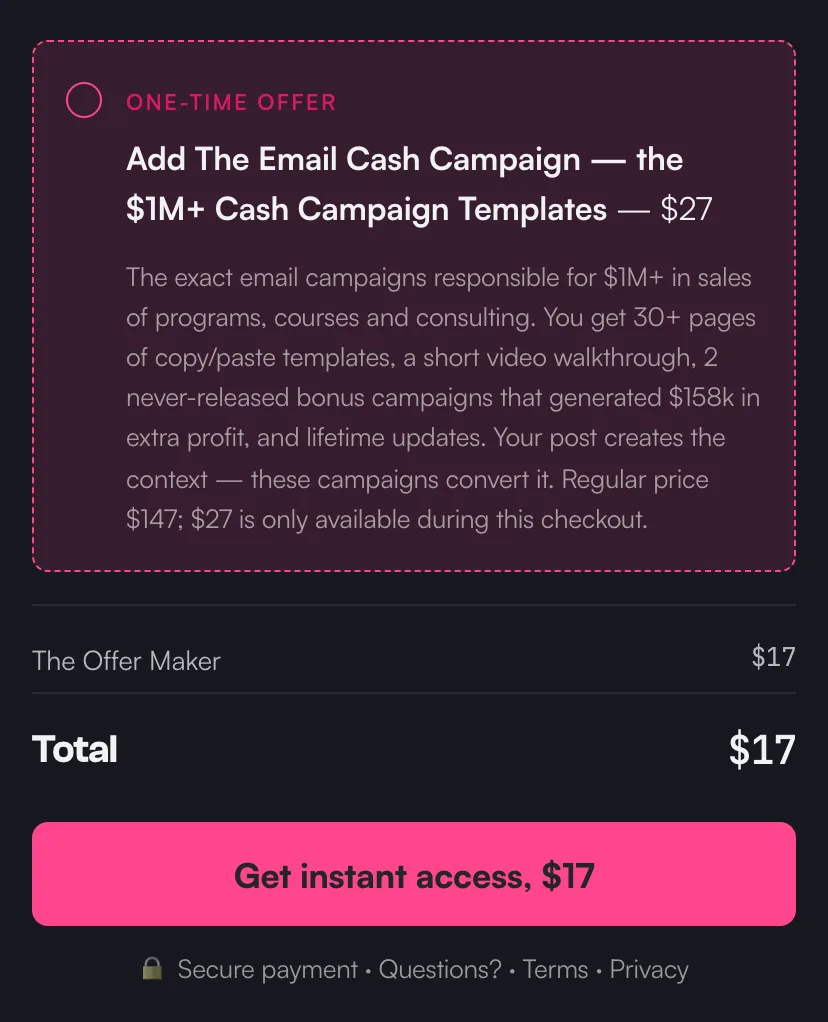
A live checkout on Swipefast, with its order bump. - 2
Bring your Systeme.io products
Create a public API key in your Systeme.io profile settings and paste it in. Swipefast reads your products, the order bumps and upsell their funnel sells with them, and your coupons, and brings them in as drafts. It only reads: the key is used for that scan and isn't saved, and nothing in Systeme.io changes. Active subscriptions keep billing in Systeme.io until they end.
Import from Systeme.io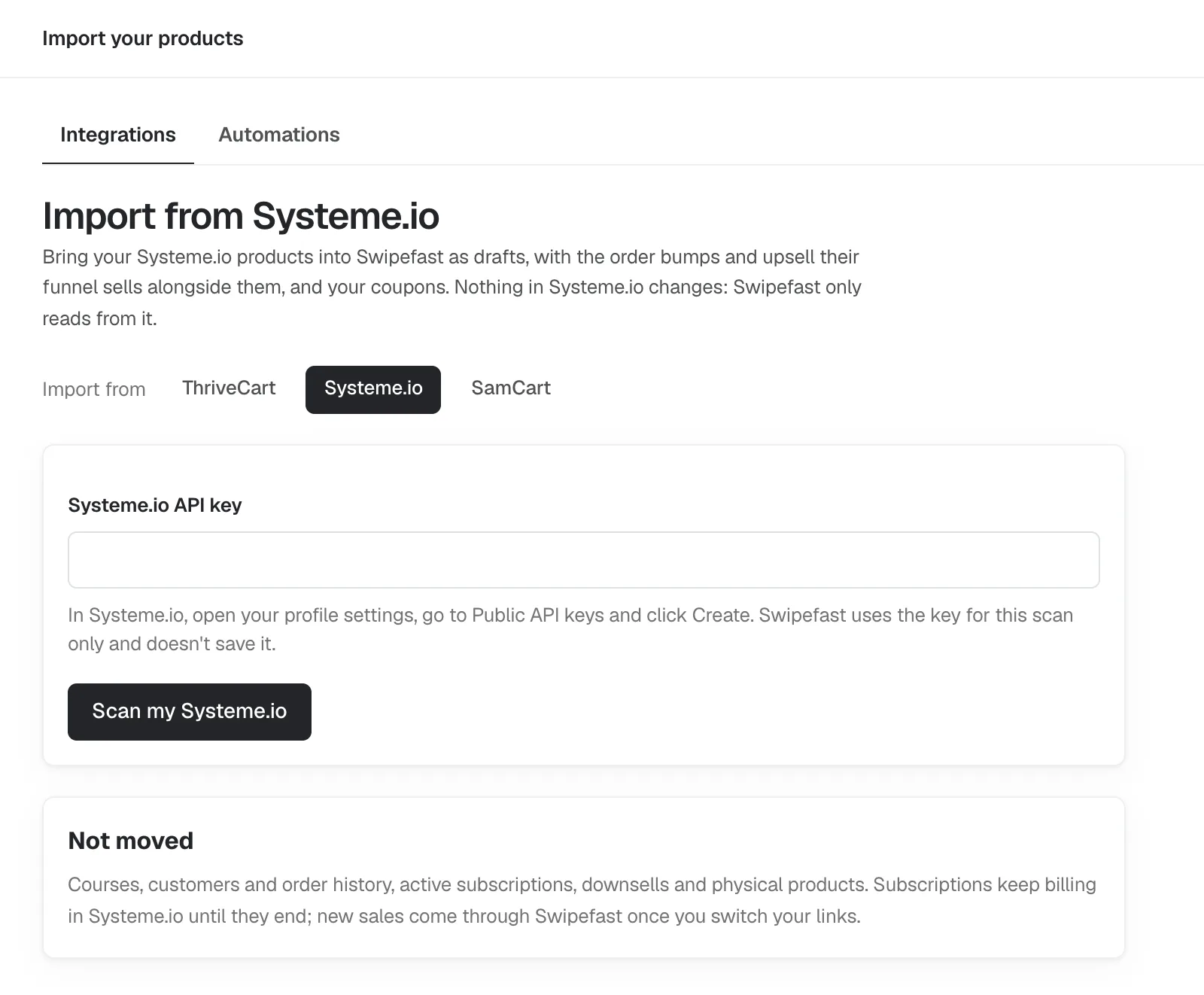
- 3
Your AI builds it
Connect Claude, ChatGPT or another AI app once. Then copy a prompt from Pip's playbook and fill in what you sell, the price and where buyers get it. Your AI builds the checkout as a draft. It never publishes on its own, and changes that touch money on a live checkout wait for your yes.
Edit a checkout with Claude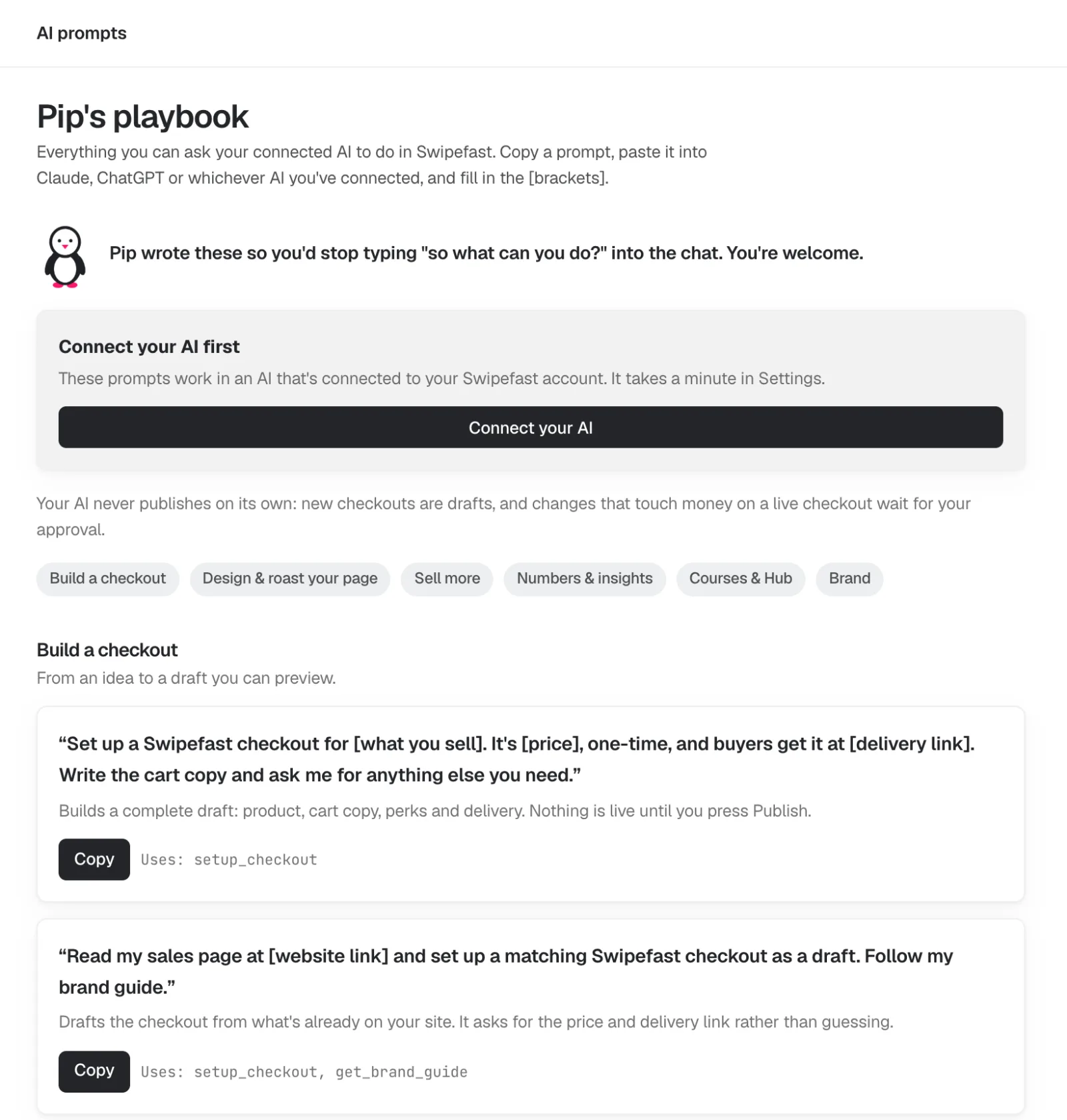
- 4
Change anything by clicking it
The editor shows your checkout the way your buyer will see it. Click the headline, the guarantee or the order bump and its settings open on the right. Changes save on their own. Payment plans, questions and options are one click each.
Add an order bump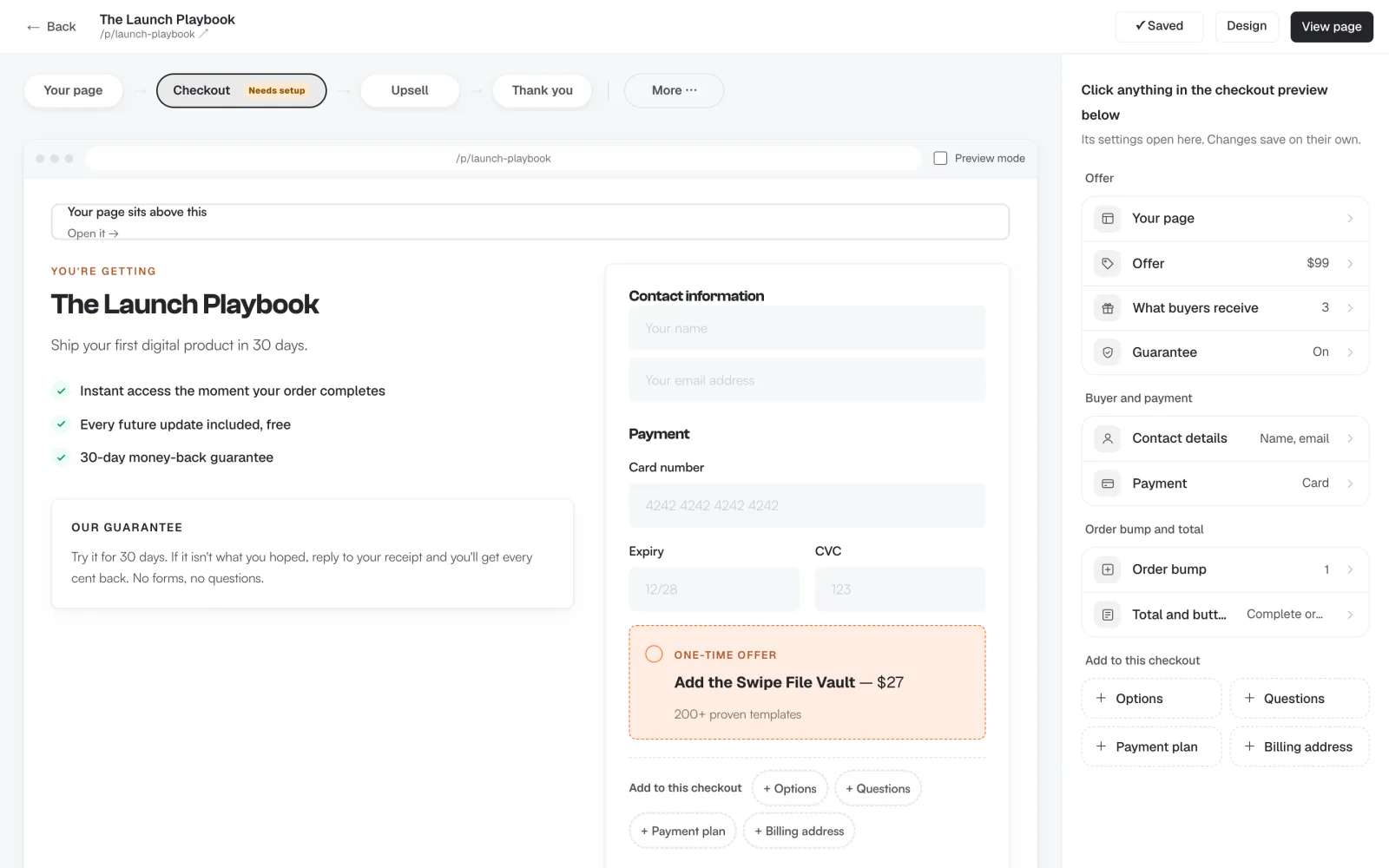
- 5
One-click upsells after payment
Straight after they pay, offer the next thing. One tap charges the card they just used, with nothing to type again. Chain up to five offers, each yes or no leading to another offer or the thank-you page. Upsells are on every plan.
Add a one-click upsell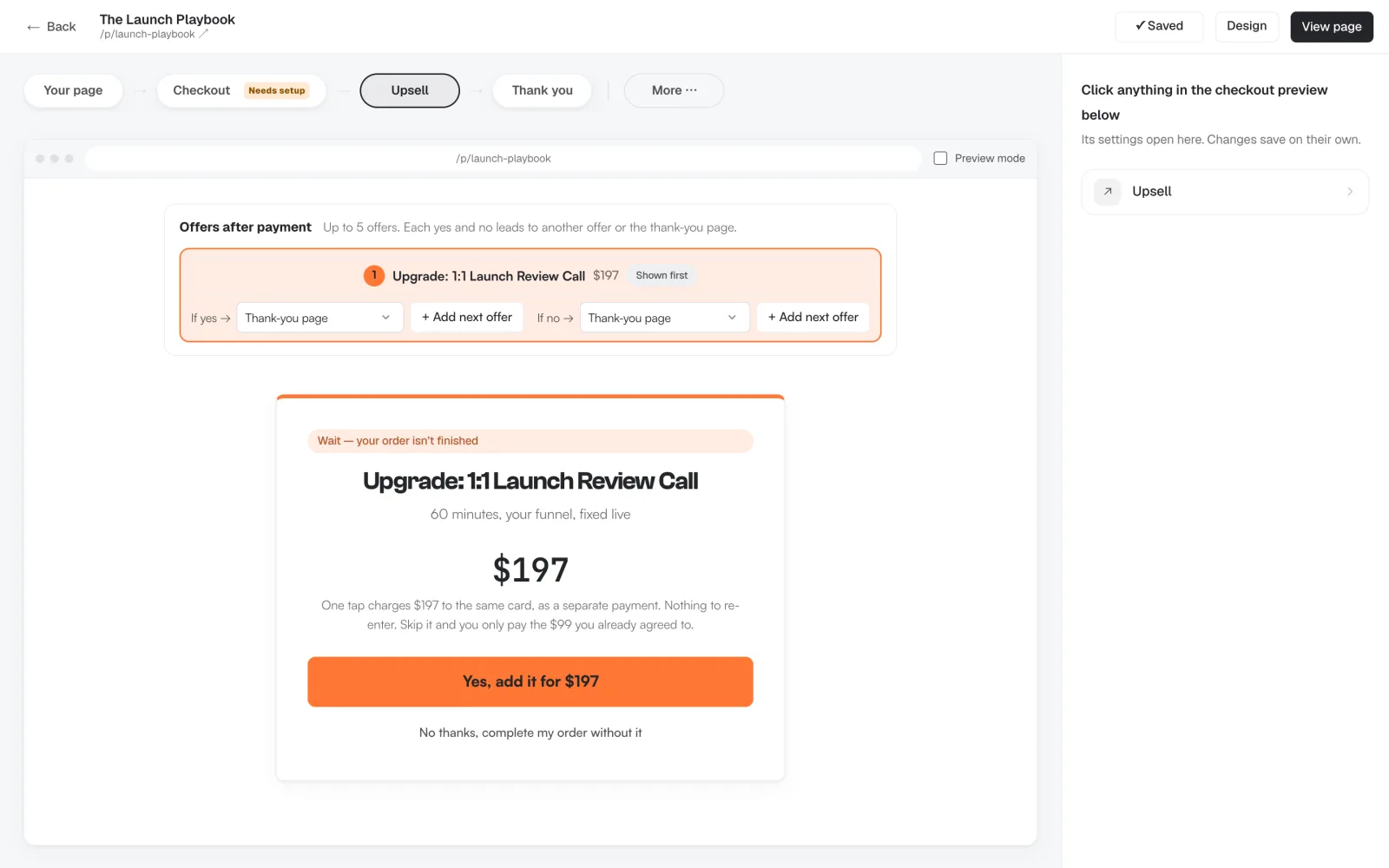
- 6
See what every offer earns
Each checkout has its own numbers: revenue, average order, conversion rate, and how many buyers took the order bump and the upsell. You see which offer pulls its weight and which one to change.
Real order bump numbers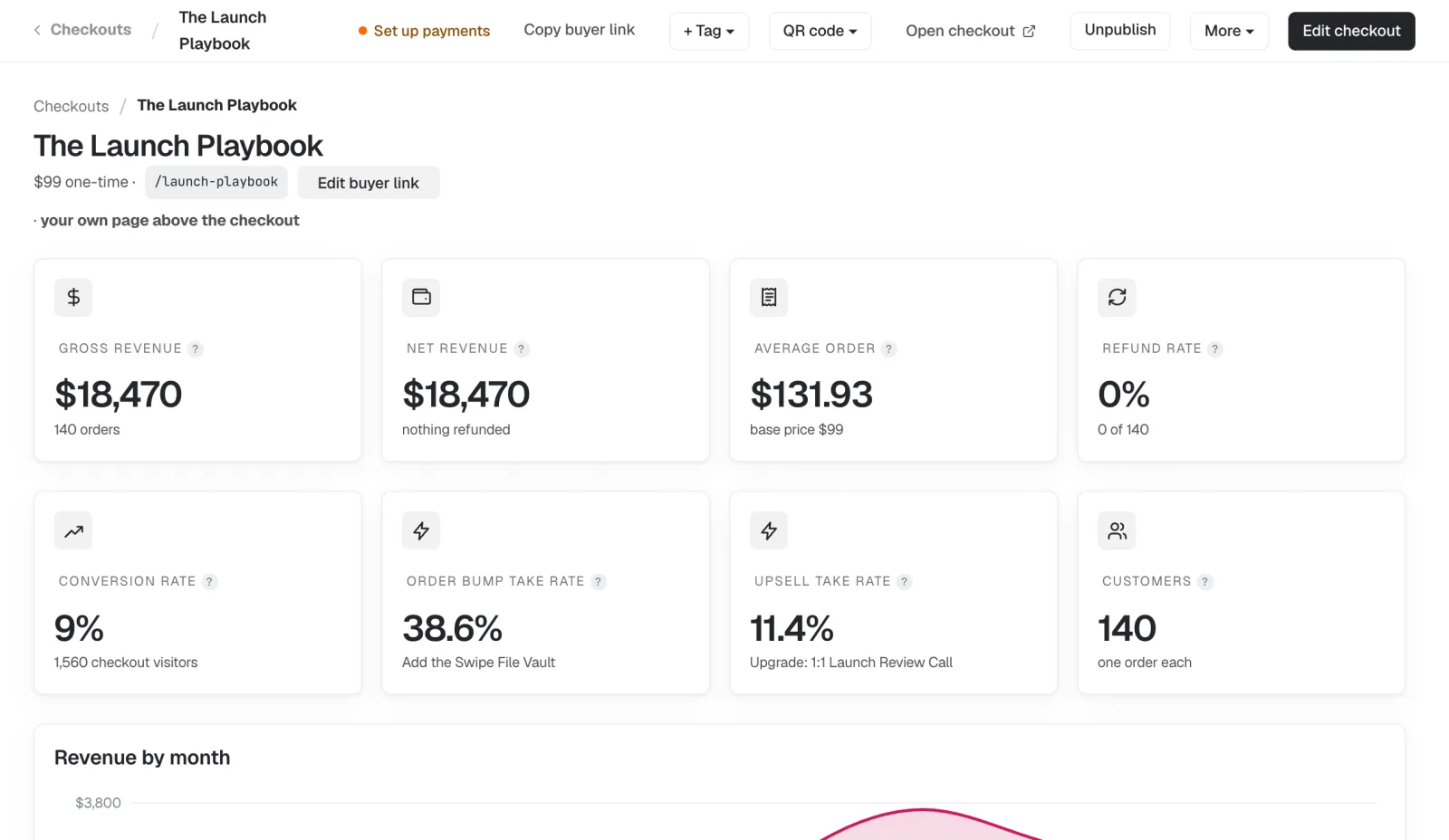
Demo account, sample numbers.
Dashboard screens are from our demo account, so their names and numbers are sample data.
Systeme.io or Swipefast?
| Systeme.io | Swipefast | |
|---|---|---|
| Price | Free $0; Startup $17/mo; Webinar $47/mo; Unlimited $97/mo; 2 months free yearly | Starter $29/mo or $290/yr; Pro $49/mo or $490/yr |
| What it is | All-in-one: funnels, email, courses, website, community | A checkout and sales page, with a course Hub |
| Free plan or trial | Free plan, no card, no time limit | 7-day free trial (card needed), no free plan |
| Fee on each sale | 0% | 0% |
| Order bumps | 1 on Free, 10 on Startup, 100 on Webinar, unlimited on Unlimited | Unlimited, from Starter |
| One-click upsells | 1 on Free, 10 on Startup, 100 on Webinar, unlimited on Unlimited | Chains of up to 5 offers with yes and no paths, from Starter |
| Payment processors | Stripe, PayPal, Apple Pay, Razorpay, Flutterwave, Mercado Pago, Xendit, cash on delivery | Your own Stripe, PayPal or Lemon Squeezy |
| Buy now, pay later | Not listed on its pricing page | Klarna, Afterpay and Affirm through Stripe, from Starter |
| Sales tax | Adds VAT for the buyer's country on order forms | Stripe Tax for EU VAT and US sales tax; 0.2% on taxed orders when Stripe is connected through Swipefast |
| Email marketing | Built in, unlimited sends; 2,000 contacts on Free, 5,000 on Startup | Not built in; connects to Kit, Mailchimp, MailerLite and more |
| Courses | Built in: 1 on Free, 5 on Startup | Course Hub; videos play from YouTube, Vimeo, Loom and others |
| Affiliates | Every plan | On Pro |
| A/B tests | 1 on Free, 10 on Startup | No |
| Build and edit with your AI | MCP server on every plan; asks before it changes anything | MCP on every plan; checkouts start as drafts, and money changes wait for your approval |
Written by Jacob, Swipefast's founder, so this is our side of it. Systeme.io prices, plan limits and payment processors from systeme.io/pricing, VAT from its help centre and AI from systeme.io/mcp, all checked November 9, 2026.
What it costs a month
| Sales a month | Systeme.io | Swipefast | |
|---|---|---|---|
| $1,000 | $0 | $29 | $29 more a month |
| $5,000 | $0 | $29 | $29 more a month |
| $10,000 | $0 | $29 | $29 more a month |
| $50,000 | $0 | $29 | $29 more a month |
Systeme.io on Free, its cheapest plan with order bumps and upsells, against Swipefast Starter. Card fees aside: they're the same 2.9% + 30¢ on both. From systeme.io, checked 15 October 2026.
- You want more bumps and upsells than your Systeme.io plan allows, without moving up to Unlimited at $97
- You sell to the US or the EU and want sales tax and buy now, pay later on the checkout
- You're happy to keep Systeme.io, or another email tool, for your list and move only the checkout
- You have under 2,000 contacts and one or two offers. Systeme.io's Free plan covers that, with email, 3 funnels and a course, for $0
- You want funnels, email, courses, a blog and a community in one login. Swipefast is only the checkout
- You take payments with Razorpay, Flutterwave, Mercado Pago or Xendit. Systeme.io connects them; Swipefast works with Stripe, PayPal and Lemon Squeezy
Moving from Systeme.io?
- Export your customers and sales from Systeme.io. How to export ↗
- Bring your products across with the importer: they arrive as drafts with their order bumps. Use the importer →
- Point your buttons and links at your new checkout, and publish.
Your past orders and receipts, any subscriptions it already bills, and anything only Systeme.io does.
The short answers.
Is Systeme.io really free?
Yes. Its Free plan has no time limit and needs no card. It covers 2,000 contacts, 3 funnels, 1 course, 1 order bump and 1 one-click upsell, with unlimited emails (systeme.io/pricing, checked November 9, 2026). Swipefast has no free plan: you get a 7-day free trial, with a card, then Starter at $29 a month.
What does a $5,000 month cost on each?
Take one $97 course with a bump and an upsell, selling $5,000 a month, about 52 orders. Card fees are the same on both: 2.9% + 30¢ comes to about $160.60. Neither takes a cut of your sales. Systeme.io then costs $0 up to 2,000 contacts, $17 up to 5,000, $47 up to 10,000 and $97 past that. Swipefast Starter is $29 at any list size, but it doesn't send your emails, so if you keep Systeme.io for those, add the two together.
What does the importer bring across from Systeme.io?
Paste a Systeme.io API key and Swipefast reads your account. It only reads, and the key isn't saved. Each digital product arrives as a draft checkout with its price and billing: one-time, monthly or yearly, and a plan with a fixed number of payments becomes a Swipefast payment plan. It adds up to 5 order bumps from the product's order form and the first upsell after it, keeps the old link's path when it's free, and brings your active coupons, paused. One scan reads up to 100 products, 50 funnels and 200 coupons.
Do my subscriptions, customers and saved cards move too?
No. Swipefast doesn't move or cancel anything in Systeme.io, so active subscriptions keep billing there until they end, and buyers' saved cards stay where they are. New buyers subscribe through Swipefast once you switch your links. Customers, order history, courses, affiliates, downsells, physical products, free trials and weekly subscriptions don't come across either.
What do I set up by hand after the import?
A delivery link for each product, order bump and upsell: the import shows how each one was delivered in Systeme.io, such as a course or a file, and the checkout won't publish until the links are in. Then your sales page (each draft comes with a prompt your AI uses to rebuild it from your Systeme.io page), your courses in the Swipefast Hub, and the buttons in your emails and pages, pointed at the new checkout.
When should I stay on Systeme.io?
When you're under 2,000 contacts with one or two offers, since the Free plan does it for $0, or when you use its email, funnels, courses and community together and $17 to $47 a month covers you. If you only want more from the checkout, move just that and keep Systeme.io for the rest.
Guides for this.
Keep $2,040 a year.
Start your 7-day free trial for $0At $5,000 a month in sales. Prices checked 15 October 2026.
Systeme.io is a trademark of its owner, and Swipefast isn't affiliated with it. Prices may have changed since 15 October 2026.
Your checkout, live this afternoon.
Try either plan free for 7 days. Your first payment is 30 days risk-free.