Outgrown a plain payment link?
Stripe Payment Links is free and quick, and for a single simple sale it's all you need. Swipefast is for when you want the checkout to sell: your brand, an extra at checkout, an offer after payment.
From $29/mo · 7-day free trial · 0% of your sales · 30 days risk-free
- What they sell
- The same $97 course
- Price
- $97 on a Stripe link, or on Swipefast
- At checkout
- Swipefast adds: workbook, +$27
- After they pay
- Swipefast adds: one tap for the coaching call, $197
Built for the way you sell.
Your checkout, not Stripe's page
Payment Links is a Stripe-hosted page with preset fonts and your colours. Swipefast is your design, your sales page above it, on your own domain.
An offer after they pay
Swipefast shows one offer after payment that adds to the same card in one tap. Payment Links' extras are optional items before payment.
Payment plans and affiliates
Split a price into instalments from Starter, and give affiliates tracked links and commission on Pro.
Still your Stripe account
Buyers pay into your own Stripe account, exactly as with Payment Links. Swipefast takes 0% of your sales.
The real product, screen by screen.
Every picture here is Swipefast itself, not a mock-up: what your buyer sees, how you build it, and what you see after the sale.
- 1
What your buyer sees
A Swipefast checkout, live and taking orders. The order bump sits right above the total, so one tick adds it while their card is already out. This one is the founder's own checkout for The Offer Maker.
Try the live demo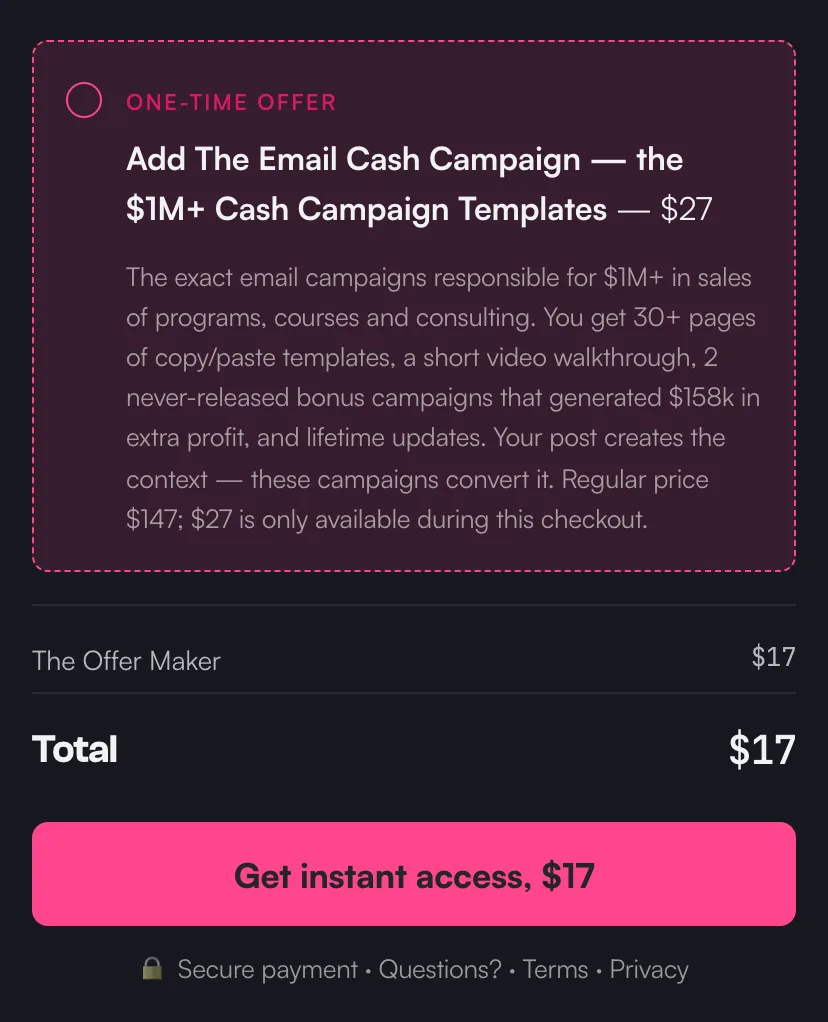
A live checkout on Swipefast, with its order bump. - 2
Your AI builds it
Connect Claude, ChatGPT or another AI app once. Then copy a prompt from Pip's playbook and fill in what you sell, the price and where buyers get it. Your AI builds the checkout as a draft. It never publishes on its own, and changes that touch money on a live checkout wait for your yes.
Edit a checkout with Claude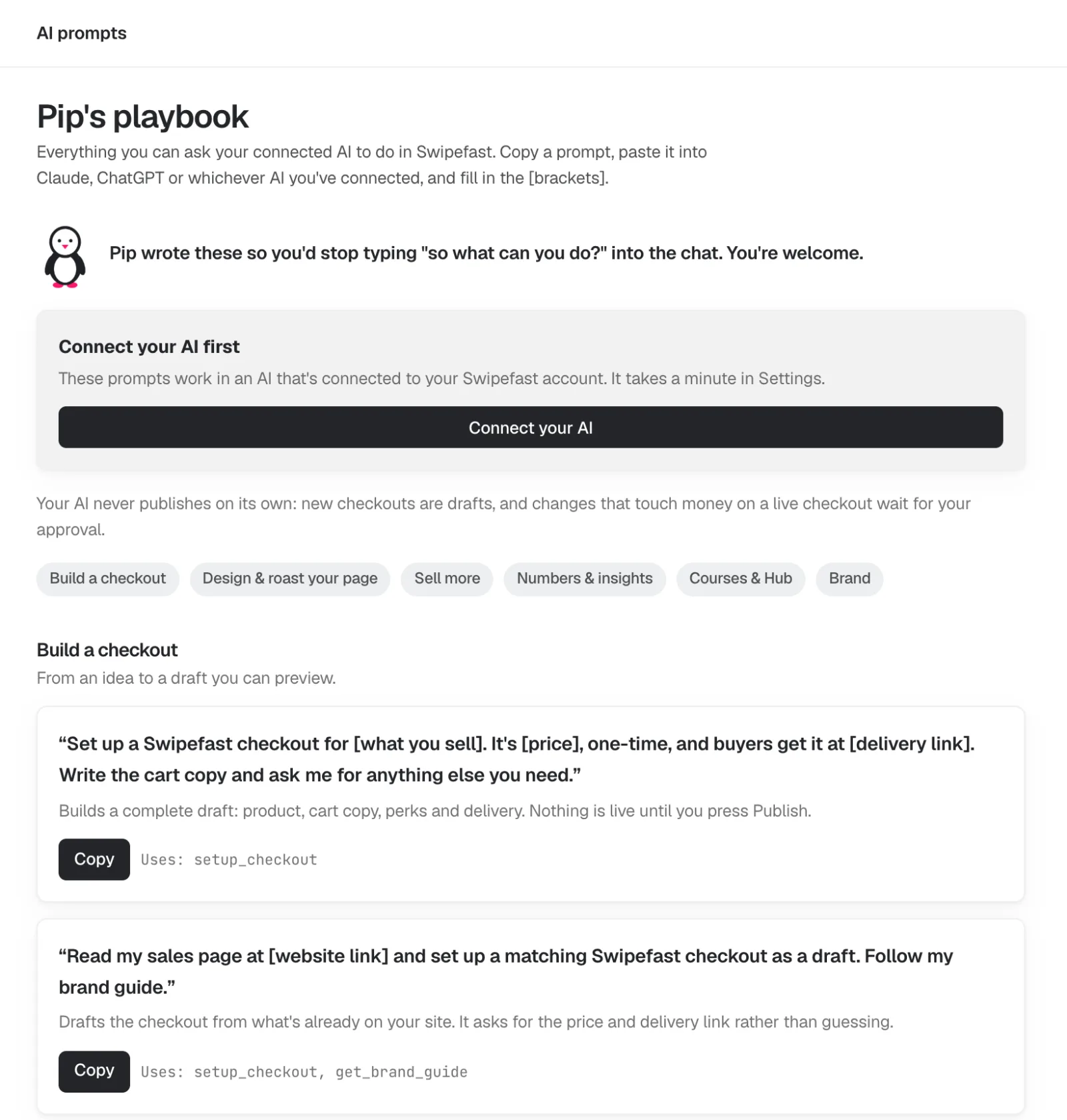
- 3
Change anything by clicking it
The editor shows your checkout the way your buyer will see it. Click the headline, the guarantee or the order bump and its settings open on the right. Changes save on their own. Payment plans, questions and options are one click each.
Add an order bump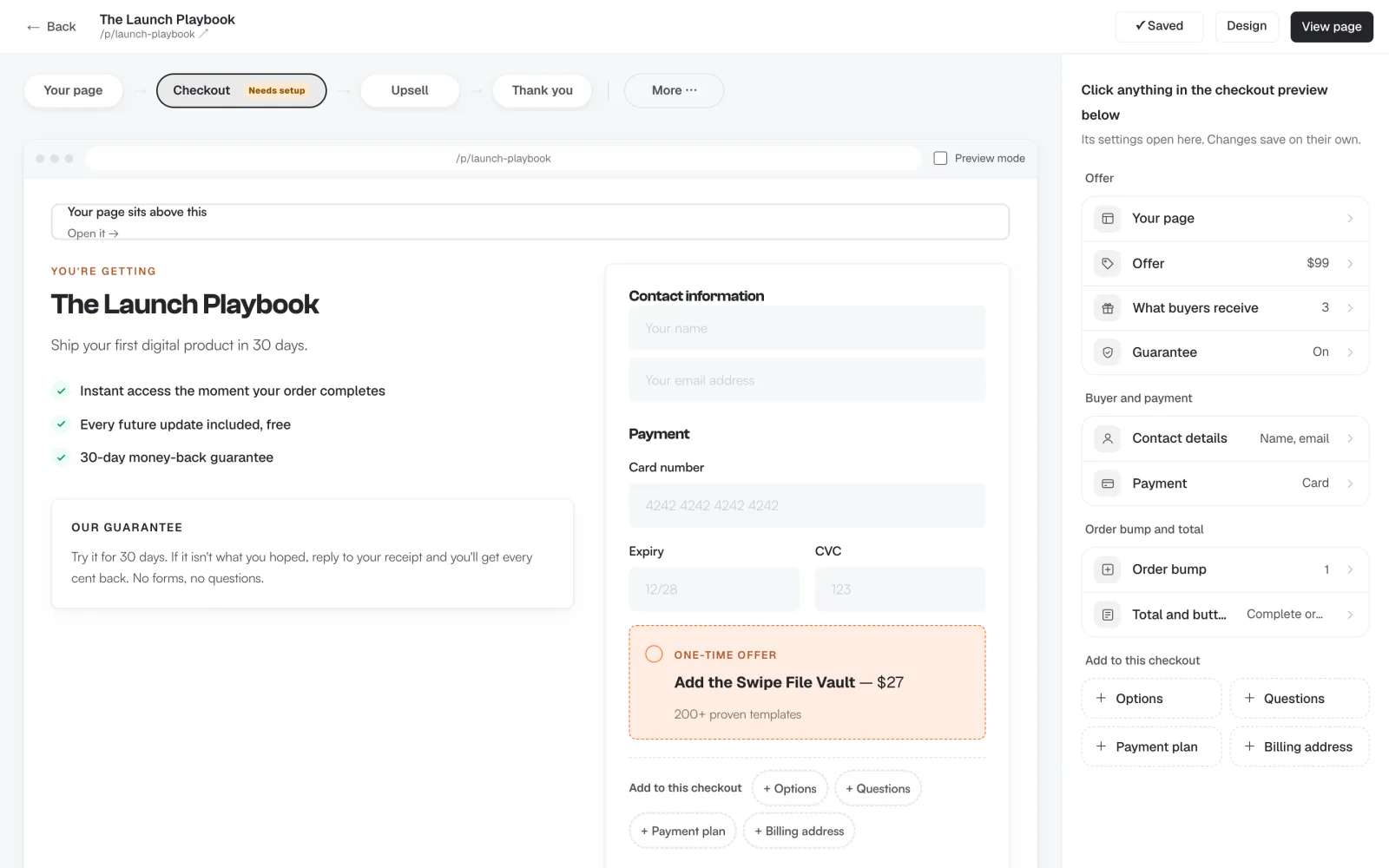
- 4
One-click upsells after payment
Straight after they pay, offer the next thing. One tap charges the card they just used, with nothing to type again. Chain up to five offers, each yes or no leading to another offer or the thank-you page. Upsells are on every plan.
Add a one-click upsell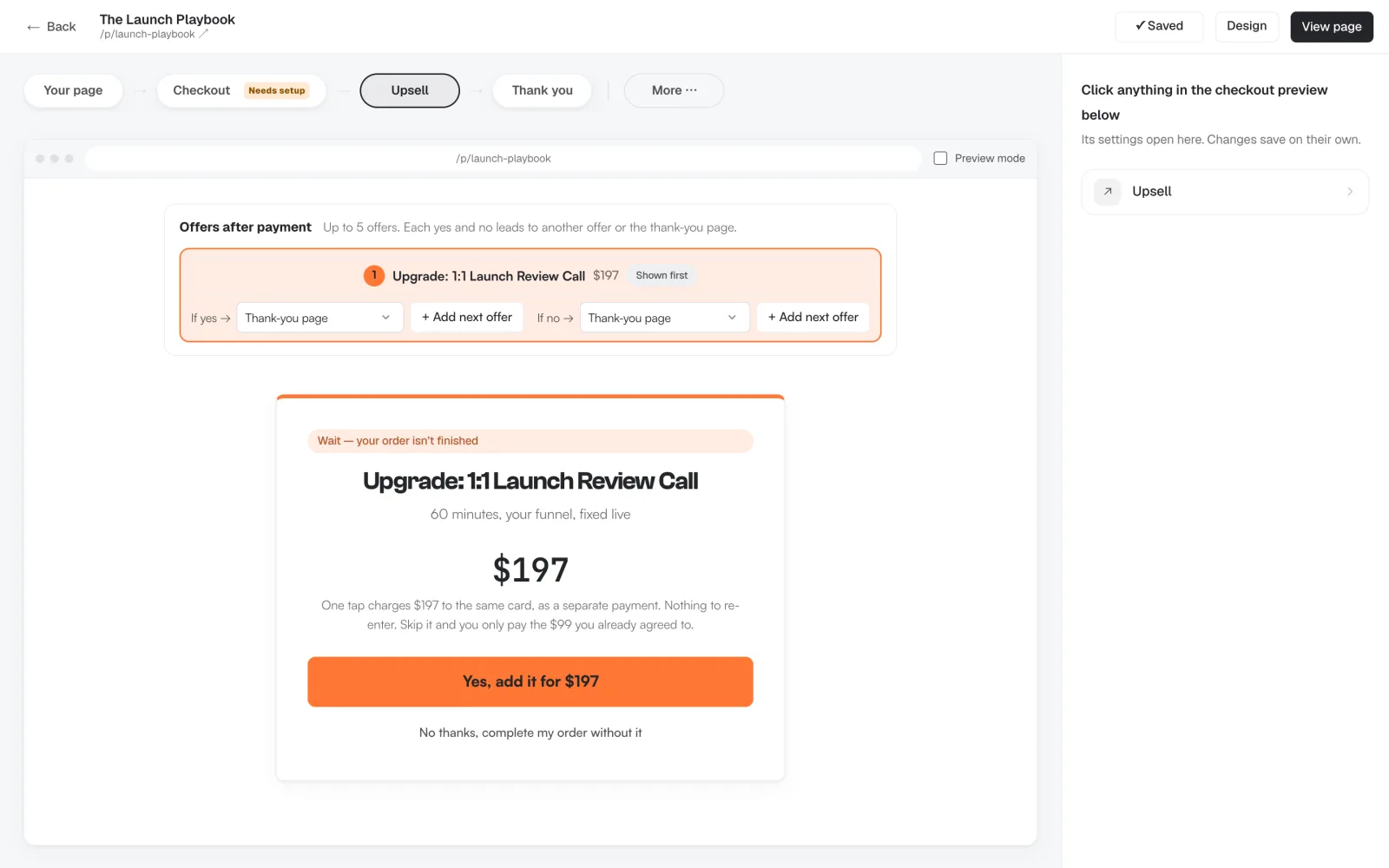
- 5
See what every offer earns
Each checkout has its own numbers: revenue, average order, conversion rate, and how many buyers took the order bump and the upsell. You see which offer pulls its weight and which one to change.
Real order bump numbers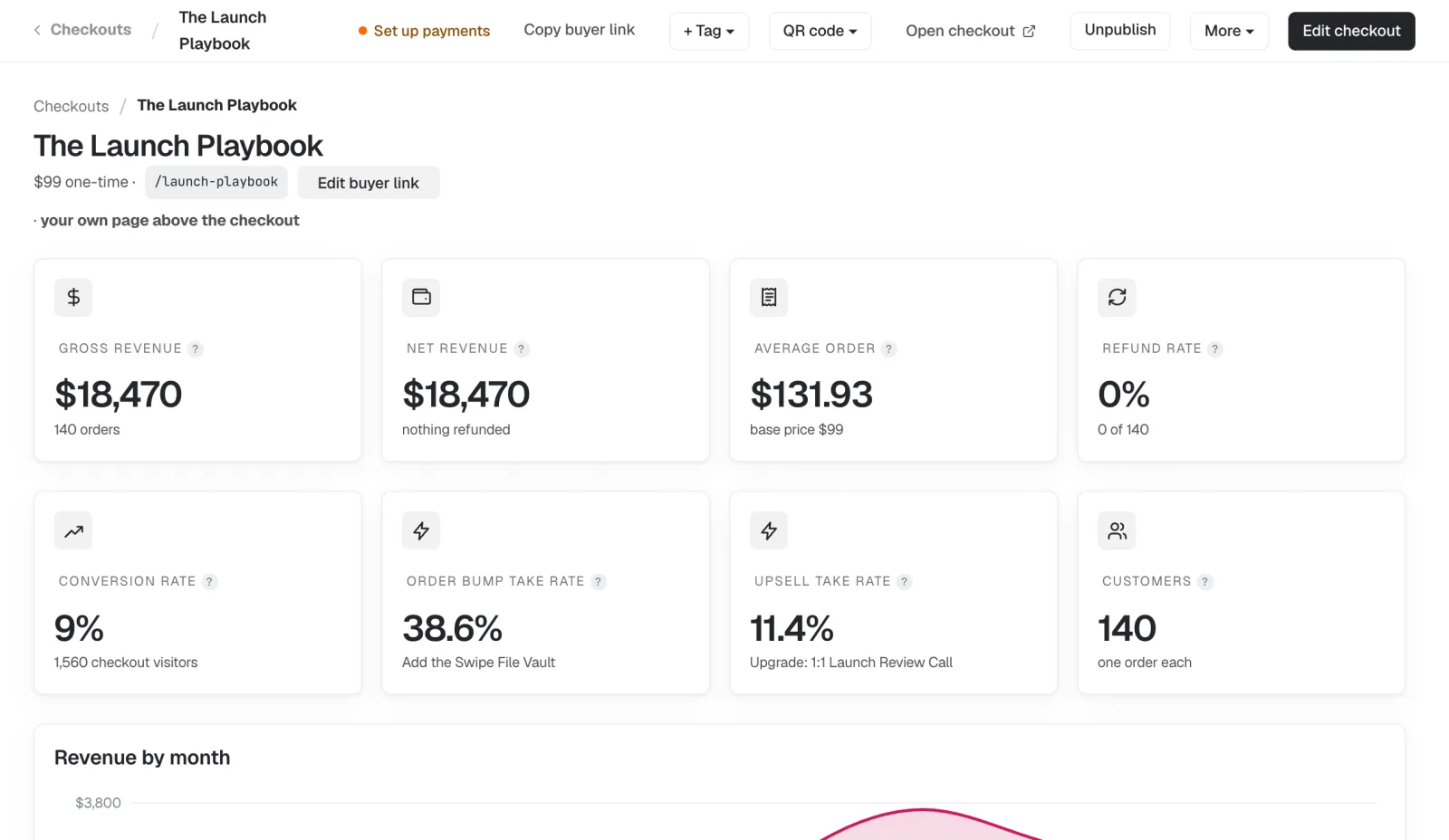
Demo account, sample numbers.
Dashboard screens are from our demo account, so their names and numbers are sample data.
Stripe Payment Links or Swipefast?
| Stripe Payment Links | Swipefast | |
|---|---|---|
| Monthly price | Free | Starter $29/mo; Pro $49/mo or $490/yr |
| Fee on each sale | Stripe's card fee only | Stripe's card fee only (0% to Swipefast) |
| Look and feel | Stripe-hosted page, preset fonts, your logo and colours | Your design and sales page, light or dark, on your own domain |
| Extras at checkout | Up to 10 optional items | Unlimited order bumps, from Starter |
| Offer after payment | Not available | One-click upsell, from Starter |
| Promo codes | Yes | Yes |
| Subscriptions | Yes, with monthly-to-yearly upsell | Yes, monthly or yearly, from Starter |
| Payment plans | Not on Payment Links | Yes, from Starter |
| Affiliate tracking | No | Yes, on Pro |
| Sales tax | Stripe Tax | Stripe Tax (0.2% on taxed orders when Stripe is connected through Swipefast) |
Stripe Payment Links features from docs.stripe.com, checked October 1, 2026.
What it costs a month
| Sales a month | Stripe Payment Links | Swipefast | |
|---|---|---|---|
| $1,000 | $0 | $29 | $29 more a month |
| $5,000 | $0 | $29 | $29 more a month |
| $10,000 | $0 | $29 | $29 more a month |
| $50,000 | $0 | $29 | $29 more a month |
Stripe Payment Links has no monthly fee and takes its cut from each sale, against Swipefast Starter. Card fees aside: they're the same 2.9% + 30¢ on both. From stripe.com, checked 15 October 2026.
- You sell to an audience and want to make more from each buyer
- You want the checkout to look like your brand
- You need payment plans, affiliates or an upsell after payment
- You sell one thing occasionally and don't want a monthly fee. Stripe Payment Links is free and does that well
Moving from Stripe Payment Links?
- Export your customers and sales from Stripe Payment Links. How to export ↗
- Tell your AI "Rebuild my Stripe Payment Links checkout in Swipefast, with the same bump and upsell." It sets everything up as a draft for you to check.
- Point your buttons and links at your new checkout, and publish.
Your past orders and receipts, any subscriptions it already bills, and anything only Stripe Payment Links does.
The short answers.
Is Stripe Payment Links enough?
For an occasional, simple sale, yes: it's free and fast. It's limited when you want your own branded checkout, an offer after payment, payment plans or affiliates.
Does Swipefast use my Stripe account?
Yes. You connect your own Stripe account and buyers pay into it, just like Payment Links. Swipefast takes 0% of your sales.
Can Payment Links do order bumps?
Payment Links can show up to 10 optional items before payment, which works like a simple bump. It has no offer after payment, which Swipefast includes.
Can I keep my Stripe payment links?
Yes. Nothing changes in Stripe. Use Swipefast for the offers you want to sell harder, and keep simple links where they work.
Guides for this.
Keep $2,040 a year.
Start your 7-day free trial for $0At $5,000 a month in sales. Prices checked 15 October 2026.
Stripe Payment Links is a trademark of its owner, and Swipefast isn't affiliated with it. Prices may have changed since 15 October 2026.
Your checkout, live this afternoon.
Try either plan free for 7 days. Your first payment is 30 days risk-free.