Checkout for coaches, built by your AI: sell coaching packages and calls.
Tell Claude, ChatGPT or Cursor what your programme costs. It builds the checkout with a payment plan, an order bump and a one-click upsell, and you publish it when it looks right.
From $29/mo · 7-day free trial · 0% of your sales · 30 days risk-free
- What they sell
- 12-week coaching programme
- Price
- $1,500, or 3 payments of $500
- At checkout
- A recorded 1:1 strategy session, +$97
- After they pay
- Straight to your Calendly link to book the first call
Payment plans, order bumps and upsells for coaching.
Payment plans
Instalments that collect themselves
Offer the full price and 2 or 3 payments side by side. Swipefast charges each payment on schedule and retries a failed card for you.
Order bump
One tick, bigger order
A small extra right beside the payment form, like a recorded session or a workbook. Clients add it with one tick while their card is already out.
One-click upsell
A next step after they pay
Offer an upgrade on the page after payment, like a VIP day or a seat in your group. One tap adds it to the same card. Chain up to 5 offers, on every plan.
Booking link after payment
Straight to your calendar
Set your Calendly or Cal.com link as the access link. Clients land there from the thank-you page and from their receipt.
Or let clients pick a time inside the checkoutBranded checkout and sales page
Your page, your brand
Your colours, your logo and your own sales page above the checkout. Your own checkout domain comes with Pro.
Sales tracking
Know which post brought the client
Put a ref or UTM tag on the links you share. Reports shows which post, email or video brought each sale.
The real product, screen by screen.
Every picture here is Swipefast itself, not a mock-up: what your buyer sees, how you build it, and what you see after the sale.
- 1
What your buyer sees
A Swipefast checkout, live and taking orders. The order bump sits right above the total, so one tick adds it while their card is already out. This one is the founder's own checkout for The Offer Maker.
Try the live demo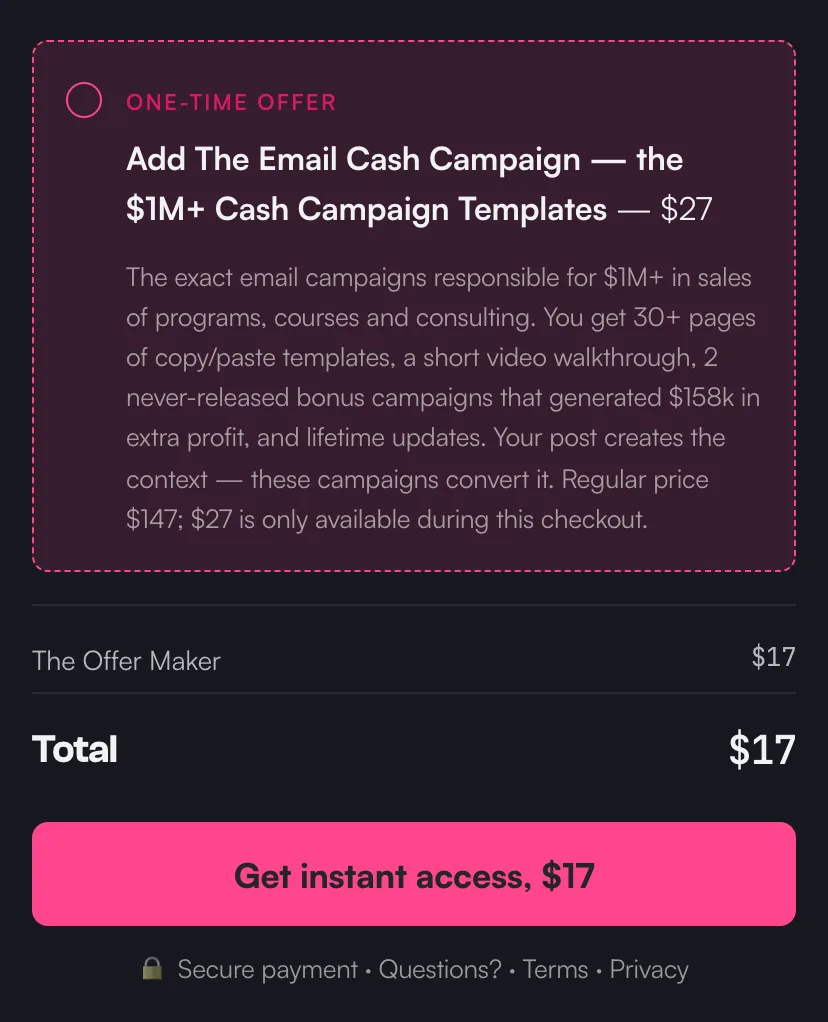
A live checkout on Swipefast, with its order bump. - 2
Your AI builds it
Connect Claude, ChatGPT or another AI app once. Then copy a prompt from Pip's playbook and fill in what you sell, the price and where buyers get it. Your AI builds the checkout as a draft. It never publishes on its own, and changes that touch money on a live checkout wait for your yes.
Edit a checkout with Claude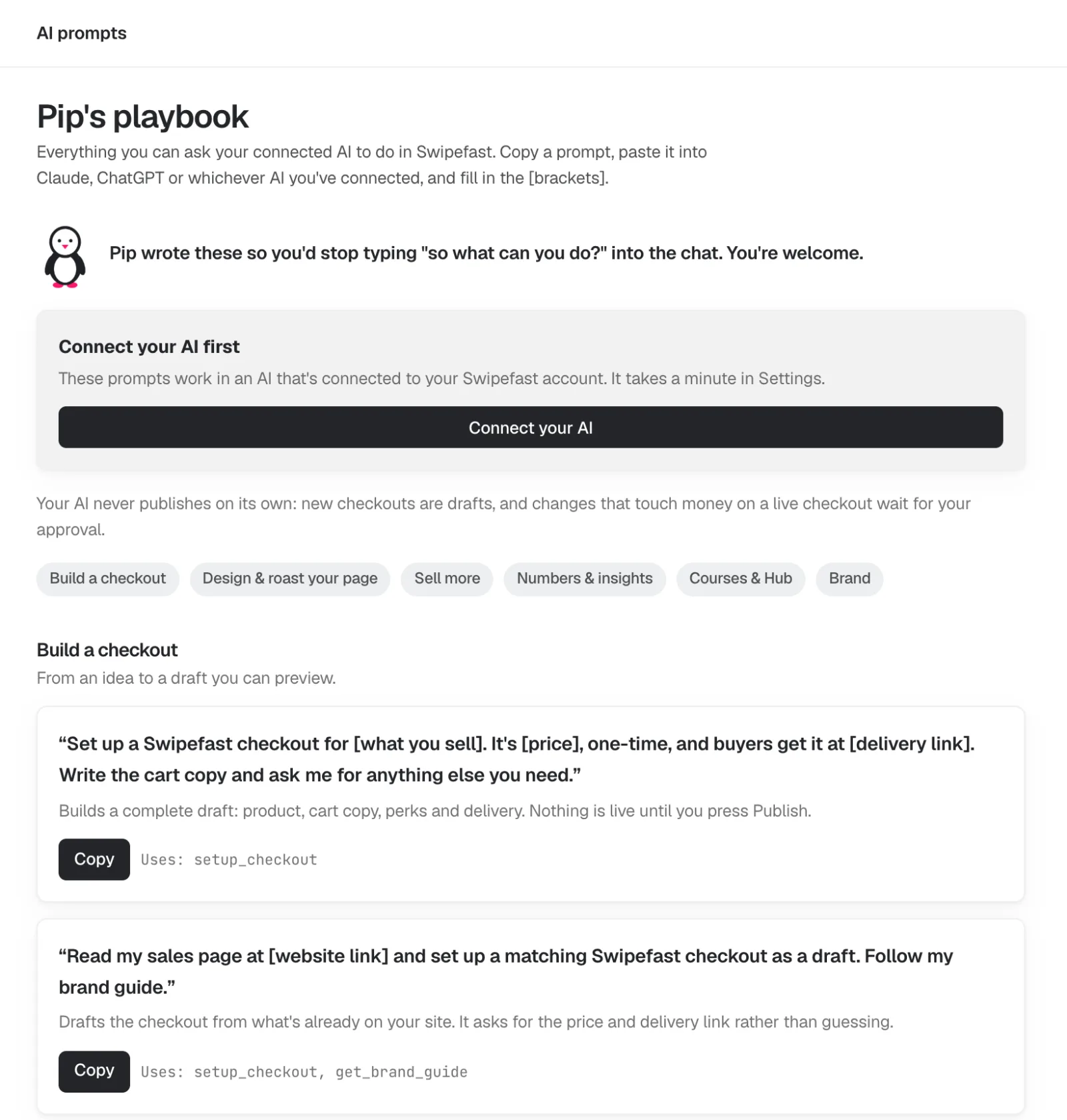
- 3
Change anything by clicking it
The editor shows your checkout the way your buyer will see it. Click the headline, the guarantee or the order bump and its settings open on the right. Changes save on their own. Payment plans, questions and options are one click each.
Add an order bump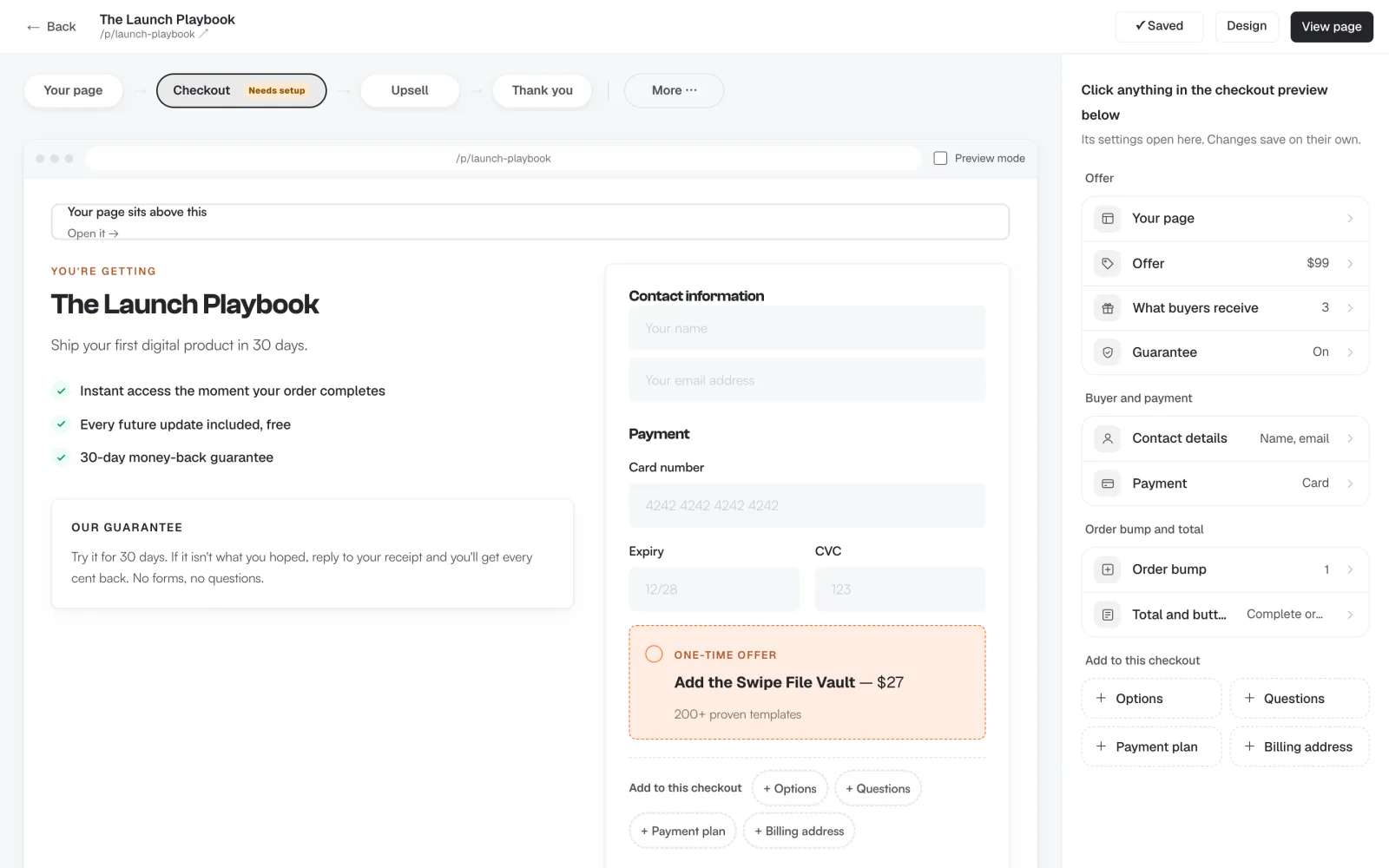
- 4
One-click upsells after payment
Straight after they pay, offer the next thing. One tap charges the card they just used, with nothing to type again. Chain up to five offers, each yes or no leading to another offer or the thank-you page. Upsells are on every plan.
Add a one-click upsell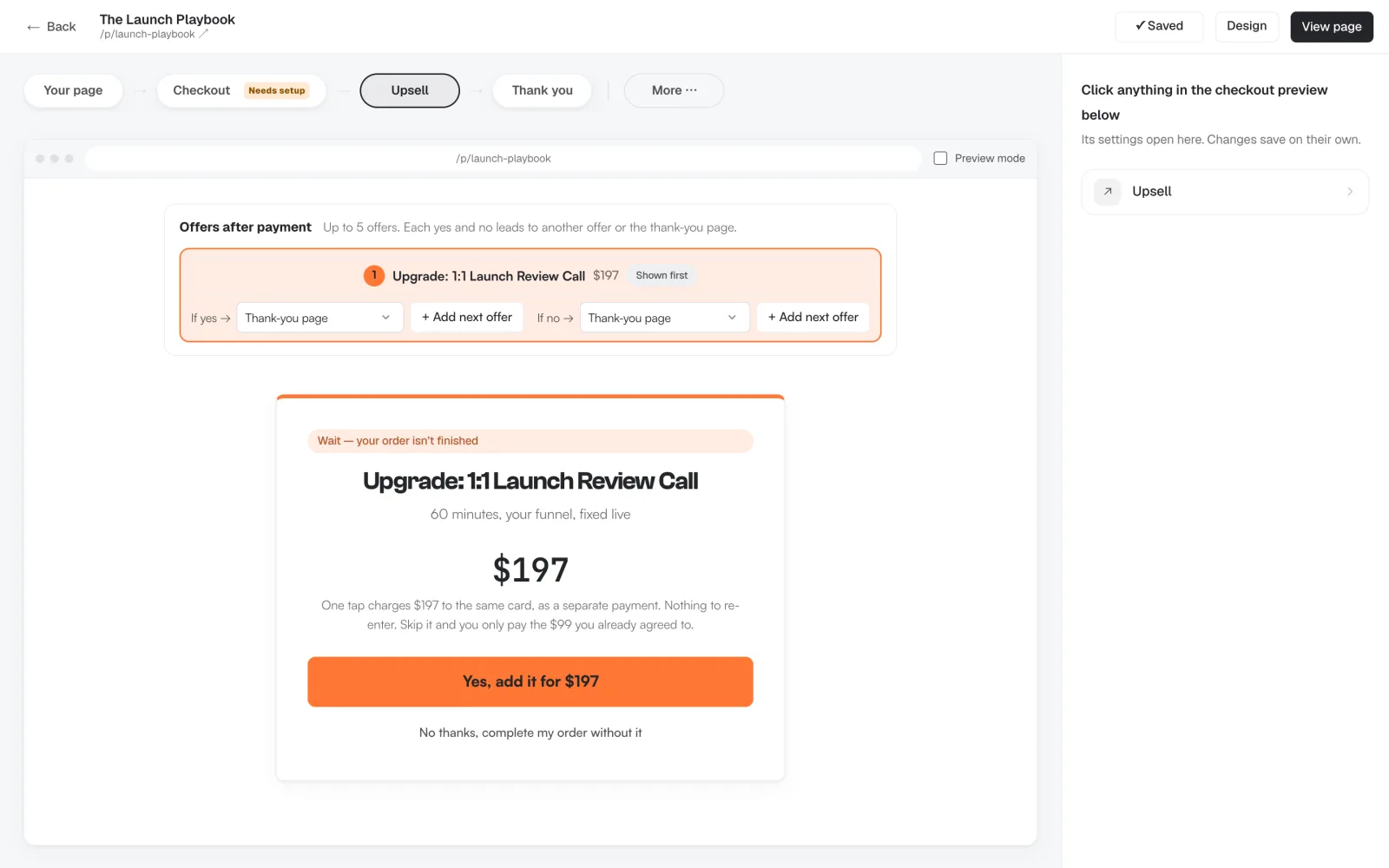
- 5
They book the call as they pay
Selling a call? Connect Google Calendar and set your hours. The buyer picks a day and a time inside the checkout and pays in the same step, and the call lands on your calendar with them invited. No separate booking tool, no back and forth.
Sell a booked call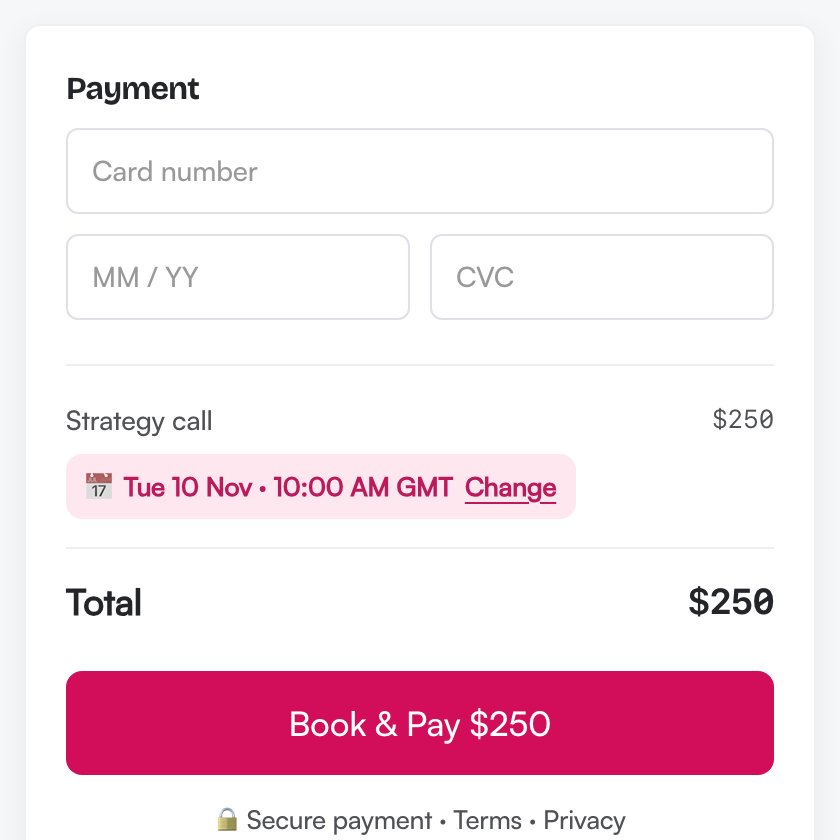
- 6
See what every offer earns
Each checkout has its own numbers: revenue, average order, conversion rate, and how many buyers took the order bump and the upsell. You see which offer pulls its weight and which one to change.
Real order bump numbers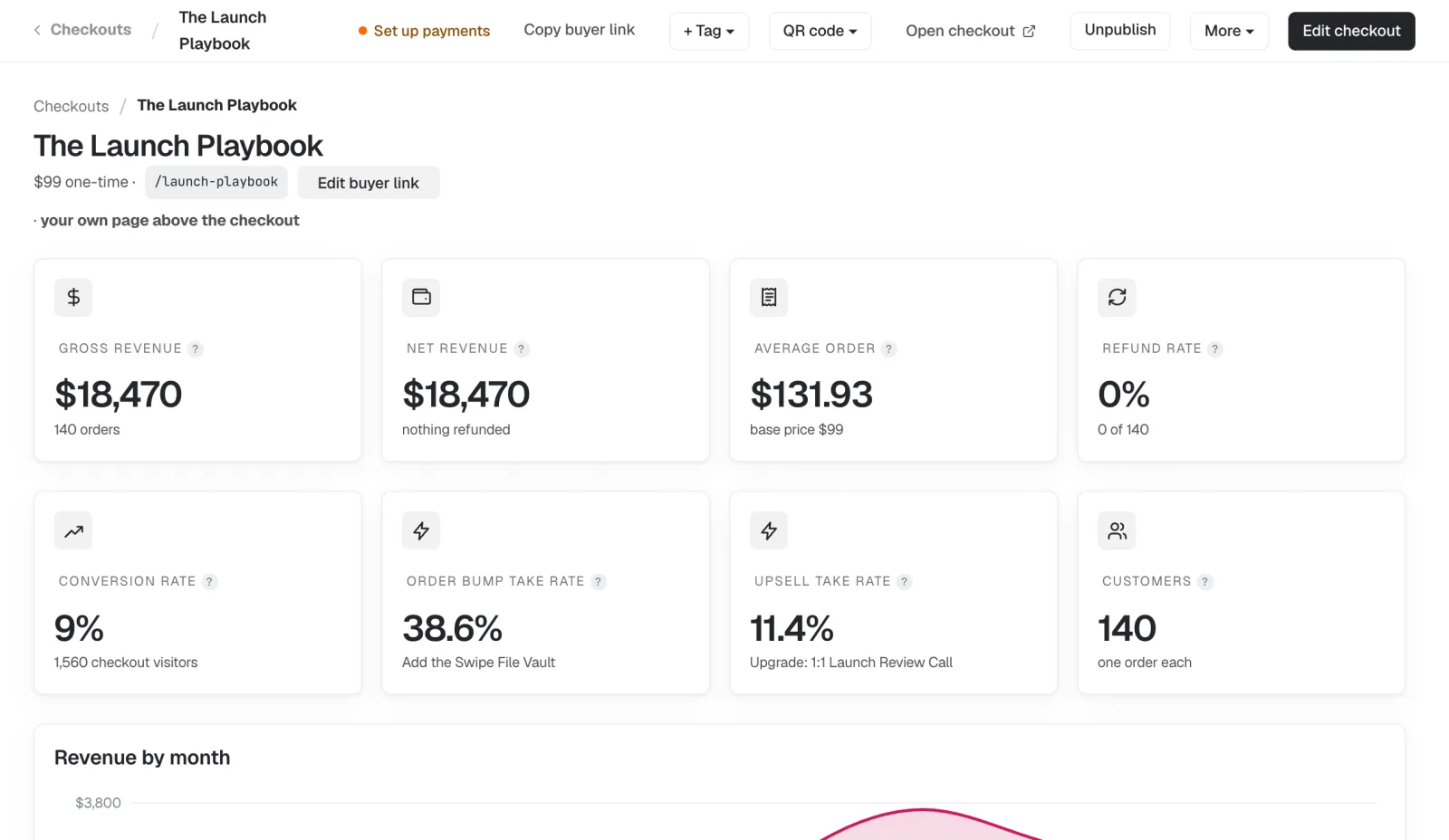
Demo account, sample numbers.
Dashboard screens are from our demo account, so their names and numbers are sample data.
Tell your AI what you sell. It builds the checkout.
Connect Swipefast once to Claude, ChatGPT, Cursor or any of the 20 AI apps it works with, on every plan. Ask in plain words and it builds the checkout, the order bump and the upsell as a draft. Nothing goes live until you publish it, and a change to money on a live checkout waits for your approval.
All 20 AI appsMake a checkout for my 12-week coaching programme: $1,500, or 3 payments of $500. Add a recorded strategy session as a $97 order bump, and send clients to my Calendly link after they pay.
Done. Your checkout is a draft in Swipefast. Check it, then publish it when you're ready.
How to sell coaching packages online with Swipefast.
- 1
Connect your AI
Add Swipefast to Claude, ChatGPT, Cursor or another AI app once. Prefer clicking? The dashboard does the same job.
- 2
Describe your coaching package
The programme, the full price, the instalments and the extra you'd add at checkout. Your AI builds it as a draft.
- 3
Publish and send the link
Connect Stripe or PayPal, check the draft and publish. Send the link after a discovery call or in a DM. Clients pay, then book.
In their own words.
“I went for the annual plan because I really trust that you put a ton of effort into everything you make.”
 Eduardo Macias MartinezDoctor & Coach
“Been loving the simplicity of Swipefast! 🙌”
 Clay GillCoach for neurodivergent people
- You sell programmes, packages, calls or a group, and already have somewhere to deliver them
- You want payment plans without chasing anyone
- You'd rather not learn a big platform to take a payment
- You want a community, or your course videos stored in the same tool. Kajabi or Podia bundle those; Swipefast's Hub hosts courses, but plays the videos from YouTube, Vimeo or Loom and has no community
Two plans. 0% of your sales.
Try either plan free for 7 days. Your first payment is 30 days risk-free.
Starter
Everything you need to sell. Ask Claude or ChatGPT to build it.
$29/month
or $290 a year
- Unlimited checkouts, order bumps and free lead magnets
- Upsell chains with downsells: up to 5 offers, yes and no paths
- Payment plans and subscriptions
- Sales tax and buy now, pay later
- Every report, plus the buyer map
- Claude or ChatGPT builds and runs it
- Email support
Pro
Everything you need to grow. Ask Claude or ChatGPT to run it.
$49/month
or $490 a year
Everything in Starter, plus:
- The affiliate centre: PayPal payouts and JV partners
- Subscribers upgrade and downgrade, with proration
- Your own domain and campaigns
- Analytics on up to 10 websites (Starter: 1)
- Zapier, Make, webhooks and the API
- Stablecoin payments, QR codes and bulk invoices
- Team members with roles, and client accounts
Card required. Cancel before day 7 and you pay nothing. Compare every feature
The short answers.
Can my AI build my coaching checkout?
Yes. Connect Swipefast to Claude, ChatGPT, Cursor or another AI app once, then describe your offer in plain words. It builds the checkout, the payment plan, the order bump and the upsell as a draft. Nothing goes live until you publish it.
Can clients pay for coaching in instalments?
Yes. Add a payment plan, such as 3 payments of $500, next to the full price. Swipefast collects each payment on schedule and retries a failed card.
Can I send clients to book a call after they pay?
Yes. Set your booking link (Calendly, Cal.com or any other) as the access link and buyers go straight there from the thank-you page and their receipt.
Does Swipefast take a cut of my coaching sales?
No. Swipefast is $29 a month on Starter or $49 on Pro ($490 a year), both with a 7-day free trial, and takes 0% of your sales on both. Your payment provider charges its normal card fee.
Can I sell group coaching or a membership?
Yes. Sell it as a monthly or yearly subscription, and send members to your Circle, Skool or other community after they pay.
Guides for this.
Your checkout, live this afternoon.
Try either plan free for 7 days. Your first payment is 30 days risk-free.