The best checkout software for coaches and course creators in 2026
The best checkout software for coaches and course creators in 2026: nine tools compared on price, fees, booked calls, payment plans, upsells and courses.
 Jacob PegsFounder of Swipefast
I'm Jacob, and I built Swipefast, so read this knowing that. Before Swipefast I sold my own courses and coaching-style products on ThriveCart for years. Every competitor price here comes from that company's own pricing or help page, checked on 9 November 2026. Where another tool does the job better than Swipefast, I say so.
This guide to the best checkout software for coaches and course creators covers both, because they mostly need the same checkout. Coaches need one extra thing: a way for the client to book the call. Course creators need another: a place for the lessons. Both get their own section below.
Want to try it on your own offer while you read? Swipefast has a 7-day free trial at swipefast.io/signup. A card is needed, and if you cancel before day 7 you pay nothing.
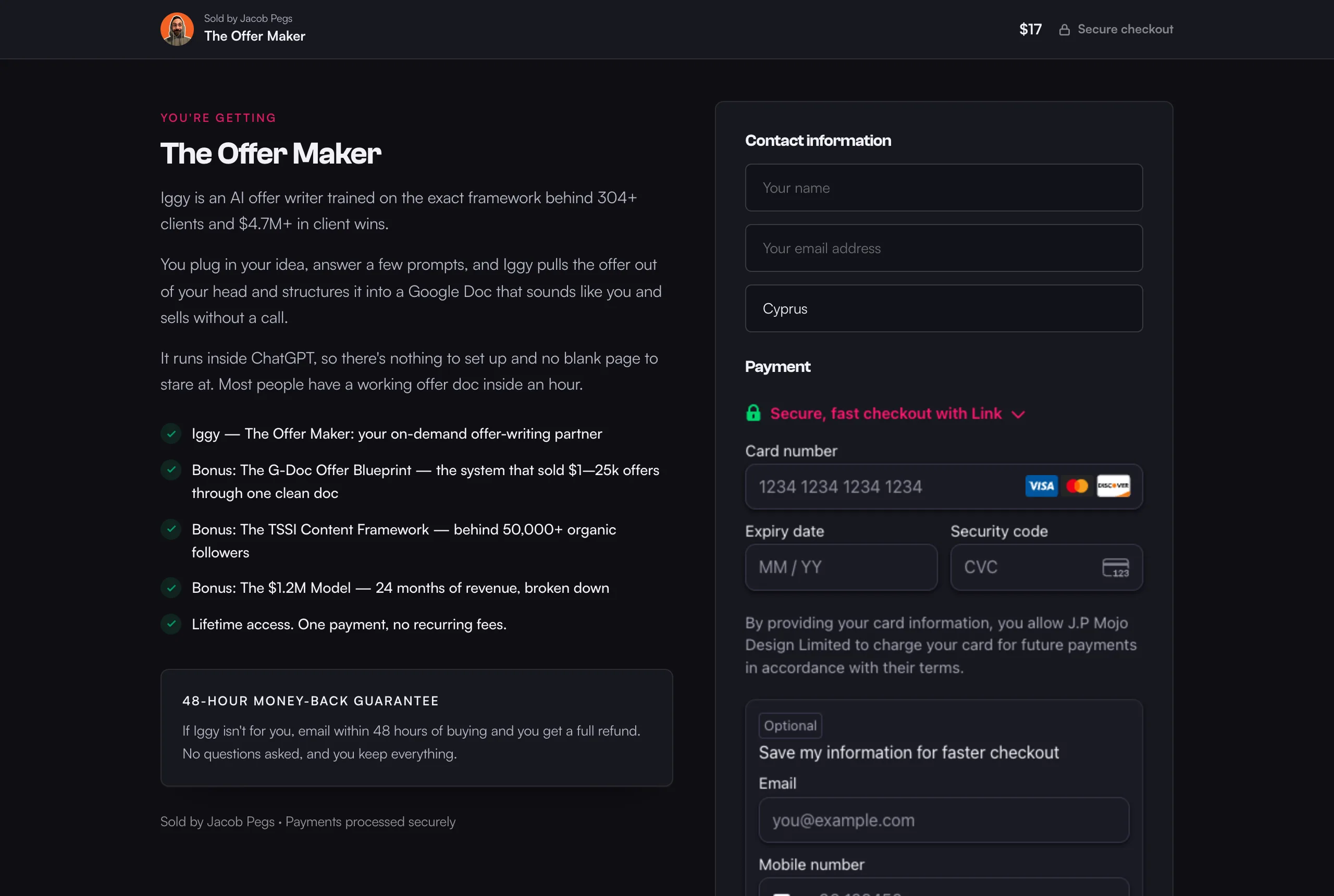
What should coaches and course creators look for in checkout software?
Six things decide how much each buyer is worth to you and how much work each sale takes. Check which plan each one is on before you compare prices, because that's where the real cost hides.
- Order bumps: a small extra the buyer adds with one tick, right beside the card form. A recorded audit beside a coaching pack, a workbook beside a course.
- One-click upsells and downsells: a bigger offer on the page after payment, bought without typing the card again. If they say no, a smaller offer can follow.
- Payment plans: so a $1,500 programme can be 3 payments of $500. The tool should charge each one on schedule and retry a card that fails.
- Booked calls (coaches): the client picks a time as they pay, so you don't chase them for a date.
- Course delivery (course creators): buyers get into the course the moment they pay, and lose access by themselves if you refund them.
- Fees and payouts: a monthly price, a cut of each sale, or both. And whether the money goes into your own Stripe or PayPal account, or through the platform first.
Which checkout software is best for coaches and course creators?
Here are the nine tools worth a look, side by side. "Not listed" means the company's own pricing or feature page didn't mention it when I checked, not that it can't be done another way.
| Tool | Cheapest plan with bumps and upsells | Booking a call | Courses | Best for |
|---|---|---|---|---|
| Swipefast | Starter, $29/mo | Buyer picks a time inside the checkout (Google Calendar or Outlook); coaching packs | Hub; videos play from YouTube, Vimeo, Loom and others | Coaches and creators keeping their own site and tools |
| ThriveCart | Standard, $47/mo (1 bump; more on Pro+ at $87) | Not listed | ThriveCart Academy, 100 GB of video on Standard | Course videos hosted next to the checkout |
| SamCart | Pro, $199/mo | Not listed | Courses App, from Core ($79) | Sellers who use SamCart's Pro tools every month |
| Kajabi | Basic, $179/mo | Coaching through Backstage; no scheduler listed | Built in | Running the whole business in one login |
| Podia | Shaker, $99/mo, for upsells (no bumps listed) | Buyers pay, then book in Calendly or similar | Built in | An all-in-one on a smaller budget |
| Stan Store | Creator Pro, $99/mo | Calendar booking from Creator, $29 | From Creator, $29 | Selling from a social bio |
| Paperbell | None listed; $97/mo | Built-in scheduling and packages | Online classes | Solo coaches who want contracts and a client portal |
| Payhip | Free (5% per sale): order bumps on every plan | Through Zoom and Calendly | Quizzes, certificates, drip | Starting out without a monthly bill |
| Gumroad | No monthly fee; 10% + 50¢ per sale | Not listed | Yes | Testing an idea this week |
Sources: each company's own pricing page, plus SamCart's and Podia's coaching pages, Kajabi's help centre and Payhip's features page, all checked 9 November 2026. They're listed at the end of this post.
What does each one cost at $5,000 a month in sales?
Here's one worked example, the same for every tool. You sell $5,000 a month: say a $97 course with one order bump and one upsell, which is about 52 orders. A coach selling packs and calls for the same $5,000 pays the same tool fees. Every row has the same revenue. No tool is assumed to sell more than another.
Card fees are left out of the table because they're the same everywhere you use Stripe or PayPal. On US cards at 2.9% + 30¢, 52 orders worth $5,000 cost $160.60 in card fees, whichever tool sits on top. So the table compares only what the tool itself charges.
| Tool | Plan you'd need | Tool cost a month | A year |
|---|---|---|---|
| Swipefast | Starter | $29 | $348 |
| ThriveCart | Standard | $47 | $564 |
| Payhip | Pro ($99, no fee) beats Free (5% = $250) and Plus ($29 + 2% = $129) | $99 | $1,188 |
| Stan Store | Creator Pro | $99 | $1,188 |
| Podia | Shaker, billed monthly | $99 | $1,188 |
| Kajabi | Basic, with Kajabi Payments | $179 | $2,148 |
| SamCart | Pro | $199 | $2,388 |
| Gumroad | No plan: 10% + 50¢ × 52 orders | $526 | $6,312 |
At this size, SamCart Pro costs $2,040 a year more than Swipefast Starter for the same bump and upsell ($2,388 minus $348). ThriveCart Standard costs $216 a year more. Two details move the numbers a little. Kajabi adds 2% on Basic if you use a third-party processor other than PayPal or Kajabi Payments, which would be another $100 a month here. Swipefast takes 0% of your sales, except 0.2% on orders where you switch on automatic sales tax and Stripe is connected through Swipefast: $10 a month if all $5,000 were taxed.
Paperbell isn't in the table because its pricing page lists no order bumps or upsells; it's $97 a month, or $970 a year, for everything else. Your numbers are different? The checkout fee calculator at swipefast.io/tools/checkout-fee-calculator works it out for your own sales.
How do coaches sell a booked call in Swipefast?
Connect Google Calendar once in Integrations, then make the checkout a booked call. The buyer picks a day and a time inside the checkout and pays in the same step. The call goes on your Google Calendar with the buyer invited and a Google Meet link, and their time shows on the receipt and the thank-you page.
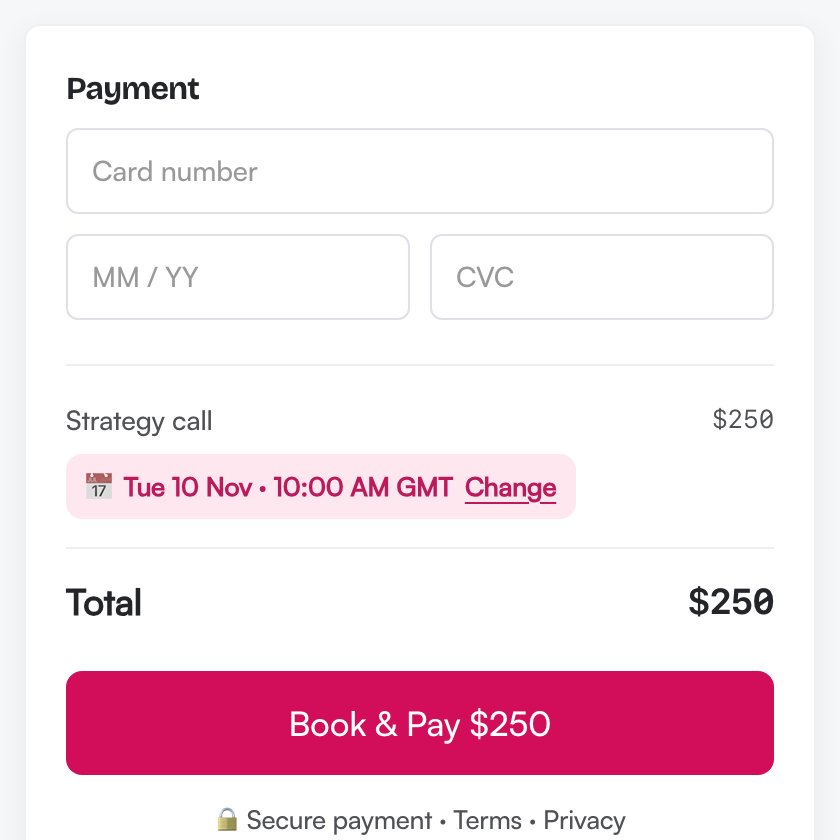
- No double bookings: while the buyer pays, their time is held for 15 minutes. Times you're busy in Google Calendar never show as open.
- Their time zone: you set your hours in yours, and buyers see your open times in theirs.
- Your rules: call length, buffer between calls, the least notice you need and how far ahead people can book.
- Questions before they pay: ask things like "What do you want from the call?". The answers show in your dashboard, your sale alert and the calendar event.
- Refunds: refund the order and the booking is cancelled and the event comes off your calendar.
Booking is on every plan, Starter included. It works on one-time prices and payment plans, with Stripe or PayPal. Two limits: it connects to Google Calendar or Outlook (Outlook.com and Microsoft 365), not Apple Calendar, and it doesn't work on Lemon Squeezy checkouts. The full setup, with screenshots, is at swipefast.io/blog/sell-a-booked-call-in-swipefast.
Can clients buy a pack of coaching calls?
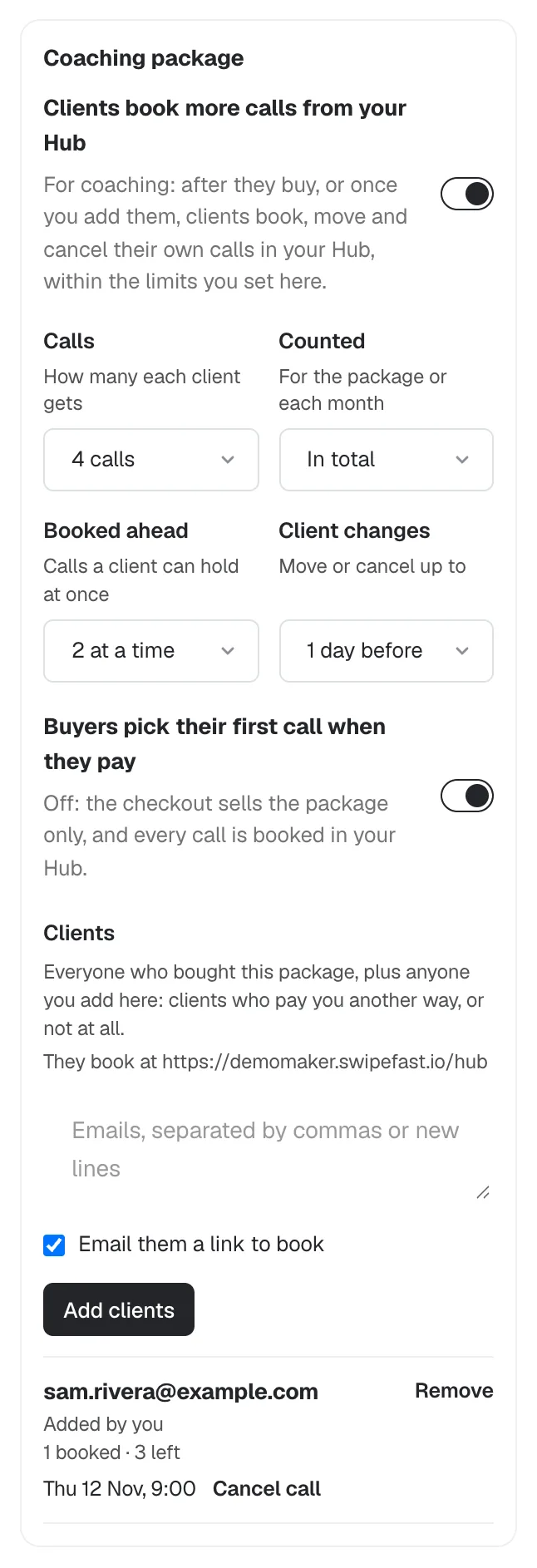
Yes. Most coaches sell sessions in packs, not one at a time, so a call checkout can become a coaching package. You set how many calls each client gets, say 4. The buyer picks their first call while paying. Then they book, move and cancel the rest themselves in your Hub, within the limits you set.
- Calls: how many each client gets in the pack.
- Booked ahead: how many calls a client can hold at once, so nobody grabs all four slots next week.
- Client changes: how close to a call a client can still move or cancel it, such as 24 hours before.
- Clients: everyone who bought the pack, plus anyone you add by email who paid you another way.
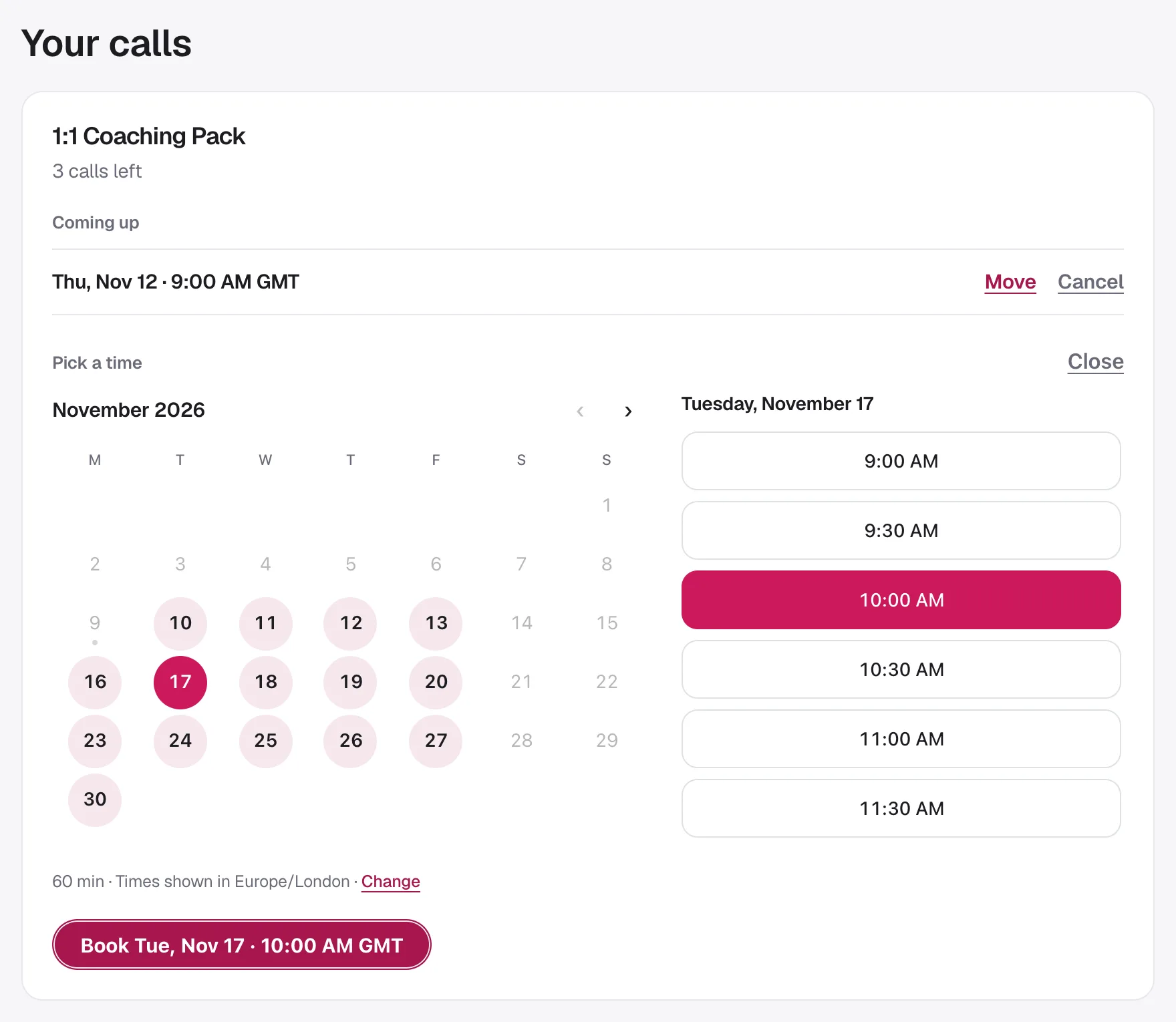
In your Hub, each client sees how many calls they have left and their next call, which they can move or cancel within your limits, and a button to book the one after it.
A pack is a one-off purchase, so you can also offer it as a payment plan: a 4-call pack at $600, or 3 payments of $200. The coaching checkout page at swipefast.io/checkout-for-coaches shows a full coaching setup, and swipefast.io/calendar-booking explains booking on its own. Selling audits or retainers as a consultant? swipefast.io/checkout-for-consultants is built for that.
How do order bumps, upsells and downsells work for a coaching offer?
Take that $600 pack. Beside the card form, an order bump offers a recorded review of the client's current offer for $97. After they pay, a one-click upsell offers a seat in your 90-day group for $297. If they say no, a downsell offers your library of past call recordings for $49. All of that is on Starter.
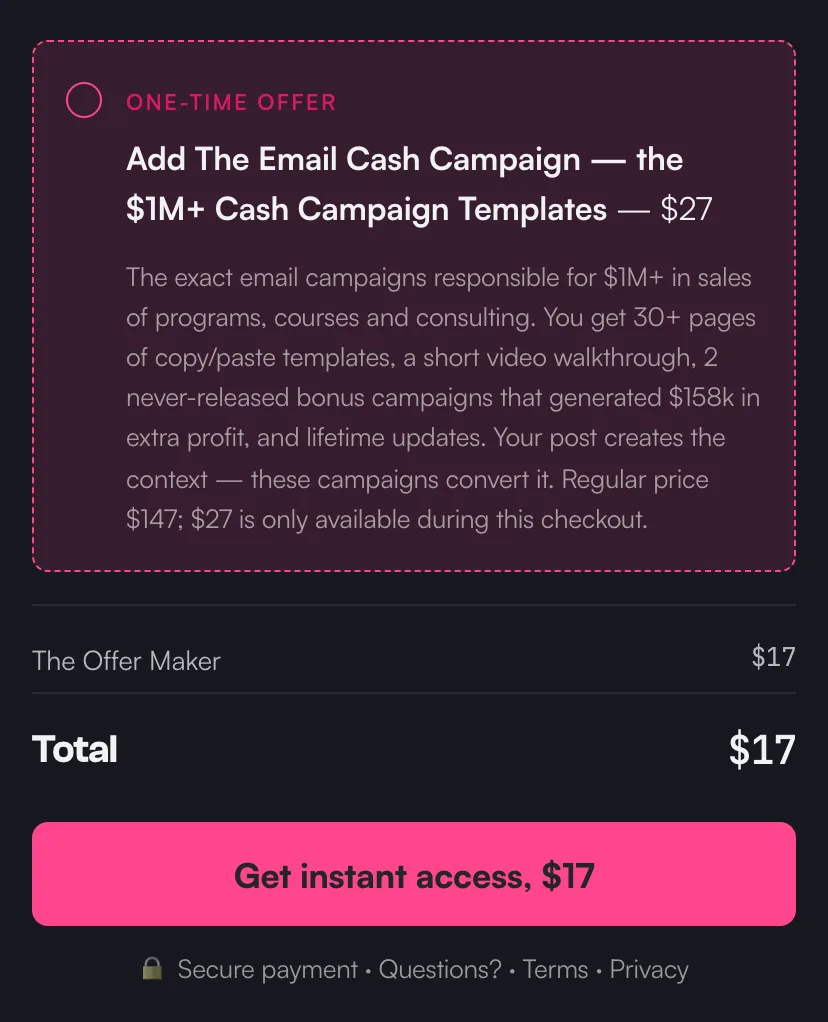
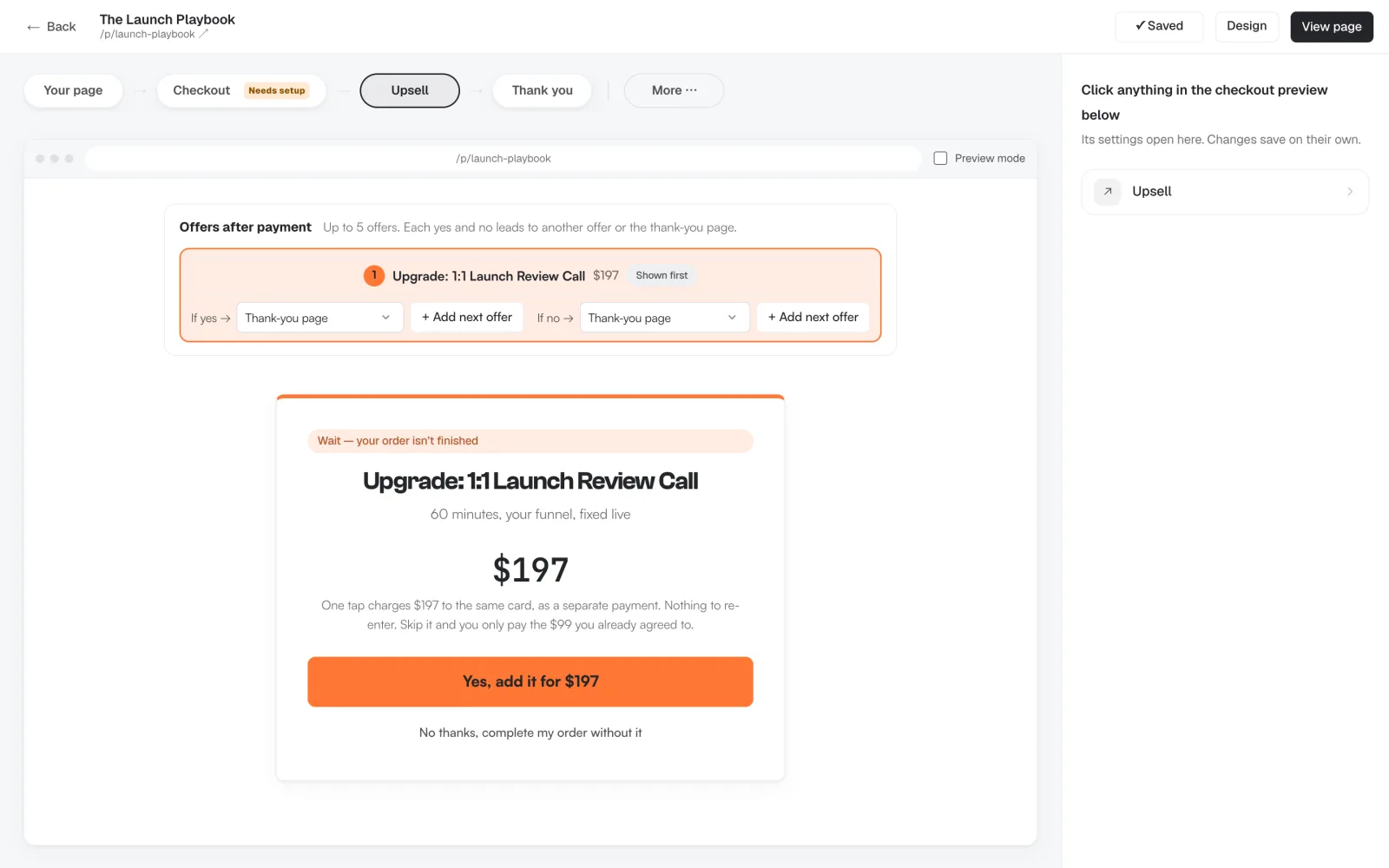
After payment you can chain up to 5 offers. Each yes and each no leads to another offer or to the thank-you page, so a no to the group seat can lead to the smaller offer. The upsell charges the card the buyer just used, with nothing to type again.
Are bumps worth the effort? In two of my own funnels on ThriveCart, order bumps were taken by 41% and 27% of buyers. Four upsells were taken by 2% to 9% of the people who saw them, and still added $11,384. Those were digital products, not coaching, so treat them as one seller's numbers, not a promise. The full breakdown is at swipefast.io/blog/order-bump-conversion-rate-real-numbers.
What do course creators need from a checkout?
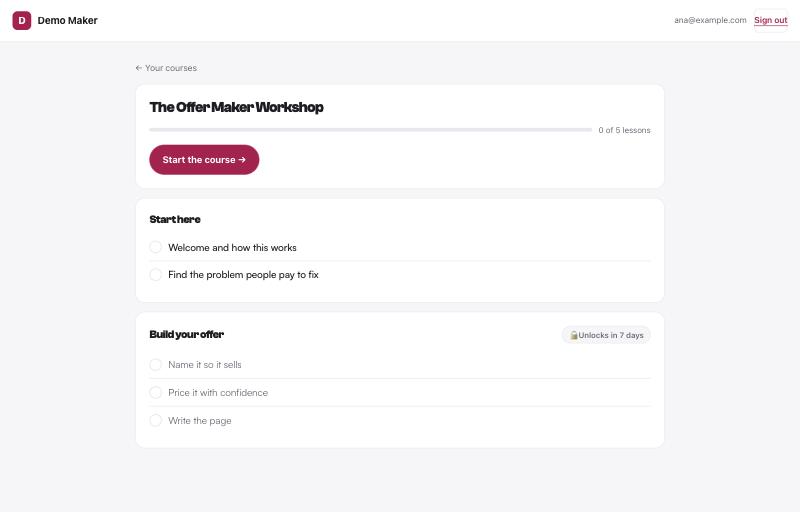
Course creators need the checkout to hand over the course the second someone pays, and take it back if they're refunded. In Swipefast you can do that two ways. Send buyers to the course platform you already use (Teachable, Thinkific, Circle, Skool or anything with a link) by setting it as the access link. Or put the course in your Swipefast Hub.
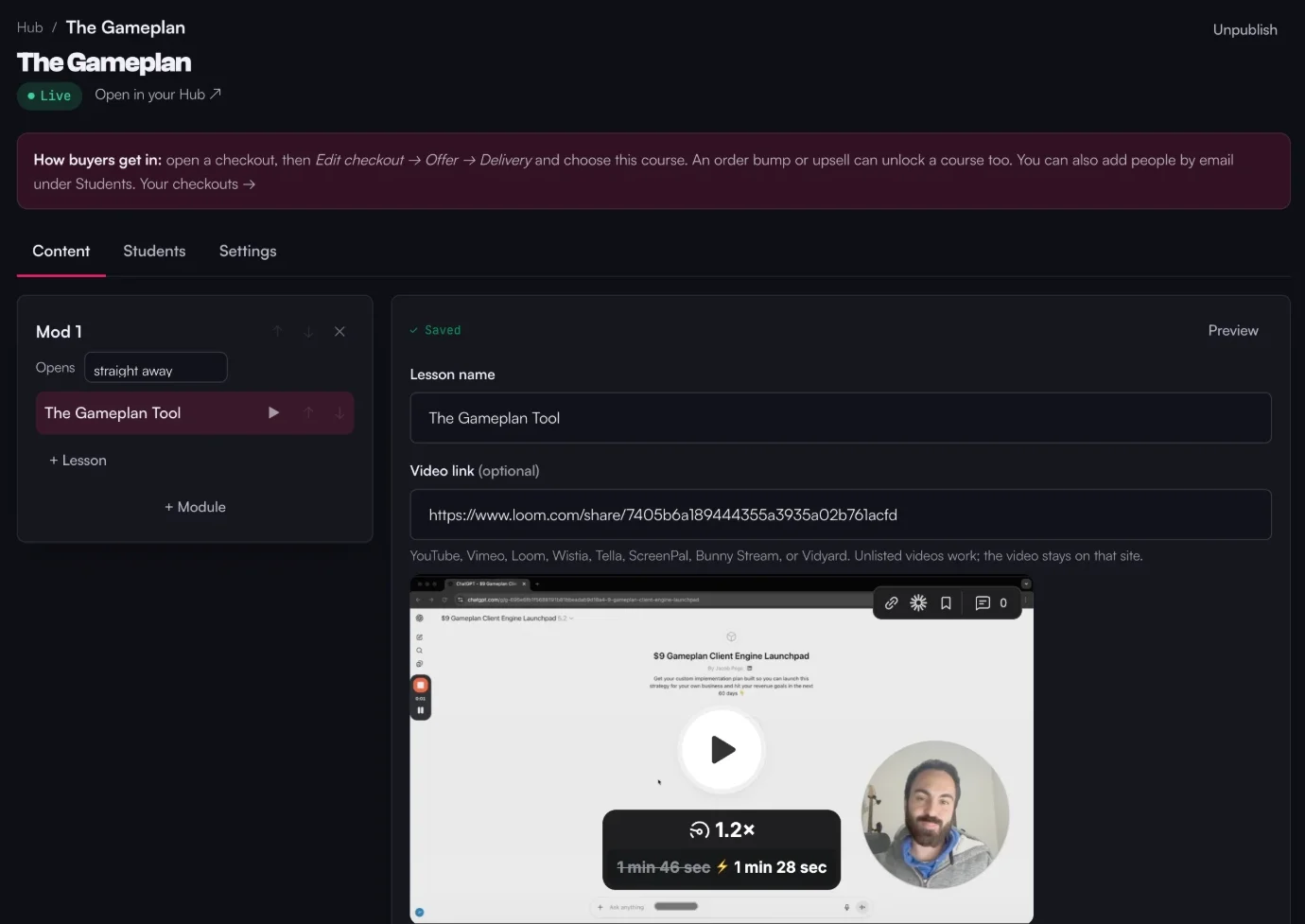
- Lessons: modules with lessons inside, each with a video, text, images and a PDF. Videos play from YouTube, Vimeo, Loom, Wistia, Bunny Stream and a few others.
- Drip: open a module a set number of days after someone joins.
- Progress: buyers tick off lessons and see a progress bar.
- Sign-in: buyers get a sign-in link on the thank-you page and in their receipt. No password to set.
- Access that follows the money: if an order is refunded or a membership ends, the course closes for that buyer by itself.
- Bumps and upsells can each give access to their own course, so a bonus course can be the order bump.
What the Hub doesn't do: it doesn't store your video files, and it has no quizzes, certificates or community. If you want those in the same place as the checkout, ThriveCart's Academy stores video (100 GB on Standard), Payhip lists quizzes and certificates, and Kajabi and Podia bundle a community. Pricing a new course? The calculator at swipefast.io/tools/course-pricing-calculator works backwards from what you want to earn. Selling a membership instead? swipefast.io/checkout-for-memberships covers that setup.
Is Swipefast the right checkout for you?
Swipefast is a focused checkout. Starter, at $29 a month, has unlimited checkouts, order bumps, upsell and downsell chains, coupons, payment plans, subscriptions, booked calls, coaching packs, the course Hub, abandoned-checkout emails, automatic sales tax and your email tool (Kit, Mailchimp, ActiveCampaign, beehiiv or MailerLite). Pro, at $49 a month or $490 a year, adds affiliates, your own checkout domain, Zapier, Make, webhooks, the API and team access. Buyers pay into your own Stripe or PayPal account, so Swipefast never holds your money. You can also have Claude or ChatGPT build the checkout, and anything that touches money on a live checkout waits for your approval.
- Choose it if: you have a site, a list or a social following, and you want a checkout that sells calls, packs and courses with bumps and upsells, without moving everything else.
- Skip it if: you want video storage, a community or contracts in the same tool. It's also the newest tool here, with fewer years of edge cases behind it.
Is ThriveCart good for coaches and course creators?
Yes, it's the most established checkout here. Standard is $47 a month, or $37 billed yearly, and takes 0% of your sales. It includes one order bump, one-click upsells and downsells, split pay, buy now pay later and subscriptions. Every plan comes with ThriveCart Academy, which hosts courses with 100 GB of video storage on its Starter level. Pro+, at $87 a month or $67 billed yearly, adds multiple bumps, the affiliate centre and JV contracts. Both have a 30-day free trial.
- Choose it if: you want course videos stored in the same account as your checkout, or you want a big user base and a long feature list.
- Skip it if: you sell calls. Its pricing page lists no booking, so you'd send buyers to a separate scheduler after they pay. Comparing the two directly: swipefast.io/thrivecart-alternative.
Is SamCart worth it for coaches?
SamCart's coaching page lists payment plans with automatic instalment collection, subscriptions for retainers and one-click upsells. Its pricing page lists Core at $79 a month and Pro at $199, with 25% off yearly and a 7-day free trial. Order bumps, one-click upsells and the affiliate centre are on Pro. Its own processor, SamPay, charges 2.9% + 30¢, and tax collection adds 0.5% on Core or 0.35% on Pro.
- Choose it if: you already run on SamCart and use the Pro tools every month.
- Skip it if: you only need a bump and an upsell. That's $199 a month on SamCart. Its coaching page suggests sending a checkout link after a discovery call, with no booking at checkout. The side by side: swipefast.io/samcart-alternative.
Is Kajabi better for course creators?
Kajabi runs the whole business: website, courses, coaching, community, email and checkout. Basic is $179 a month or $143 billed yearly, with 5 products and 2,500 contacts. Growth is $249 ($199 yearly) and Pro $499 ($399 yearly). Kajabi takes no revenue share. Its help centre shows order bumps as a tick box at checkout and up to 10 upsells per offer. There's a 14-day free trial.
- Choose it if: you want one login and one bill for everything, and you'll use most of it.
- Skip it if: you already like your website and email tool. You'd pay $179 a month for a lot you have. More detail: swipefast.io/kajabi-alternative.
Is Podia enough for a small coaching business?
Podia sells courses, downloads, coaching and community on every plan. Mover is $49 a month ($42 billed yearly) with a 5% transaction fee. Shaker, at $99 a month ($84 yearly), drops the fee and adds upsells and affiliates. For coaching, buyers pay first, then book through Calendly, SavvyCal, YouCanBookMe or Squarespace Scheduling. Its pricing page doesn't list order bumps or payment plans. 14-day free trial.
- Choose it if: you want an all-in-one for less than Kajabi.
- Skip it if: you want buyers to book while they pay, or an order bump at checkout. More detail: swipefast.io/podia-alternative.
Is Stan Store good for coaches?
Stan is a storefront for your social bio. Creator is $29 a month or $300 a year, with calendar booking, courses and email collection. Creator Pro, at $99 a month or $948 a year, adds order bumps, upsells, payment plans, affiliates and email flows. Stan takes 0% of sales, and there's a 14-day free trial.
- Choose it if: most of your sales start on Instagram or TikTok and followers like to browse everything you sell in one place.
- Skip it if: buyers come from your site, newsletter or ads already decided. Our Stan Store post goes deeper on that choice: swipefast.io/blog/stan-store-alternatives-for-coaches-and-creators.
What about Paperbell for 1:1 coaching?
Paperbell is built for coaches rather than for checkouts. One plan, $97 a month or $970 a year, includes a coaching website, scheduling, packages, a client portal, contract signing, email workflows, group coaching tools and online classes, with no added transaction fee. Its pricing page doesn't list order bumps or upsells. It offers a 30-day money-back guarantee.
- Choose it if: you run a 1:1 practice and want contracts, notes and scheduling in one place more than you want a bigger order.
- Skip it if: you also sell courses or digital products and want bumps and upsells on every sale.
Just starting out: Payhip or Gumroad?
Both have no monthly fee and take a cut instead. Payhip charges 5% on its free plan, 2% on Plus at $29 a month and 0% on Pro at $99, with every feature on every plan, including order bumps, payment plans, courses with quizzes and certificates, and coaching through Zoom and Calendly. Gumroad charges 10% + 50¢ on direct sales and 30% on sales through its Discover marketplace, and handles sales tax for you as merchant of record.
A percentage fee is the right trade while sales are small. On Payhip's free plan, the 5% fee passes $29 a month at $580 in sales and $49 at $980. Past that, a flat monthly price costs less, and the gap grows with every sale. Payhip and Gumroad compared with Swipefast: swipefast.io/payhip-alternative and swipefast.io/gumroad-alternative.
When is Swipefast the wrong pick?
- You want your course videos stored, not linked. ThriveCart, Kajabi and Podia host them.
- You want a community, quizzes or certificates in the same tool. Kajabi, Podia and Payhip cover those.
- Your calendar is Apple Calendar. Swipefast booking connects to Google Calendar or Outlook.
- You want contracts signed before the first session. Paperbell does that.
- You want new buyers from a marketplace. Gumroad's Discover can bring them, for 30%.
How do you switch without losing clients mid-plan?
Rebuild your best-selling checkout first and test it with a real purchase. Swipefast has importers for ThriveCart (with an API key) and SamCart (paste your checkout links) on both plans: products arrive as drafts with their prices and order bumps, and nothing in the old tool changes. Customers, active subscriptions and saved cards don't move. So keep the old checkout running until the last client on a payment plan or subscription has finished paying, and move your links from the busiest page first. The full checklist is at swipefast.io/blog/moving-from-thrivecart-or-samcart-checklist.
Try it on your own offer
Pick the offer you sell most, a call, a pack or a course, and build its checkout with a bump and an upsell. It takes a few minutes in the dashboard, or one message to Claude or ChatGPT. Start your 7-day free trial at swipefast.io/signup, or compare plans at swipefast.io/pricing. Cancel before day 7 and you pay nothing.
Questions people ask before choosing
Can a client book a coaching call before paying?
Not in Swipefast: picking the time and paying are one step. The time is held for 15 minutes while they pay, and if it was just taken they're asked to pick another before any money moves. So every call on your calendar is already paid for.
Which checkout software has no transaction fees?
Swipefast takes 0%, except 0.2% on orders where you switch on automatic sales tax and Stripe is connected through Swipefast. ThriveCart and Stan Store take 0%. Podia takes 0% from Shaker, Payhip from Pro, and SamCart adds no fee on SamPay. Kajabi takes no revenue share, but adds 2% on Basic with a third-party processor other than PayPal. Card processing still applies everywhere.
Can clients pay for a $2,000 coaching programme in instalments?
Yes, in most of these tools. Swipefast has payment plans on Starter and retries a card that fails. ThriveCart has split pay on Standard, SamCart lists automatic instalment collection, Stan Store has payment plans on Creator Pro, and Payhip offers 3 or 6 payments. Swipefast also has Klarna, Afterpay and Affirm on Starter.
Do order bumps work for coaching, or only for digital products?
They work for coaching when the extra is small and obvious next to the main offer: a recorded review, a workbook, a template pack. The take rates I've published (41% and 27%) came from digital products, so test your own bump rather than assume those numbers.
Should a course creator use Kajabi or a separate checkout?
Kajabi if you want the site, courses, email and community in one place and will use most of it. A separate checkout if you already have those, or if bumps and upsells are what you want to improve. Swipefast can deliver a course in its Hub or send buyers to the platform you already use.
Which calendar does Swipefast booking work with?
Google Calendar or Outlook (Outlook.com and Microsoft 365), one per account. Swipefast reads only your free and busy times, not what your events are, and adds each booked call to a calendar you own with the buyer invited. Apple Calendar isn't supported.