12 Upsell Examples for Coaches and Course Sellers
12 copy-ready upsell and order bump examples for courses, ebooks, templates and coaching, with prices, why each works, and realistic take rates.
 Jacob PegsFounder of Swipefast
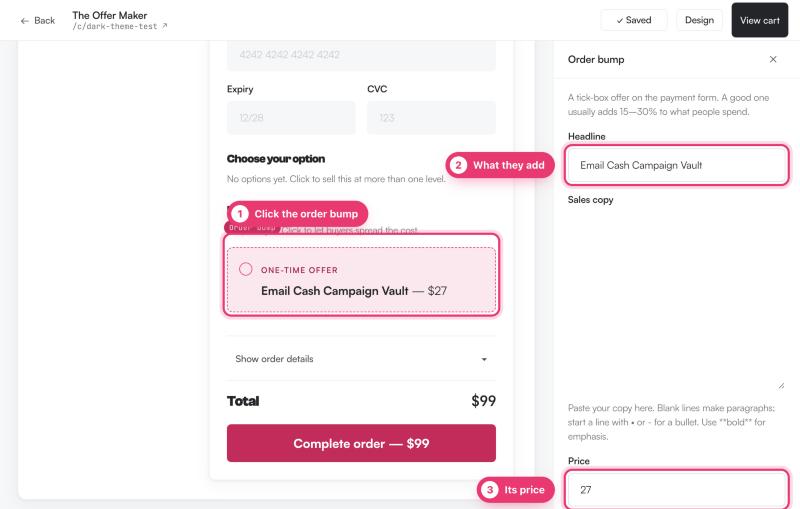
In short
The right upsell depends on what you sell: a course, an ebook, a template pack, or coaching. Order bumps at checkout convert far better than post-purchase upsells, so put your cheapest, easiest-to-say-yes offer on the bump.
- Course sellers: workbook or template bumps, then a coaching or membership upsell after purchase.
- Ebook and low-ticket sellers: checklist or mini-workshop bumps, then a full course upsell.
- Template sellers: done-for-you swipe file bumps, then a premium template pack upsell.
- Coaches: workbook or recorded module bumps, then more sessions or a retainer upsell.
If you sell digital products, an upsell is an extra offer shown during or right after checkout. The two places to put one are the order bump (a small checkbox on the checkout page) and the one-click upsell (a second offer the buyer accepts without re-entering payment details). This article gives you 12 concrete upsell examples grouped by what you sell, with prices, why each works, and where it belongs in the flow.
Order bump vs one-click upsell vs downsell
An order bump is a small, optional add-on on the checkout page itself. The buyer ticks a box and the price is added to their total. Because it takes one click and no new payment details, take rates are high.
A one-click upsell appears after payment. The buyer's card details are already stored, so accepting takes one click too, but the mental purchase is over. Fewer people buy, so this slot suits a bigger, more expensive offer.
A downsell is a cheaper fallback shown to buyers who said no to the upsell. If they decline your $299 coaching package, you might offer a single recorded session for $79.
If you want the full reasoning behind the split, see order bump vs one-click upsell: the difference.
The 12 upsell examples at a glance
| # | Offer | Fits | Placement | Typical price |
|---|---|---|---|---|
| 1 | Course workbook or PDF workbook | Courses | Bump | $17-$37 |
| 2 | Done-for-you templates or checklists | Courses | Bump | $19-$47 |
| 3 | Mini-course on one skill | Courses | Bump | $27-$49 |
| 4 | Audio version and transcripts | Courses | Bump | $9-$19 |
| 5 | Extended access or lifetime updates | Courses | Bump | $29-$79 |
| 6 | Coaching package or group program | Courses | Upsell | $199-$999 |
| 7 | Membership after a beginner course | Courses | Upsell | $19-$49/mo |
| 8 | Companion checklist or cheat sheet | Ebooks | Bump | $5-$9 |
| 9 | Mini-workshop recording | Ebooks | Bump | $19-$29 |
| 10 | Resource bundle | Ebooks | Bump | $17-$29 |
| 11 | Premium template pack | Templates | Upsell | $49-$149 |
| 12 | Extra sessions or a retainer | Coaching | Upsell | $150-$500/mo |
Course bumps: five offers that work
1. The workbook. Sell a printable or fillable workbook that walks the buyer through your course's exercises, as a $17 to $37 bump. It works because many buyers know they will not do the work without structure, and the workbook promises accountability for a small extra cost.
2. Done-for-you templates. If your course teaches people to build something (an email sequence, a sales page, a meal plan), sell the finished versions as a bump at $19 to $47. Buyers want the shortcut, not just the lesson. This is often the highest-converting bump on a course checkout.
3. A mini-course on one skill. Pick a single adjacent skill your main course does not cover, record 30 to 60 minutes on it, and sell it as a $27 to $49 bump. It works because it is clearly separate from what they already bought, so it does not feel like they are paying twice for the same material.
4. Audio and transcripts. For a $9 to $19 bump, offer the course as downloadable audio plus written transcripts. Commuters and people who prefer reading take it. It costs you almost nothing if you already have the recordings.
5. Extended access or lifetime updates. If the main purchase is 12 months of access, sell lifetime access or ongoing updates as a $29 to $79 bump. It works because the fear of losing access is real and immediate, and the buyer is already committed to the course.
Course upsells: sell the thing the course cannot be
6. Coaching or a group program. A recorded course can teach skills, but it cannot give feedback. After purchase, offer a coaching package or group program at $199 to $999. The people most eager to succeed just paid you and want more; this is the classic high-ticket course upsell and the reason many creators run bumps at all. Expect far fewer takers than a bump, but each sale is worth many times more.
7. A membership. If your course teaches a beginner the basics, offer a monthly membership at $19 to $49 a month that continues the learning, answers questions, or keeps templates updated. It works because the momentum is highest right after purchase, and recurring revenue compounds.
Ebook and low-ticket bumps: keep it under $30
8. A companion checklist or cheat sheet. If your $9 ebook explains a process, sell the one-page checklist version as a $5 to $9 bump. Small numbers, but take rates on a low-ticket bump like this can be very high, and it often doubles the order value.
9. A mini-workshop recording. Sell a 45-minute recorded workshop that goes deeper on one chapter, at $19 to $29. It works because the ebook proved your teaching style, so the risk feels low.
10. A resource bundle. Gather the tools, links, swipe copy and spreadsheets you mention in the ebook into one download and sell it as a $17 to $29 bump. Buyers save the hunting time.
Then use the post-purchase upsell slot to offer your full course. Someone who just bought a $12 ebook is a warm buyer for a $99 course, and the one-click flow means they never re-enter their card.
Template and digital-download offers
11. The premium pack. If you sell a free or cheap starter template, offer a premium pack with more variants, more niches, or commercial-license rights as a $49 to $149 upsell after purchase. If the buyer is already at checkout for a paid template, a done-for-you swipe file of extra copy and assets makes a strong $19 to $39 bump instead. It works because buyers evaluating your quality at checkout are exactly the people who want more of it.
Coaching offers: bumps and upsells for service sellers
Coaches usually sell calls or packages, and the same mechanics apply. As a bump on a program checkout, sell a workbook, a recorded module from a past cohort, or a self-paced starter module at $19 to $49. For coaching specifically, how you sell a call buyers book while they pay is its own topic; see how to sell a call buyers book while they pay.
12. More sessions or a retainer. After someone buys a single session or a starter package, offer a bigger package or a monthly retainer at $150 to $500 a month. The upsell here is not a product, it is more of your time, and buyers who just paid for one session are the warmest audience you will ever have for it.
Pricing rules of thumb
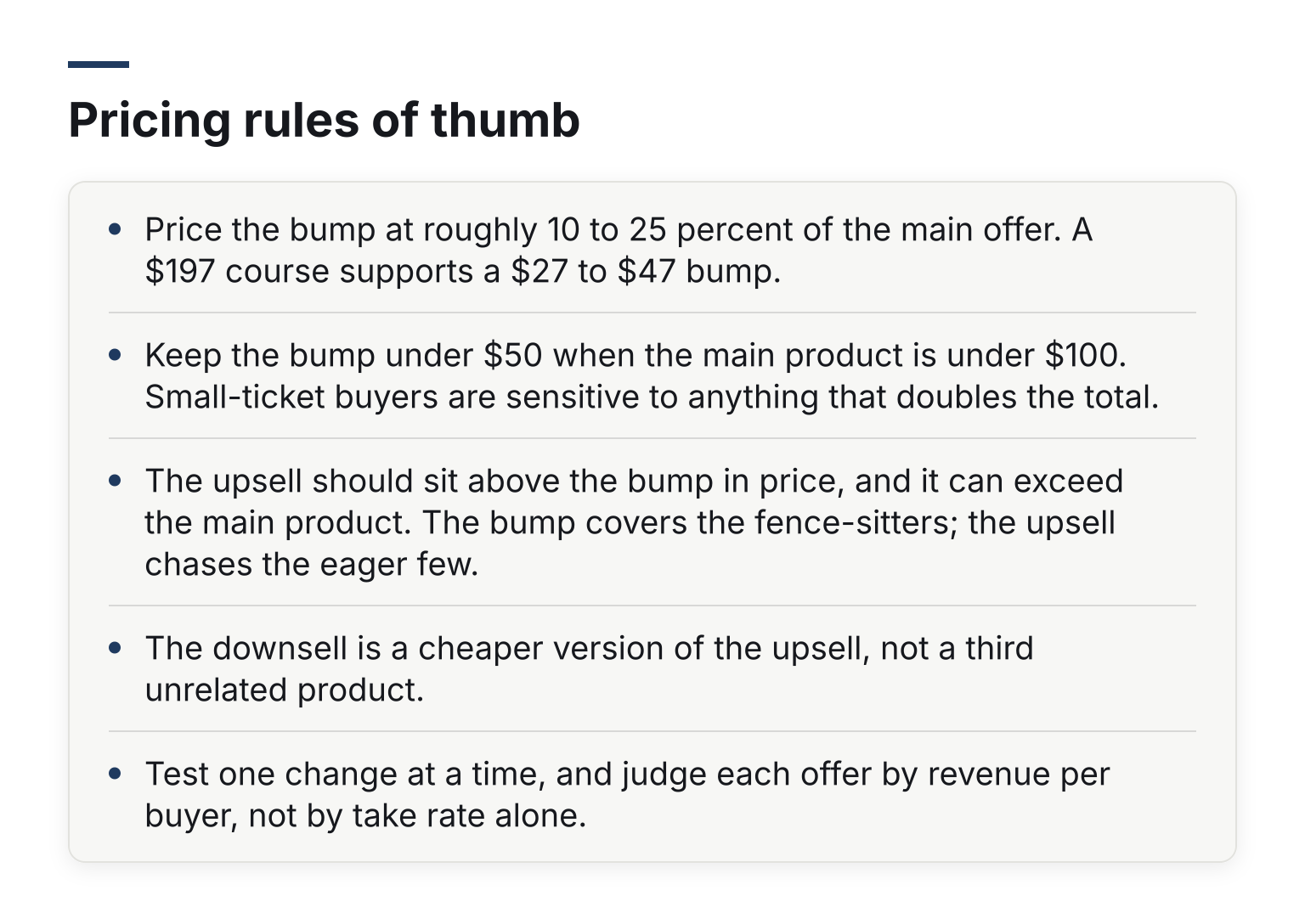
- Price the bump at roughly 10 to 25 percent of the main offer. A $197 course supports a $27 to $47 bump.
- Keep the bump under $50 when the main product is under $100. Small-ticket buyers are sensitive to anything that doubles the total.
- The upsell should sit above the bump in price, and it can exceed the main product. The bump covers the fence-sitters; the upsell chases the eager few.
- The downsell is a cheaper version of the upsell, not a third unrelated product.
- Test one change at a time, and judge each offer by revenue per buyer, not by take rate alone.
If you want to sanity-check a price before you build it, the free order bump revenue calculator shows what a bump at a given price and take rate would add to your sales.
Copy patterns that work
A bump gets one sentence. Name the item, the price, and the one benefit: "Add the 12-email swipe file for $27 and never stare at a blank draft again." Anything longer hurts the main sale.
A one-click upsell page is a yes or no question. State what they just bought, what the new offer is, what it adds, one clear yes button and one clear no button. No fake countdown timers, no navigation, no second pitch.
Never promise results you cannot back up. "Bought this and made $10k" copy on a bump is both a conversion risk and a legal one.
Realistic take rates
Set expectations honestly. In two of my own funnels, order bumps were taken by 41 percent and 27 percent of buyers, and upsells after payment by 2 to 9 percent (my real numbers). Teachable's own guidance on the difference between order bumps and upsells points the same way: friction after purchase cuts take rates hard. For wider benchmarks on checkout conversion, bumps and refunds, our checkout statistics page collects figures with their sources.
So a 25 to 40 percent bump take rate is a reasonable target, and a single-digit upsell take rate is normal, not a failure. Judge the upsell on revenue, since one $499 sale matches a lot of $27 bumps.
Five pitfalls that kill a good offer
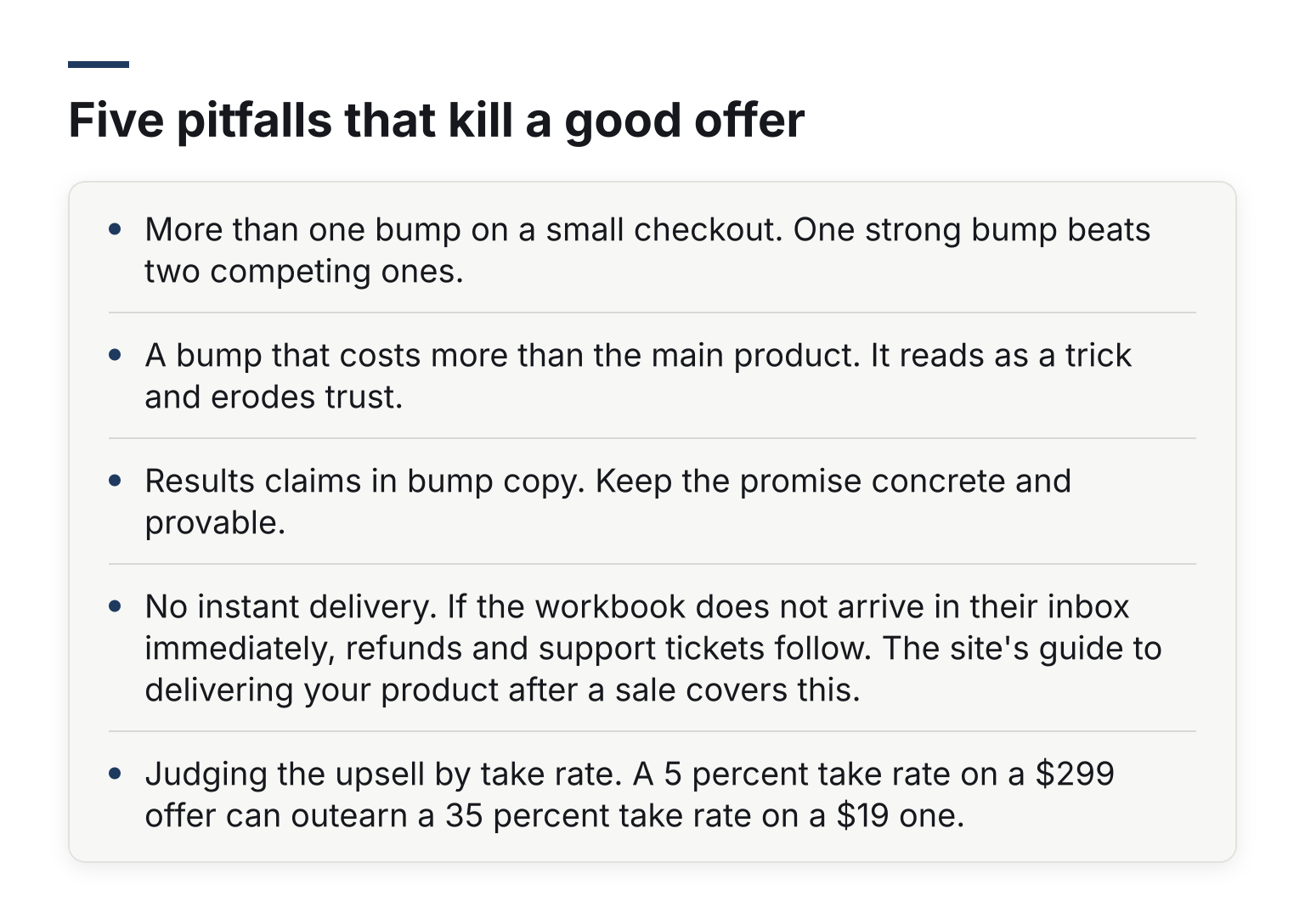
- More than one bump on a small checkout. One strong bump beats two competing ones.
- A bump that costs more than the main product. It reads as a trick and erodes trust.
- Results claims in bump copy. Keep the promise concrete and provable.
- No instant delivery. If the workbook does not arrive in their inbox immediately, refunds and support tickets follow. The guide to delivering your product after a sale covers this.
- Judging the upsell by take rate. A 5 percent take rate on a $299 offer can outearn a 35 percent take rate on a $19 one.
How to actually run these offers
Every example above is just a product plus a placement. To run them you need a checkout that supports order bumps and one-click upsells, charges the buyer once, and delivers the extra item automatically.
If you would rather compare tools before you pick one, our roundup of the best order bump and upsell software for coaches looks at which plans include bumps, one-click upsells and downsells.
Swipefast is one example of such a checkout. Order bumps, one-click upsells and downsells are on every plan, including the $29 a month Starter plan, and payments go to your own Stripe or PayPal account. If you want to try the examples from this article on a real checkout, you can start a 7-day free trial of Swipefast.
When you are ready to build, these two guides walk through the mechanics: how to add a one-click upsell and how to add an order bump to your checkout. Pick one example from this list, build it this week, and let the numbers tell you whether to add a second.
Questions people ask before choosing
What is the best upsell for an online course?
A done-for-you template pack or workbook as the bump, and a coaching package or membership as the upsell after payment. The bump catches the many, the upsell the few who want more of you.
How much should an order bump cost?
About 10 to 25 percent of the main offer, and under $50 when the main offer is under $100. One sentence of copy is enough.
What is a good order bump conversion rate?
25 to 40 percent is a realistic target. My own bumps were taken by 41 and 27 percent of buyers. Upsells after payment run far lower, often in single digits.
Can I upsell on a cheap product?
Yes. Use a tiny bump ($5 to $9) on a cheap product and save the upsell after payment for a full course. Buyers of cheap products still take relevant one-click offers.