The best order bump and one-click upsell software for coaches in 2026
Which checkout tools have order bumps and one-click upsells, on which plan, and what it costs: Swipefast, ThriveCart, SamCart, Kajabi, Stan Store and more.
 Jacob PegsFounder of Swipefast
I'm Jacob, and I built Swipefast, so it's in this list and you should read my take with that in mind. Before Swipefast I sold my own digital products on ThriveCart for years, which is where my real bump and upsell numbers come from. Every competitor price and feature below is from that company's own pricing or help page, checked on 9 November 2026. If you want to try the Swipefast way first: bumps, upsells and downsells are on Starter at $29 a month, with a 7-day free trial (card needed), at swipefast.io/pricing.
"Order bump software" and "one-click upsell software" are really the same purchase: a checkout that can add an extra before the payment and offer one more thing after it. If you're unsure which offer goes where, swipefast.io/blog/order-bump-vs-one-click-upsell explains the difference. This post is about choosing the tool.
Which tools have order bumps and one-click upsells, and on which plan?
| Tool | Cheapest plan with both | Order bumps | After payment | Fee on sales |
|---|---|---|---|---|
| Swipefast | Starter, $29/mo | Unlimited | Chains of up to 5 one-click offers, each with a yes and a no path | 0% (0.2% on orders taxed with Stripe Tax when Stripe is connected through Swipefast) |
| Systeme.io | Startup, $17/mo (Free has 1 of each) | 10 on Startup, 100 on Webinar ($47/mo) | 10 one-click upsells on Startup, plus downsell pages | 0% |
| ThriveCart | Standard, $47/mo or $444/yr | 1 bump offer; multiple on Pro+ ($87/mo) | One-click upsells and downsells | 0% on sales |
| FunnelKit | Plus, $299/yr (on offer at $149.50/yr) | Multiple, with conditions | Unlimited one-click upsells | Not stated; needs WordPress and WooCommerce |
| ClickFunnels | Launch, $97/mo or $81/mo billed yearly | Yes, as a product set as an order bump | One-click upsell and downsell pages | No cut of your sales, per its pricing FAQ |
| Stan Store | Creator Pro, $99/mo or $948/yr | 1 per product | "Upsells" listed on Creator Pro; its help docs describe bumps only | 0% |
| Kajabi | Basic, $179/mo or $143/mo billed yearly | Up to 6 on a one-time offer; 1 on subscriptions and payment plans | Up to 10 upsells, each with an optional downsell | 2.9% + 30¢ on Kajabi Payments; 2% extra on Basic with other processors (not PayPal) |
| SamCart | Pro, $199/mo (25% off yearly) | On Pro | Upsell funnels with accept and decline paths | No added fee on SamPay (2.9% + 30¢) |
All prices are in US dollars, from each company's own pricing page, checked on 9 November 2026. Card processing from Stripe, PayPal or the tool's own processor applies on top. FunnelKit's pricing page showed an offer price on the day; its normal price for Plus is $299 a year.
What should a coach look for in order bump software?
- Which plan has it. Many tools put bumps and upsells on a higher tier. Compare the price of the plan that has both, not the entry plan.
- How many bumps. One is usually enough to start, but some tools cap you at one per product or per plan.
- Whether bumps work on payment plans and subscriptions. Coaching is often sold in instalments, and some tools limit bumps on those offers.
- A path for the no. A downsell after a declined upsell, such as a single call after someone says no to a full programme, is where a lot of coaching money sits.
- Take rates per offer. You need to see how many buyers took the bump and the upsell, offer by offer, or you can't tell which one to change.
- What you'd have to move. A checkout that sits on your current site is a small change. An all-in-one platform means moving your site, email and courses too.
How much does a bump and an upsell actually add?
Here's a worked example, the same on every tool. A coach sells a $97 workshop to 50 buyers a month, which is $4,850. The order bump is a $27 workbook and the upsell is a $197 call. For the take rates I've used my own real numbers from ThriveCart: my lower bump was taken by 27% of buyers, and a typical upsell of mine by 5%.
- Bump: 50 buyers × 27% = 13.5 buyers a month on average, × $27 = $364.50.
- Upsell: 50 buyers × 5% = 2.5 buyers a month on average, × $197 = $492.50.
- Together: $857 a month, or $10,284 a year, on top of the $4,850.
That $857 doesn't depend on the tool. No checkout makes buyers tick a box more often just because of its logo. What changes is what you pay for the plan that has both offers:
| Tool and plan | Plan cost a month | Extra from the bump and upsell | Left after the plan |
|---|---|---|---|
| Systeme.io Startup | $17 | $857 | $840 |
| FunnelKit Plus ($299/yr, before hosting) | $24.92 | $857 | $832.08 |
| Swipefast Starter | $29 | $857 | $828 |
| ThriveCart Standard | $47 | $857 | $810 |
| ClickFunnels Launch | $97 | $857 | $760 |
| Kajabi Basic | $179 | $857 | $678 |
| SamCart Pro | $199 | $857 | $658 |
Stan Store isn't in this table because its help pages don't describe a one-click upsell after payment, so I can't say how its upsell would work. Card fees are left out because they're about the same on every tool. To run this with your own orders, prices and take rates, use the order bump calculator at swipefast.io/tools/order-bump-calculator.
1. Swipefast: what do you get on the $29 plan?
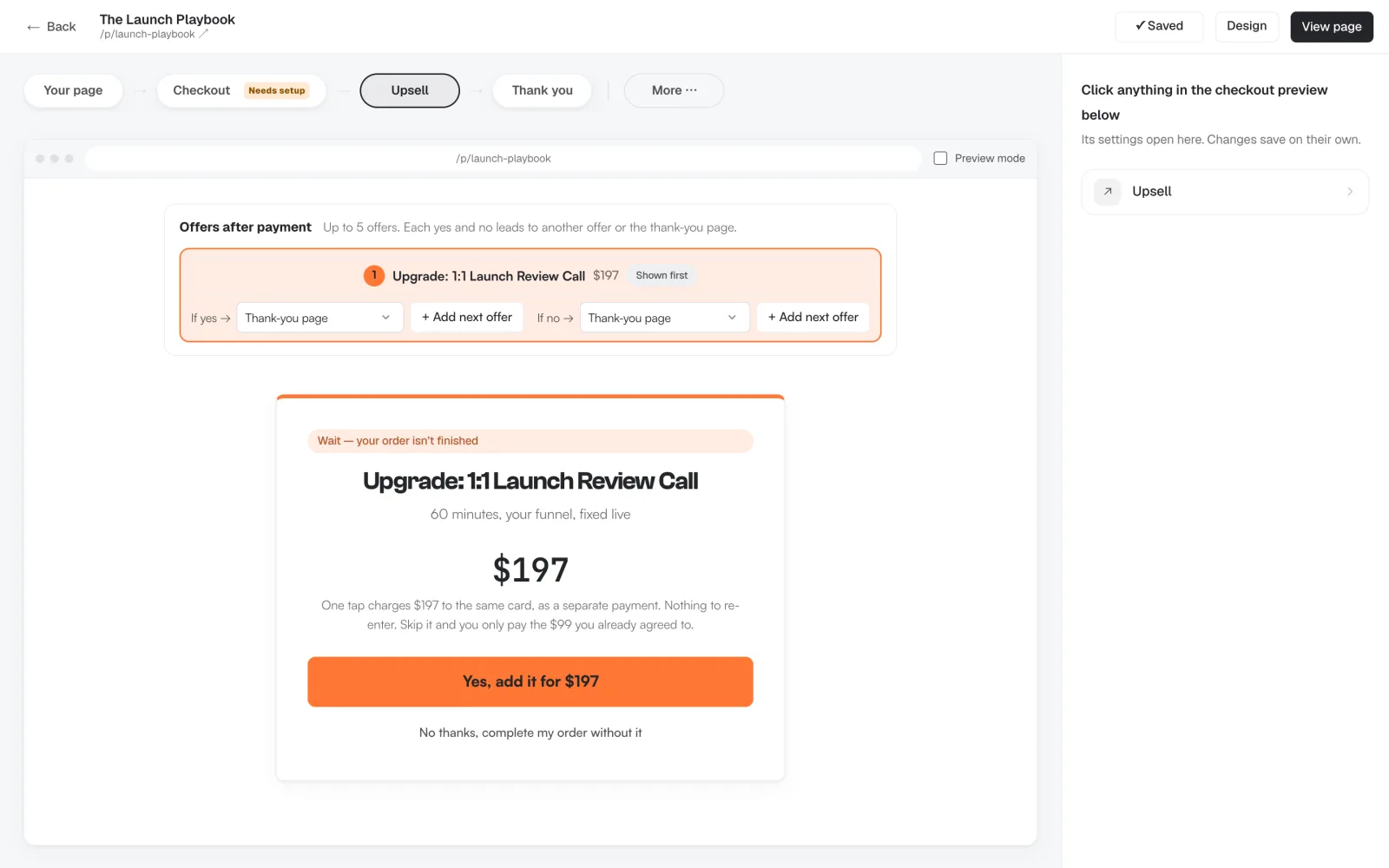
Swipefast is a checkout that sits on the site you already have. Starter, at $29 a month, has unlimited checkouts and unlimited order bumps, plus one-click upsells and downsells in chains of up to 5 offers. Each offer has an If yes and an If no, and each leads to another offer or the thank-you page. Nothing about selling is held back for Pro. Pro, at $49 a month or $490 a year, adds affiliates, your own checkout domain, Zapier and team access.
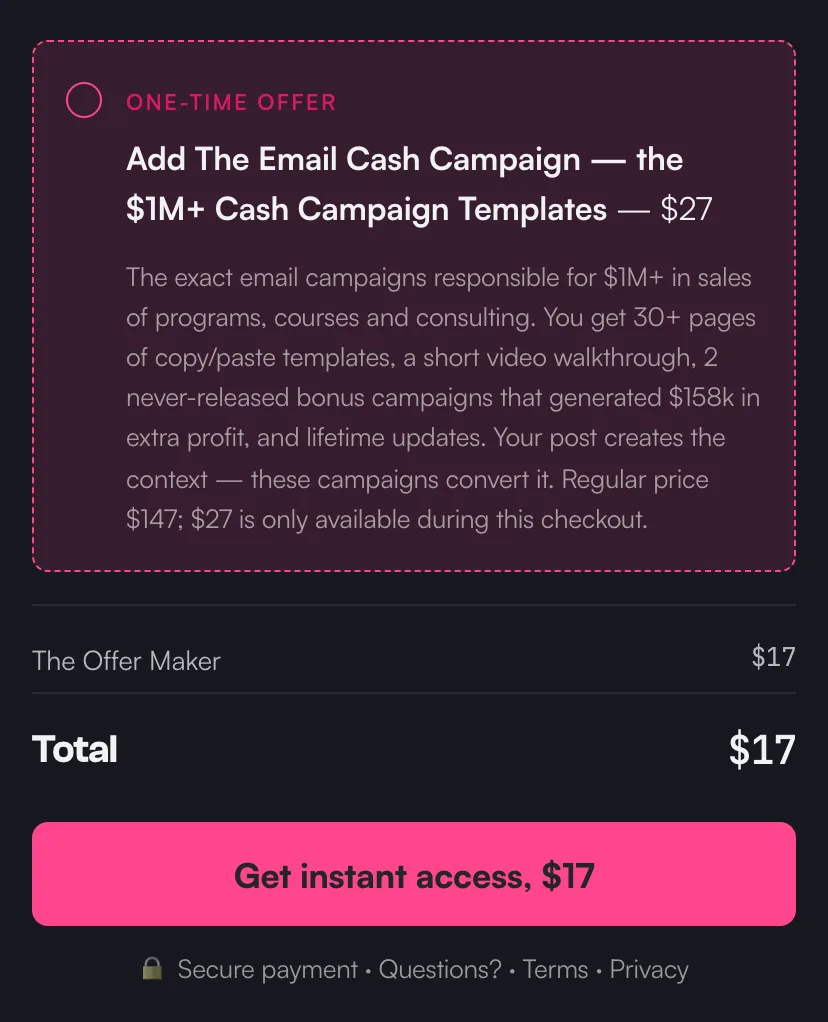
The bump sits on the payment form with a tick box, and it's charged in the same payment as the main product. The upsell opens on its own page after payment. The buyer clicks Yes and it's charged to the card they just used, as a second charge, with nothing to type again. If they close the page, the order completes as it was.
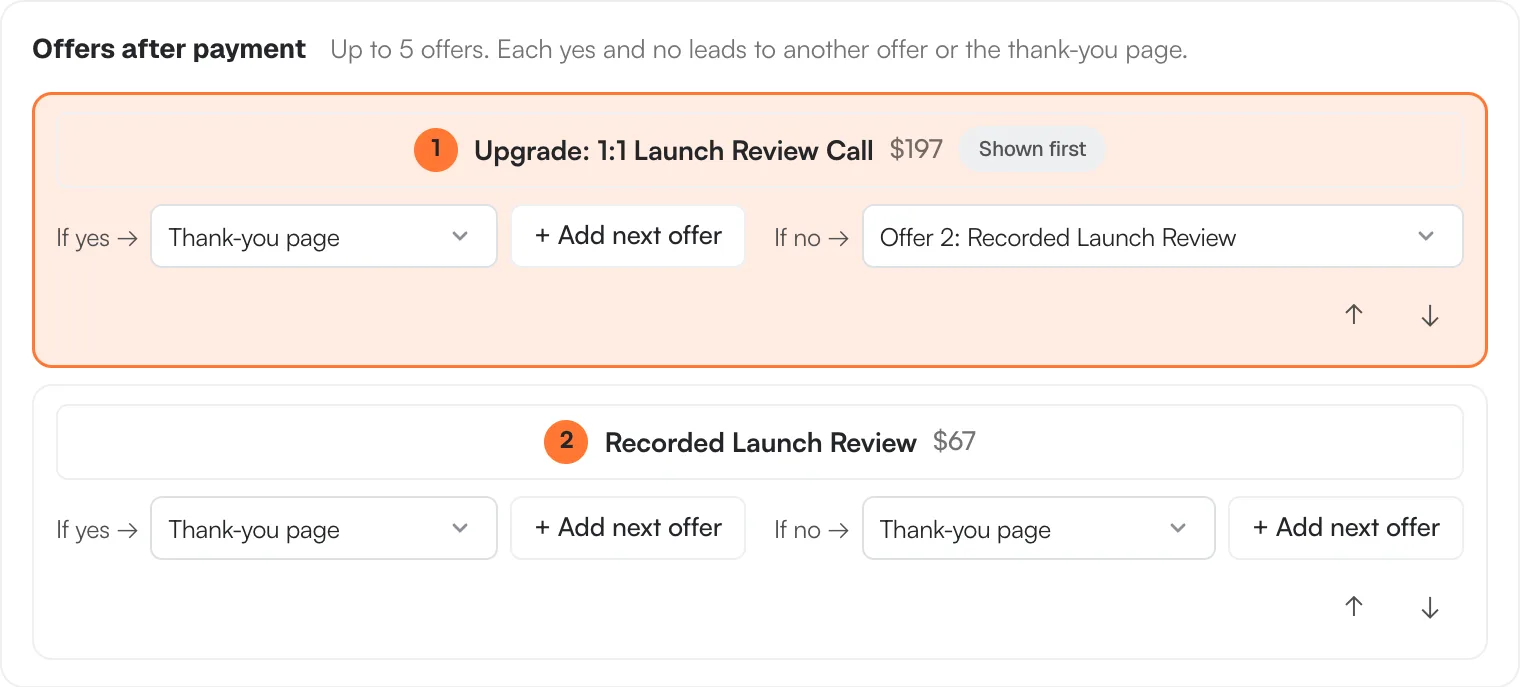
Here's a downsell in the editor. If the buyer says no to the $197 call, offer 2, a $67 recorded review, shows next. If they say no to that too, the order completes at the amount they already agreed to.
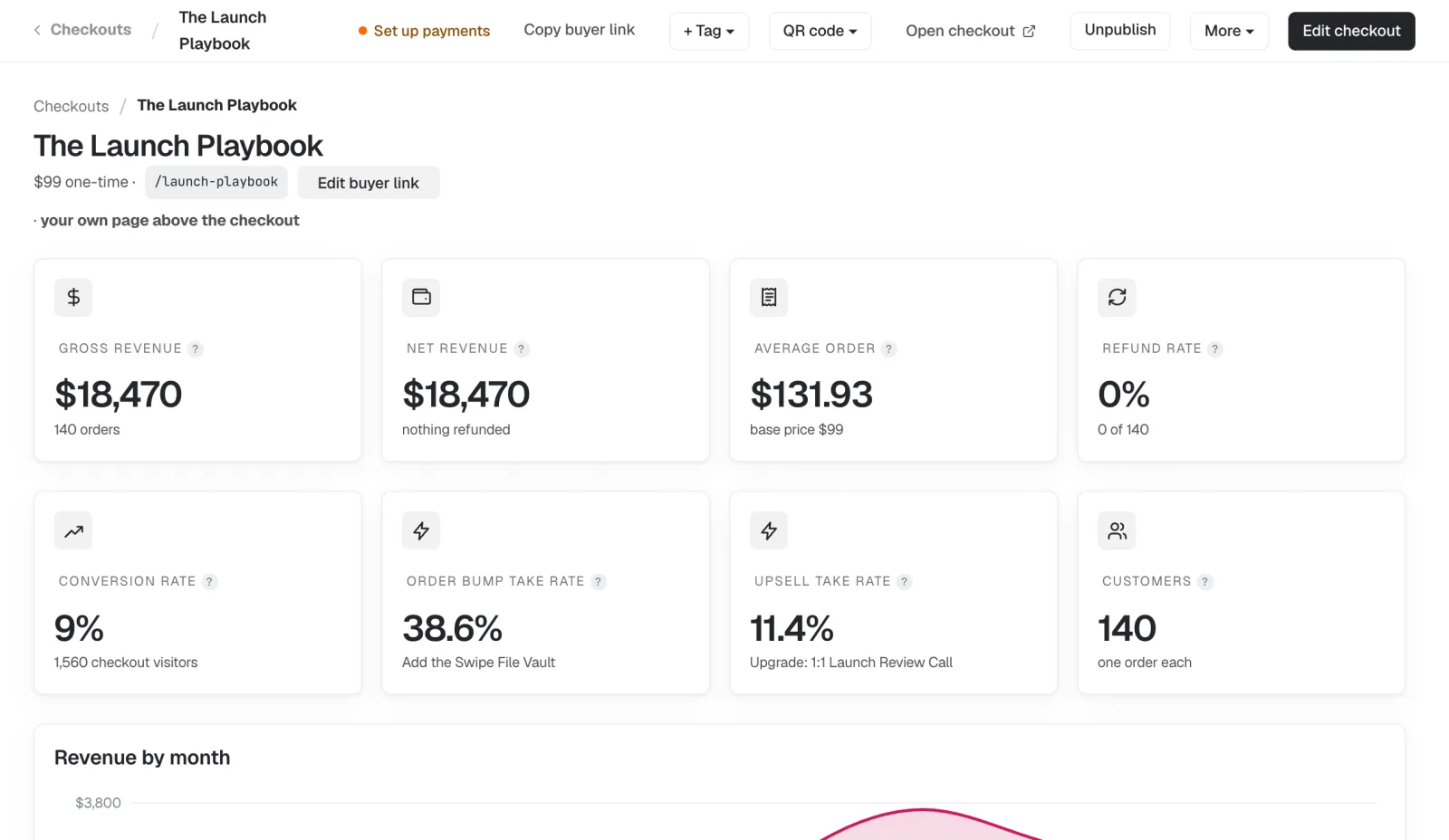
Each checkout's overview shows the Order bump take rate and the Upsell take rate next to its sales. If you connect Claude or ChatGPT, you can ask it to add the bump and the upsell for you, and changes that touch money on a live checkout wait for your OK. Pip, our penguin, would like you to stop reading comparisons and add the bump. He's not wrong.
- Choose it if: you have a site, an email tool and maybe a course platform, and you want bumps, upsells and downsells without paying for a higher tier. Setup guides: swipefast.io/blog/add-an-order-bump-in-swipefast and swipefast.io/blog/add-a-one-click-upsell-in-swipefast.
- Skip it if: you want your course videos stored in the same account. The Swipefast Hub plays lessons from YouTube, Vimeo or Loom instead. Swipefast is also newer and smaller than ThriveCart or SamCart.
2. ThriveCart: how many order bumps does Standard allow?
ThriveCart is the most established checkout here. Standard, at $47 a month or $444 a year, lists 1 bump offer and one-click upsells and downsells, along with A/B tests, cart recovery and sales tax. Pro+, at $87 a month or $804 a year, adds multiple order bumps, the affiliate centre and custom domains. It takes 0% of your sales and has a 30-day free trial.
- Choose it if: you want a mature tool with a big user base, and one bump per offer is enough.
- Skip it if: you want more than one bump without paying $87 a month, or you want something quick to learn.
3. Systeme.io: is the free plan enough?
Systeme.io bundles funnels, email, courses and a checkout, and takes 0% of your sales on every plan. Free includes 1 order bump and 1 one-click upsell. Startup, at $17 a month, raises that to 10 of each, Webinar at $47 to 100, and Unlimited at $97 removes the limit. Its help docs show downsell pages placed after the upsell page.
- Choose it if: you're starting out and want funnels, email and checkout in one cheap place.
- Skip it if: you already have a site and an email tool you like. You'd be rebuilding your pages in its editor to get the checkout.
4. SamCart: which plan has order bumps?
SamCart's pricing page lists Core at $79 a month and Pro at $199, with 25% off yearly. "1-Click Upsells + Order Bumps" are on Pro. Its upsell funnels have an accept path and a decline path for each upsell, so a no can lead to a downsell. On SamPay, its own processor, it adds no fee on top of 2.9% + 30¢.
- Choose it if: you want conditional upsell funnels and course hosting in the same account, and $199 a month is fine.
- Skip it if: bumps and upsells are the main reason you'd pay for Pro. Swipefast and ThriveCart include them on their entry plans.
5. Kajabi: how many order bumps can an offer have?
Kajabi runs your website, courses, community, email and checkout. Basic is $179 a month, or $143 billed yearly, with a 14-day free trial. Its help docs say order bumps are available on all offers: up to six on a paid one-time offer with Enhanced Checkout, and one on subscriptions, payment plans and free offers. Upsells show after checkout, each with an optional downsell, and are charged as a separate transaction with the same payment method.
- Choose it if: you want to run the whole business, courses included, from one login.
- Skip it if: the checkout is the only part you want to change. On Basic, using a payment processor other than Kajabi Payments or PayPal also adds 2% per sale.
6. ClickFunnels: do you need it just for upsells?
ClickFunnels is a funnel builder first. Launch is $97 a month, or $81 billed yearly. In its help docs, any product on a checkout page can be set as an order bump, and one-time offer pages let a buyer take an upsell or downsell without entering payment details again. Its pricing page doesn't name either feature by plan.
- Choose it if: you'll build your whole funnel there: opt-in pages, sales pages, checkout and offers.
- Skip it if: you only need a checkout with a bump and an upsell. That's a lot of software for two offers.
7. Stan Store: does it have order bumps and upsells?
Stan Store is a link-in-bio store. Creator is $29 a month and has no bumps or upsells. Creator Pro, at $99 a month or $948 a year, lists "Upsells & Order Bumps". Its help docs allow one order bump per product, on a paid product, and the bump must be a digital download, community or course, not a subscription. I couldn't find a Stan help page describing a one-click upsell after payment.
- Choose it if: most of your sales start from Instagram or TikTok and you want everything on a phone-friendly page.
- Skip it if: you want upsell chains or more than one bump per product, or $99 a month is a lot for the bump alone.
8. FunnelKit: what if your site runs on WordPress?
FunnelKit is a plugin, and its FAQ says you need a WordPress site with WooCommerce. Basic has no order bumps or one-click upsells. Plus, normally $299 a year for 2 sites, adds unlimited one-click upsells and multiple order bumps; it was on offer at $149.50 on 9 November. Upsells are charged with the card token from the main order, and it lists 15+ payment gateways that support this.
- Choose it if: your coaching site already runs on WooCommerce and you're happy maintaining plugins.
- Skip it if: you're not on WordPress. Setting up WooCommerce just for a checkout means hosting, updates and payment plugins to look after.
Which one should you pick?
| Your situation | Look at | Why |
|---|---|---|
| You have a site and tools you like, and want bumps, upsells and downsells cheaply | Swipefast, ThriveCart | Both include them on the entry plan |
| You're starting from nothing on a small budget | Systeme.io | Funnels, email and 10 bumps and upsells for $17 |
| Your site is WordPress with WooCommerce | FunnelKit | It adds both to the checkout you already run |
| You want one platform for everything, courses included | Kajabi | Bumps, upsells and downsells inside a full business platform |
| You build full funnels with many pages | ClickFunnels | Upsell and downsell pages are part of its funnels |
| You sell mostly from your social bio | Stan Store | Bumps on a mobile store, on Creator Pro |
When is Swipefast the wrong pick?
- You want course videos hosted in the same account as your checkout. Kajabi or SamCart do that.
- You want funnel pages, email and checkout all built in one editor. Systeme.io or ClickFunnels do that.
- Your shop is on WooCommerce and works. FunnelKit adds bumps and upsells without moving anything.
- You want a long track record more than a lower price. ThriveCart and SamCart have been around much longer.
How do you move your bump and upsell to Swipefast?
- From ThriveCart: create an API key and paste it into Swipefast's import page. Your products and their order bumps come in as drafts. Guide: swipefast.io/blog/import-from-thrivecart.
- From SamCart: paste your checkout links, up to 20 at once. Each comes in as a draft with its price, billing and order bumps. Guide: swipefast.io/blog/import-from-samcart.
- Upsells aren't rebuilt for you: the ThriveCart import lists them by name, and the SamCart import leaves them out. Add each one in the editor with + Add an upsell, and add the delivery links before you publish.
- Active subscriptions and saved cards stay with your old tool and keep billing there until they end. Keep it running until your last payment-plan buyer has finished.
If you sell coaching, swipefast.io/checkout-for-coaches shows a full coaching checkout with a payment plan, a bump and an upsell. When you're ready, Starter is $29 a month with a 7-day free trial: swipefast.io/pricing.
Questions people ask before choosing
Is there order bump software with no monthly fee?
Systeme.io's Free plan includes 1 order bump and 1 one-click upsell, with 0% taken from sales. FunnelKit is billed yearly rather than monthly, but needs a WordPress site with WooCommerce. Swipefast has no free plan: Starter is $29 a month after a 7-day free trial.
Why does the buyer see two charges after a one-click upsell?
In Swipefast the upsell is a second, separate charge on the same card, so the card statement shows two lines. Kajabi and Systeme.io also charge accepted upsells as a separate transaction. A short note on the upsell page saying so heads off questions.
Can the upsell be a coaching call?
Yes. In Swipefast every upsell needs an access link, and that link can be your booking page. Swipefast can also take the booking inside the checkout itself, if the call is the main product.
Do one-click upsells work with PayPal?
It depends on the tool and your PayPal account. In Swipefast, depending on your PayPal account, the buyer may add the upsell in one tap or approve a separate PayPal payment. FunnelKit lists PayPal among the gateways that support one-click upsells.
Does Swipefast take a cut of bump and upsell sales?
No. Swipefast takes 0% of your sales, bumps and upsells included, except 0.2% on orders where you switch on Stripe Tax and Stripe is connected through Swipefast. Your payment provider's card fee still applies.
Sources checked
- ThriveCart pricing
- Systeme.io pricing
- Systeme.io: upsell and downsell pages
- SamCart pricing
- SamCart: smart upsell funnels
- Kajabi pricing
- Kajabi: add order bumps to an offer
- Kajabi: upsells overview
- ClickFunnels pricing
- ClickFunnels: products and order bumps in a funnel step
- ClickFunnels: one-click upsell and downsell pages
- Stan Store pricing
- Stan Store: order bumps
- FunnelKit pricing
- FunnelKit: one-click upsells