Tag your checkout links to see which ones sell
Add a tag like ads or og to a Swipefast checkout link and every sale shows where it came from. Then compare your ads, posts and emails in Reports.
You share the same checkout in an ad, in your posts and in your emails. A sale comes in. Which one sent it? A tag answers that. If you've used ThriveCart, it's the same idea as its tags.
1. Make a tagged link
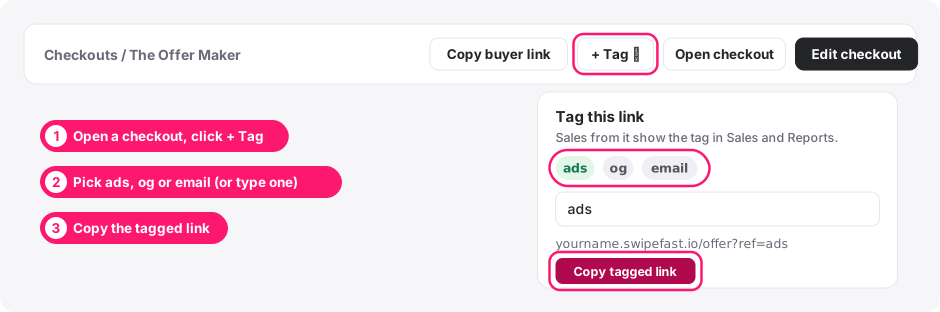
Go to Checkouts and open the checkout. Next to Copy buyer link, click + Tag. Pick a tag, or type your own, and click Copy tagged link.
| Tag | Use it for |
|---|---|
| ads | Paid ads: Meta, Google, YouTube |
| og | Your own posts, bio link and stories (organic) |
| Your newsletter and email sequences | |
| Your own | Anything else you want to compare: podcast, black-friday, a partner's name |
You can also type a tag yourself: add ?ref=ads to the end of any checkout link. If the link already has a ? in it, add &ref=ads instead.
2. Use a different link in each place
Put the ads link in your ads, the og link in your bio and posts, and the email link in your emails. That's the whole setup. Nothing changes for buyers: they see the same checkout.
3. See the tag on every sale
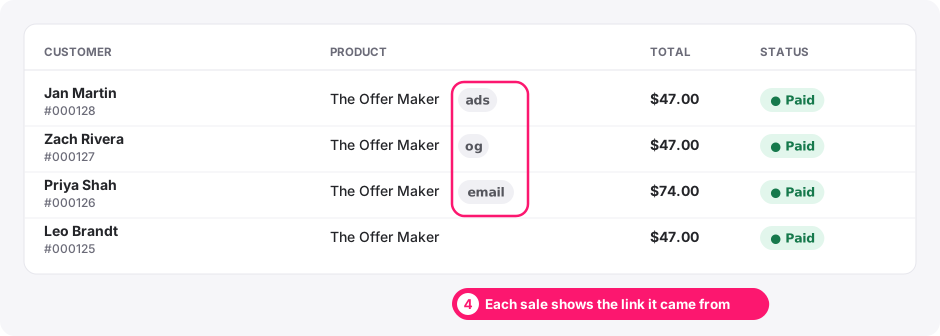
In Sales, each sale shows its tag next to the product. You can search Sales by tag, and the CSV export has a Tag column.
4. Compare your tags in Reports
Reports has a Your link tags table. For each tag it shows how many people reached the checkout, how many bought, the bought rate and the revenue.
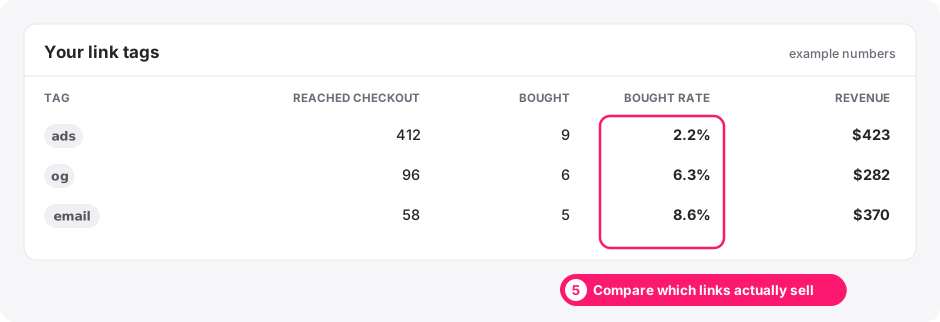
The bought rate is the useful number. In the example, ads bring the most people but the fewest of them buy. That points at who the ad reaches or what it promises, not at the checkout, because the same checkout sells well to people from posts and emails.
How a tag is counted
- The last tagged link a buyer clicked wins, for 30 days. If they click your ad, then come back a week later from your bio link, the sale counts as og.
- Coming back with no tag (typing your address, a bookmark) keeps the tag they already had.
- Tags are tidied: Ads, ADS and ads count as one tag.
- Tags work alongside UTM tags, affiliate links and your Meta Pixel. They don't change any of them.
Questions people ask before choosing
Do tags change what the buyer sees?
No. The checkout is exactly the same. The tag only tells you where the buyer came from.
Can I use UTM tags instead?
Yes. UTM tags still work and show in Where your buyers came from in Reports. Tags are the quicker option when all you want is one word per link.
Will older sales show a tag?
No. Tags are recorded from October 6, 2026, so sales before that have none.
What if someone shares my tagged link?
People who buy through their share count under the same tag. Give a partner their own tag, or an affiliate link, if you want them counted separately.