How to get a Telegram message every time you make a sale
Send every Swipefast sale to Telegram with Zapier: the buyer's first name, country, product and price, the moment someone pays. About 10 minutes to set up.
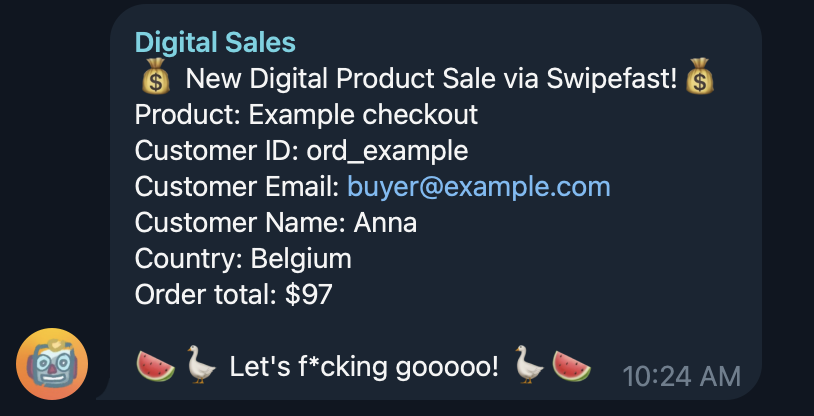
Swipefast already emails you when you make a sale. A Telegram message is faster, and it is more fun. It also works for a team chat, so everyone sees the wins as they happen.
What you need
- A Swipefast account with at least one checkout.
- A Zapier account. Webhook triggers work on Zapier's free plan.
- Telegram on your phone or computer.
1. Start the Zap and copy its address
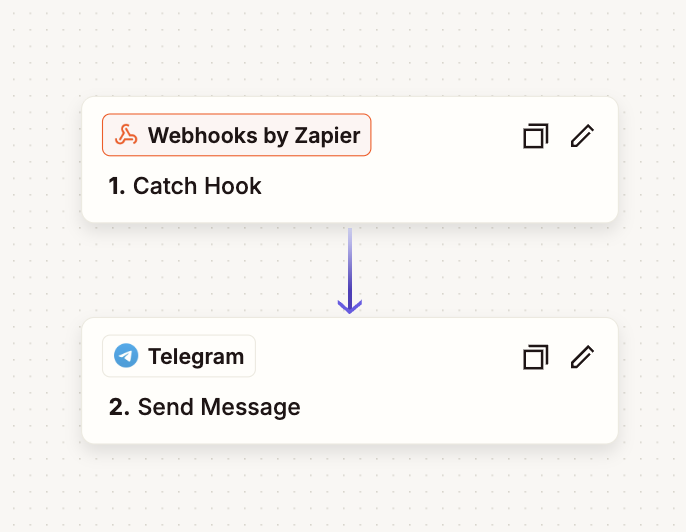
- 1. In Zapier, click Create, then Zap.
- 2. For the trigger, choose Webhooks by Zapier, then Catch Hook.
- 3. Click Continue until Zapier shows you a webhook URL. Copy it.
2. Paste it into Swipefast
- 1. In Swipefast, open Integrations and click Add integration on Zapier.
- 2. Paste the address into Web address to send to and click Connect.
- 3. Click Send test. Swipefast sends a sample sale from Anna in Belgium for $97.
- 4. Back in Zapier, click Test trigger. You should see the sample sale's fields.
3. Add the Telegram step
- 1. Add an action: Telegram, then Send Message.
- 2. Connect your Telegram bot. Zapier asks for a bot token: in Telegram, message @BotFather, send /newbot, pick a name, and paste the token it gives you into Zapier.
- 3. Open your new bot in Telegram and press Start, or add it to the group chat you want the alerts in.
- 4. In Zapier, pick that chat.
4. Write the message
In Message Text, type your words and click to insert the sale's fields. Every field is ready to read, so there is no maths or formatting step.
| Field in Zapier | Example | What it is |
|---|---|---|
| Product | The Offer Maker | The checkout's product name |
| Total | $97 | What the buyer paid, written as money |
| First Name | Anna | The buyer's first name |
| Name | Anna Peeters | Their full name |
| Country | Belgium | Where they are buying from |
| anna@example.com | Their email address | |
| Order Id | ord_x1y2z3 | The order, to find it in Sales |
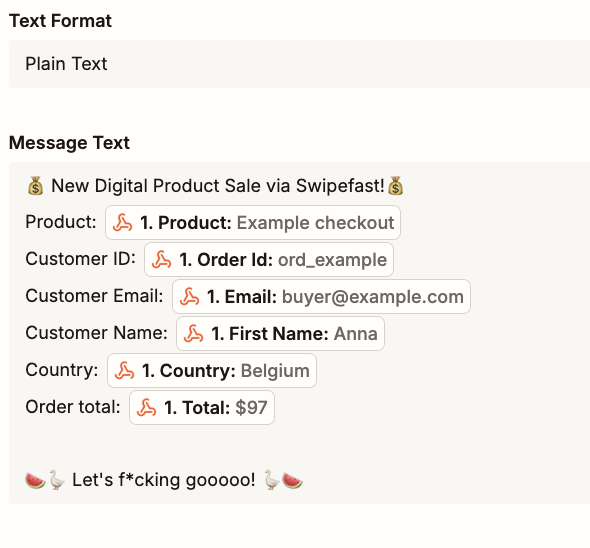
Set Text Format to Plain Text. Click Test step, and the sample sale arrives in Telegram. Then click Publish to turn the Zap on.
Only want sales?
Swipefast sends Zapier every event: sales, refunds, upsells, renewals and cancellations. To hear about sales only, add a Filter step between the two steps: Event, (Text) Exactly matches, order.paid. Add the filter after testing, because the Send test event is called integration.test and a filter for sales would stop it.
Questions people ask before choosing
Can I send sales to Slack, Discord or a text message instead?
Yes. Keep the same Webhooks by Zapier trigger and swap the Telegram step for Slack, Discord, SMS or any other app Zapier supports. The fields are the same.
Do I need a paid Zapier plan?
No. Zapier lists webhook triggers on its free plan, and a two-step Zap like this one fits within it. A paid plan only matters if you send more tasks a month than the free plan allows.
Can I use Make instead of Zapier?
Yes. In Swipefast, add the Make integration instead, use a Custom webhook module as the trigger and a Telegram Bot module to send the message. The same fields come through.
Does it work for renewals and upsells?
Yes. Renewals arrive as subscription.rebilled and upsells as upsell.accepted. They carry an Amount field, like $49, instead of Total.