How to add an order bump to your checkout
Add an order bump to your Swipefast checkout: one extra item with a tick box on the payment form, charged in the same payment as the main product.
An order bump is a small extra offer that sits on the payment form. The buyer ticks a box to add it before they pay. It goes on the same payment as the main product, and the total updates straight away.
Add an order bump
- 1. Open Checkouts and click Edit on your checkout.
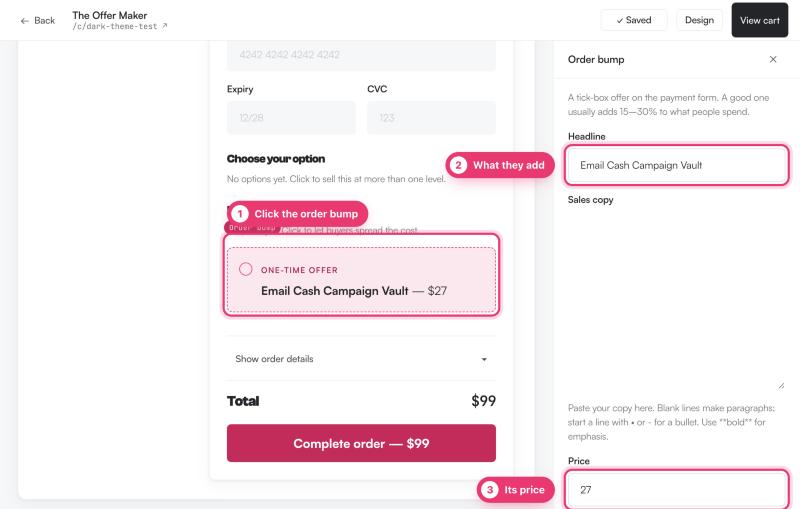
- 2. In the Checkout step, click the slot that says No order bump yet.
- 3. Write a Headline, such as the name of the extra.
- 4. Write the Sales copy. Blank lines make paragraphs. Start a line with • or - for a bullet, and use **bold** for emphasis.
- 5. Set the Price.
- 6. Paste the Access link after purchase. This is required, so nobody can buy something they can't get to.
- 7. Click Add order bump.
The bump now shows on your checkout. Click it any time to edit it. Changes save on their own.
Change or remove it
- Click the bump in the editor to change its wording, price or link.
- Click Remove this order bump to take it off the checkout.
- Click + Add another order bump if you want more than one.
What the buyer sees
The bump appears on the payment form with its headline, copy and price. If they tick it, it's added to the order total and charged in the same payment. Their receipt lists it as its own line, with its access link.
Check how it's doing
On the checkout's overview page, Order bump take rate shows the share of orders where buyers ticked the bump.
Questions people ask before choosing
Is the order bump charged separately?
No. It's added to the same payment as the main product, so the buyer sees one charge.
Can I have more than one order bump?
Yes. Click + Add another order bump. One is usually easier for buyers to understand and for you to measure.
Why can't I add a bump to my Lemon Squeezy subscription?
Order bumps aren't available on Lemon Squeezy subscriptions, because a custom subscription price would repeat at every renewal. Use a one-time Lemon product, or Stripe and PayPal.